BUG: Dashboard in Safari/iOS doesn't render correctly
Planned
Hi,
Just wanted to highlight a few bugs when viewing the HH Dashboard in Safari on iOS. There's a few issues here:
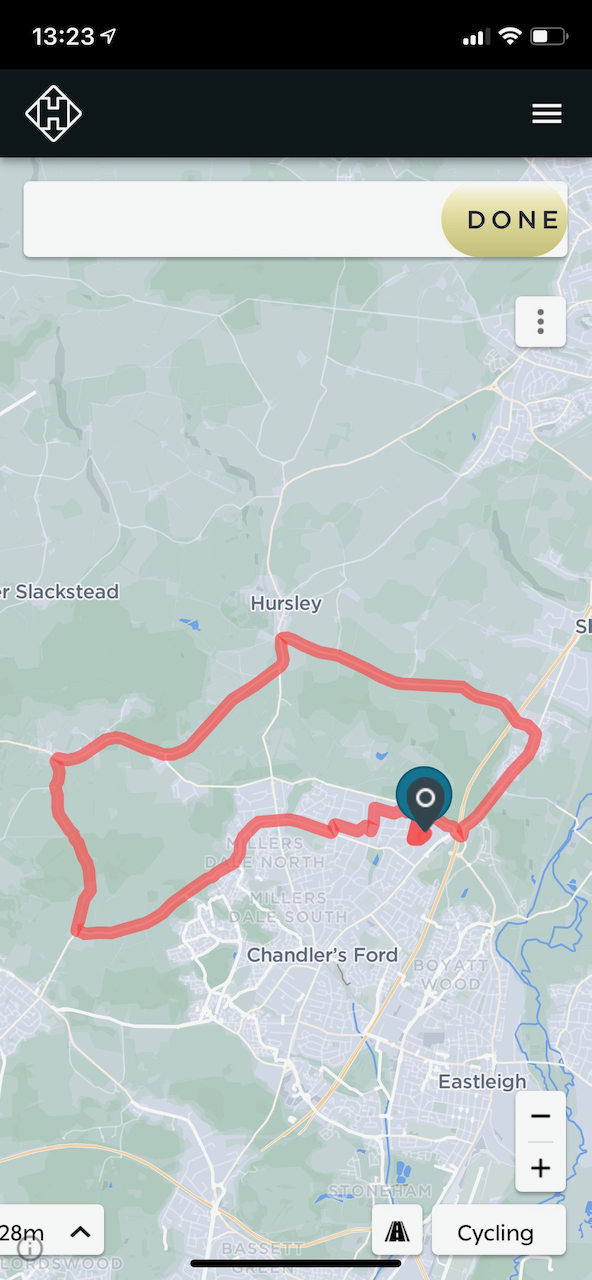
- Large white box and Done button at top of screen looks messy. Suggest large white box does not need to be shown on mobile browsers since it just contains the items in the overflow menu (vertical ellipsis icon below Done button).
- It seems to open the route in the route builder rather than opening it in read only mode as per the desktop version of the Dashboard. I don't especially want this ride to open in the route builder on my iPhone since I just wanted to review the data that was captured.
- Distance and Elevation field are having some CSS positioning issues at the bottom of the screen and are unreadable (also impossible to pan/scroll across to view the full values).
FYI I'm on iOS 14.4.1.
Steve

Please sign in to leave a comment.
Comments
1 comment