Airplane mode
Answered
-
Official comment

Hi Ivo,
The Airplane mode basically cuts off all the networks when toggled, the main reason being that there is no Electromagnetic interference while "in-flight", however, you can enable WIFI to connect to a WIFI network and the location/GPS as well would be still active as this does not interfere with the signals on a flight as a cellular network would. However, we did not add the airplane mode quick toggle on the drop-down as the karoo 2 is designed for road use and we did not see a use case where someone would use it on a flight ;)
As contradictory as it may look, This is how the android software has been designed :) This would work the same way on your mobile phone as well.
Comment actions -

This issue has come up before in this thread:
https://support.hammerhead.io/hc/en-us/community/posts/1260800854070-critical-bug-flight-mode-
It does seem strange that the wi-fi turns itself on even when Airplane Mode is enabled. My iPhone certainly doesn't work like this (Airplane mode means all network activity is disabled until Airplane mode is turned off) and I'd be very surprised if Android has been designed to allow network traffic when Airplane mode is enabled. That's the point of Airplane mode, right?
-
That’s exactly what’s happening. I’m not surprised by the fact that you can turn WIFI on manually, I’m surprised that it turns itself on while airplane mode is activated. And the reason why I thought airplane mode switch would be handy in drop down menu is not because I want to use the device on the plane... It would be more convenient to put ot there as battery saver measure - you could switch off wifi, SIM network etc. all with one swipe. Now you can turn off wifi and SIM data separately but to turn off SIM network altogether (not only mobile data) you have to either navigate to settings menu and turn on airplane mode or manually remove SIM card. Not a deal breaker for sure but quality of life update ;)
-
Yep, I understand what you're saying and tend to agree with you.
iOS has a similar concept in the Control Centre where the first icon in the top left corner is to enable and disable Airplane mode (and the others control mobile data, wi-fi, and Bluetooth obvs):
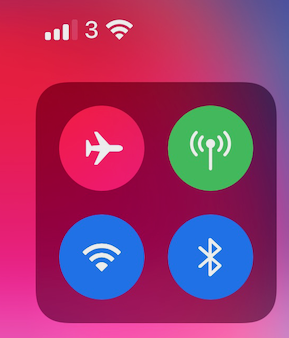
If Airplane mode is on, then it should not turn any data services on. Previously, I thought this was not that much of a big deal but I can see that this might be concerning.
-
Dear Hammerhead - here’s another example why airplane mode in quick menu would be useful.
Assume I’m out on a ride, with airplane mode turned manually ON before a ride (I have a route loaded pre-ride and set everything up). As a battery save measure I turned airplane mode ON to kill off WIFI and both SIM data and network „coverage”. But now during a ride I decide I need to change a route. In order to create new route (not by long pressing on a map) I have to connect to Internet. But hey - if I try to turn on mobile data from quick settings now it won’t connect. So I have to manually navigate to settings, turn airplane mode off, turn mobile data on, create a route, turn airplane mode on and now I can continue. Quite a lot of menu navigation, right?
But it all would be done with just one click if airplane mode toggle was in quick settings menu.
OR
enable us to turn off SIM data AND mobile network coverage using SIM toggle in quick settings (right now you can turn off mobile data transmission but your Karoo stays „connected” to the mobile network - just wasting battery trying to stay connected in low coverage area. Which is pointless if you turn off data because you can’t text or make calls with the device anyways).
I think that nowadays all (?) phones etc. that have swipe down menus have an airplane mode switch in there (especially if they come with SIM data functionality). If you introduce airplane mode feature anyways - why not do it right?
Just my 2 cents ;)
EDIT: typo correction
Please sign in to leave a comment.
Comments
5 comments