Pause indicator (minor UI modification)
Answered
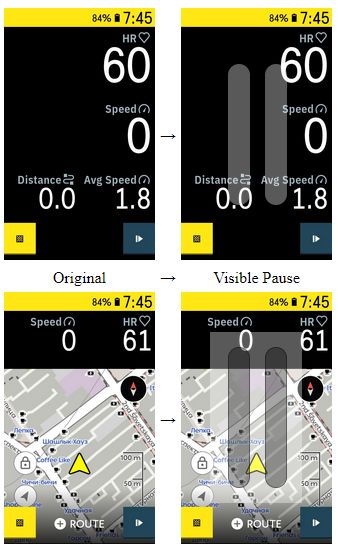
At the moment it's very hard to see a pause mode in current UI. Yes, Karoo try to alert about it when motion detected, but there was a long ride and I was really tired, on top of my screen was appeared 'Low battery' alert and there was a music in my headphones... so, I missed around 10km of track record. However it's very easy to fix this issue with very simple change in UI -
-
I made screenshot with 84% after Karoo was charged and next recovery ride was done. It's just an illustration how UI can show pause.
Did you ever see Low Battery alert?! It's a big rectangle with red background which appear over top bar and make it impossible to see the bar color...
-

Hey Imyarek,
I got what you are talking about - the red bar is at the top when the battery alert is up and you don't see the yellow bar. Couple in being exhausted from riding hard... I can see it happening.
A pause icon bold across the front could be helpful for situations like that and some of the community would probably appreciate that. I will bubble that up to the software team - if it is something we start seeing lots of requests or upvotes for, it will move up in priority.
Thanks for the suggestion - many of our best ideas start out that way!
-
@Jami, you nailed it. It's probably not very important request and possibly rare case when exhaustion mixed with alert bar covered top bar, but it's better to prevent cases like this one and improve UI in advance (imho).
@Benno, sure. I knew it, but it was a road trip with the high traffic that diverted my attention.
Please sign in to leave a comment.
Comments
4 comments