Is there way to close warning banner?
Answered
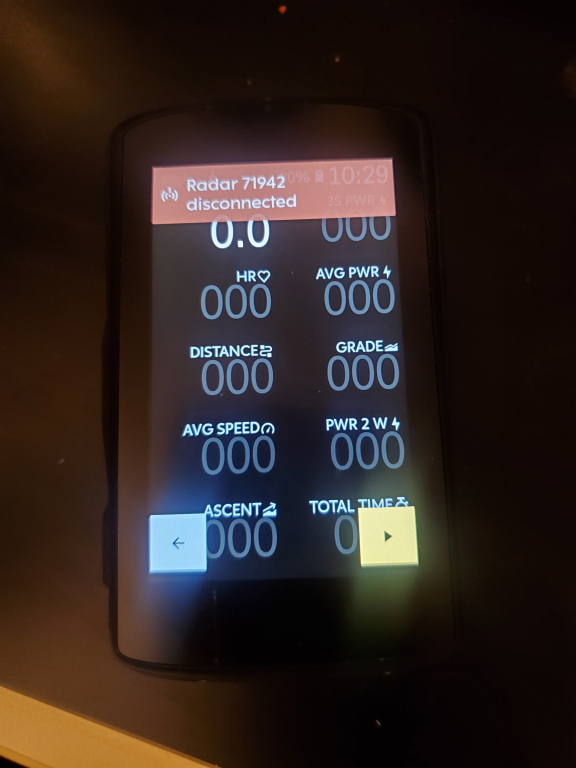
I use Varia Rader and when I disconnect it or battery is low, red warning banner pops on top of the screen, and it seems like there is no way to remove unless I press it and go to Sensor setting page.
Is there way to just simply close the warning banner without going to setting page of the sensor?
-

Hey Juhan.
I totally understand that it might be inconvenient for you to close the warning by going to the sensor page and then return to the ride page. Unfortunately, we do not have the option to directly close the banner at the ride screen, when it pops up. However, I am certain that we will certainly look into this in the future. Currently, we do not have it prioritized in our backlogs. We will certainly announce it once it is ready for usage.
-

It is nice to be alerted when disconnect occurs, as I would hate to lose a $200 light, and the persistence helps, but it is hard to clear the obstructing banner. Similarly the Mute function has lately appeared erratic, and hard to control. May I suggest a video demo/tutorial on it as it evolves. Saying "tapping it" sometimes is unclear as to which "ït" you are talking about.
-

One thing i've found when clicking on the banner, going into the sensor page and returning is that when you click the return button, if you have the 'on screen button icons' turned on, it also presses pause as well as the back and the then you get the ride not recording error. Something to be aware of.
-

Hi All!
I was out riding today and I had the same problem...I can tell you, with the latest software update -- as at June 20, 2021 -- O could not get the banner to clear by pressing on it and when I turned off my Varia RTL515 it still stayed (which I understand as it is there in case it falls off).
I have two thoughts...1. how about a screen that asks have you turned off your Varia and, if the user answers yes, then just kill the message / warnings 2. how about find a better / different way to display it so I can still see the information that is normally at the top of the screen, which is the real issue.
Would appreciate some additional feedback on this.
Thanks,
Joel

Please sign in to leave a comment.
Comments
7 comments