Feature request: Add option to view elevation grade in % when planning routes

right now, selecting a portion of your route just shows you this: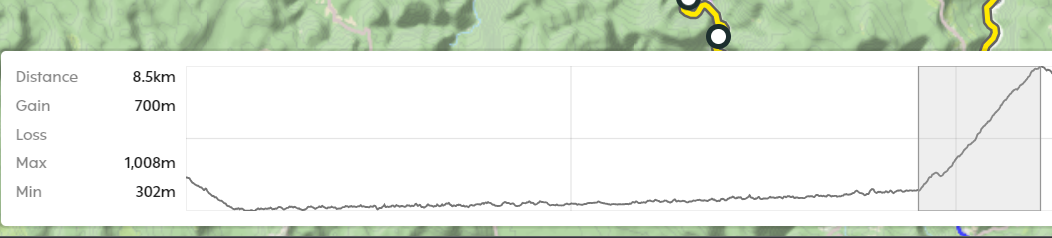
I know how long the climb is and how much altitude I will gain on it. I could calculate the % myself, but as we all know the Hammerhead dashboard elevation data is unreliable and notoriously bad, although the slope of the climb on the view seems pretty accurate.
When importing the same gpx into Garmin connnect, and using the box select tool on this climb, this is what I get:
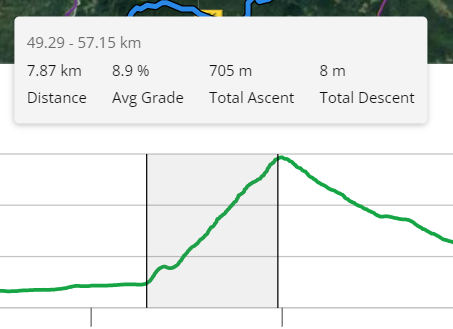
Now I know that the average grade of this entire climb is 8.9%, which I am okay with and is within my ability. For steeper climbs, knowing the grade is absolutely crucial to whether or not I will plan the route up it or not, since I think we can all agree that having to step off the bike because you cannot handle the climb and walk in cycling shoes is something nobody wants. Knowing that something is too steep for your ability can definitely save you from that, as you can just plan your route differently and pick a longer, but easier climb to reach your destination.
Since it's a question of simple maths, I think this feature would be very easy to implement and would help a lot of us out.
-
I believe both of you are missing the point. I know other apps are able to do that, since I obviously showed a screencap from another app that I've been using for that purpose.
Strava (routes only work with Strava Pro so that is not available to everyone), Garmin connect and Komoot are all apps that give you the option to view route gradient. Even in Hammerhead Dashboard, you can see it, but only after you've done the ride which in my opinion is pretty much useless. It is a popular and relatively easy to implement feature, I don't see why I would have to use other apps to plan routes for the bike computer I paid 399€ for. The reason for this request was that I'd like to see that option in THIS app, so that we won't have to transport routes across apps, which is obviously an inconvenience.


Please sign in to leave a comment.
Comments
3 comments