Please Move the Delete Ride Button

Anyone else accidentally their best ride ever (no really, it was) because there's a flippin delete ride button when saving? It's heartbreaking. There's no undo. It doesn't belong there. I'm devastated. You just finish 60 miles, you're toast and because you can't see straight, you hit the DELETE button. Ahhh! Nooo!
Please consider taking that off of the save screens and leaving it in the rides screen. For the love of cyclists, remove it. Thank you.
-

It's could be an easy feature to add, because for information, your ride is probably not really lost. It's a little technically but when you choose to delete your ride, it (the fit file) stay in the karoo memory anyway, I already recovered a ride like that.
When you familiar with android usb debugging it's not very hard, else you can search for some guides. You need to enable usb debug mode, connect the karoo to a computer, and use a software like adb explorer to navigate in the FitFiles folder and get it.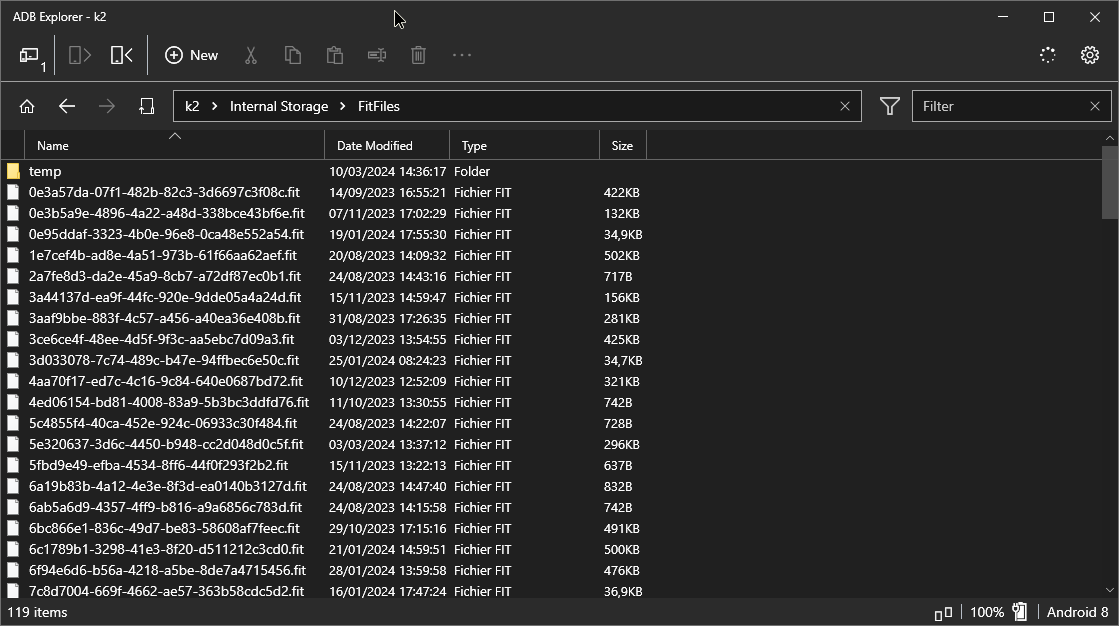
-

It hasn’t happened to me …yet. But when adding a title to the ride the keyboard is so close to the delete and save icons. I’m afraid that when typing in the ride title or description, I’ll accidentally press the delete icon which sits just above the keyboard. It is so awkwardly placed. There should also be a warning, are you sure you want to delete this ride.
-

Must have been more than a year ago for me but yes, has happened me a couple of times. The issue was that the display at the end of ride dialog was updating with a lag so my key presses attempting to save the ride got interpreted as a deletion. Managed to recover the rides successfully but was mightily annoyed, don’t remember encountering this since so either the lag is less likely to happen or maybe I just have learned to wait for longer when saving the ride.
And yes, it would definitely make a lot of sense to move the delete confirmation to one of the two upper buttons.

Please sign in to leave a comment.
Comments
4 comments