Headwind extension

Hi,
using the new SDK, I've build a small extension that shows the current wind direction and speed relative to your riding direction in a datafield (i. e. the headwind). It looks like this:

In the picture, the wind direction is shown by the triangle on the right data field, indicating that the wind is coming from the left behind you. This results in a headwind speed of "-3 km/h", providing a slight boost. The extension periodically downloads weather data for your approximate location from the open-meteo.com weather API, which you can view using other data fields if desired:

The top right one shows the current weather conditions with absolute wind direction, speed and gust speed. The source code and APK for sideloading (now easy due to hammerhead's cool new sideloading support!) are available at https://github.com/timklge/karoo-headwind . Feel free to open issues at github for suggestions and issues you encounter.
If you run out of valuable data field slots on your map page, maybe the powerbar extension is a solution for you (also shown on the screenshots for HR) :)
-
Hi,
I've pushed a small update to version `1.6.3`. This adds a compass data field, a tab with an embedded windy.com map and the option to use the karoo's built-in magnetometer to obtain the current direction instead of GPS.
By default, the app will continue to determine the current direction based on GPS (as done by the Karoo itself). Magnetometer usage is disabled by default. If you enable magnetometer usage in the app settings, the direction should update even if you are rotating on the spot without moving. I added this as an experiment because I was curious how well this works and how accurate it is; there's probably a reason why Hammerhead doesn't use it in the ride app itself (increased battery usage?), so it is turned off by default.
The windy data tab added to the main menu shows a wind overview map for your current location by default. It is only available if you are connected to Wifi (or use a K2 with SIM inserted). Originally, I wanted to add a rain / wind radar overlay to the main karoo map, but this is not feasible because of the low bandwidth of the bluetooth bridge and there is no way to draw overlays onto the map using the current SDK. All the windy.com tab does is open an embedded web view. I like their visualizations, so I added it because it was easy to do.
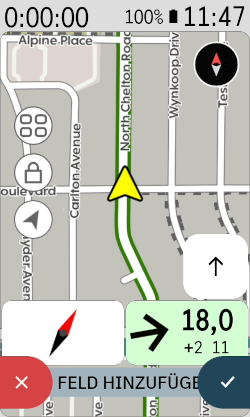
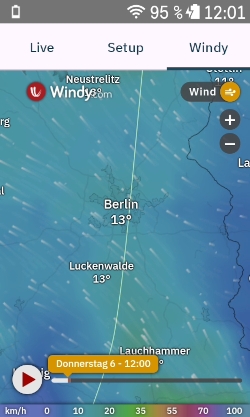
If you click on the "Headwind" item in the extension library, the Karoo should show an "Update" button.
Full Changelog: https://github.com/timklge/karoo-headwind/releases/tag/1.6.3
-

I added the compass datafield to my map page and enabled the magnetometer. On my ride the compass needle was pointing south instead of north for the first 4-5 miles. Then it switched to pointing north, but it soon drifted to pointing east! When I switched off the magnetometer, the compass needle froze in the pointing east position.
-
Hm thats unfortunate, I had tested it on some rides with rather good results. I guess the magnetometer stuff is an interesting experiment, but will not provide much value due to the lower accuracy when moving. The compass should fall back to the gps bearing when the magnetometer feature is disabled, I'll check if I messed up the fallback.
It might be worthwhile to use the magnetometer when standing still and rely on GPS bearing when moving, but I think I'll just remove the magnetometer feature if it doesn't prove useful.
You can recalibrate the magnetometer by making an 8 gesture with the karoo. Are you using a K2 or a Karoo 3?
-

Hi @timklge, I wanted to thank you for this extension. Second of your's I am using (and it's only four in total)! :-)
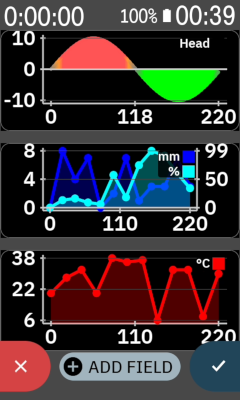
I have a minor request regarding the graphs (temperature, precipitation, wind). Would it be possible to align them (in particular the y-axis x-positions)? I have all three graphs on one page, but the graphs are somewhat misaligned, because you position and scale them depending on the tick label sizes (widths). Personally, I would prefer (since it is more eye-pleasing), to have all graphs horizontally aligned. Any chance you could do this?
Please sign in to leave a comment.
Comments
37 comments