No map imported into strava
Answered
I have been using strava for a few years with the Karoo without any problems until today.
Finished a ride today and uploaded it into strava. ( I don't like the new upload icon, does it upload when it goes grey or when it's orange or when I touch the tick?)
It went into strava but no map only the avg speed, time, etc data. No segments. Looked in the hammerhead dashboard and there was the map of the ride.
Tried deleting it from strava and RE-uploading it but still no map.
Any ideas?
-

Hi Jon, Sorry for the trouble caused. Let me clarify this to you.
When you see the orange color projected on the Strava (or other third-party application icons), it means that it is selected and you can upload it by tapping on the tick icon.
I have a quick question for you. Which Activity upload type you have selected while uploading the Ride to Strava? Is it "Ride" "Commute" or "Trainer"? You have to select "Ride" to see the maps.
For more details, please see: https://support.hammerhead.io/hc/en-us/articles/360049718834-Activity-Upload-Types
-

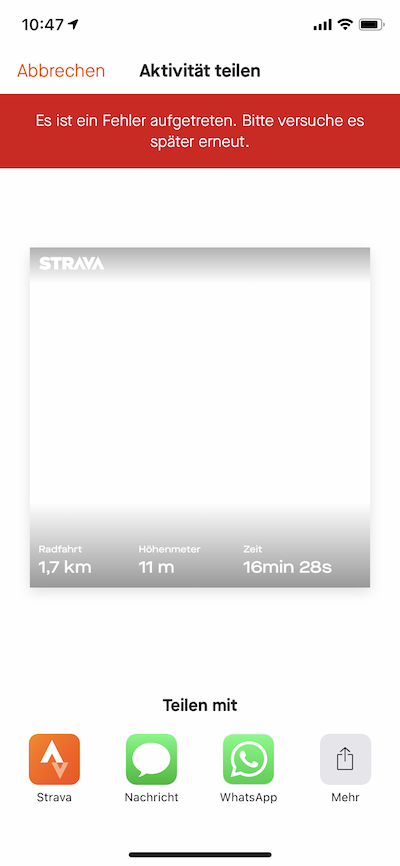
Unfortunately, I have the same problem with my Karoo 2 and the latest firmware (1.184.978.12). I have completed a ride, selected activity type „Ride“ (as required for the map to show according to Hammerhead support in this thread) and uploaded to Strava. In Strava, the map is missing. In Komoot, however, the map is showing, so I would suspect that there is a problem with the upload to Strava. Please advise.
-
No, it's a plain "ride" activity. This is the link: https://www.strava.com/activities/4736976912
Another try with full sensor set, but same result - no map in Strava timeline: https://www.strava.com/activities/4738580643
Interestingly, trying to share the activity from the iOS app prompts a Strava error. Please note also the empty map:

Please sign in to leave a comment.
Comments
5 comments