Ride Upload - Unknown partner Komoot
Answered
Hi,
I just upgraded my K1 to Version 1.168.941.3 and noticed a slight oddity on completing a test "ride":
- On this occasion, I wanted to see the new Quick Action Menu without actually going for a ride so I just started a ride from my desk.
- I stopped the ride a few seconds later (after testing the Quick Action Menu) and saved it as normal (but did not sync it with Strava and Ride with GPS because it wasn't a proper ride).
- I went back to the home screen and noticed that there was a notification (see attached photo).
- The notification said: "Ride Upload - Unknown partner Komoot"
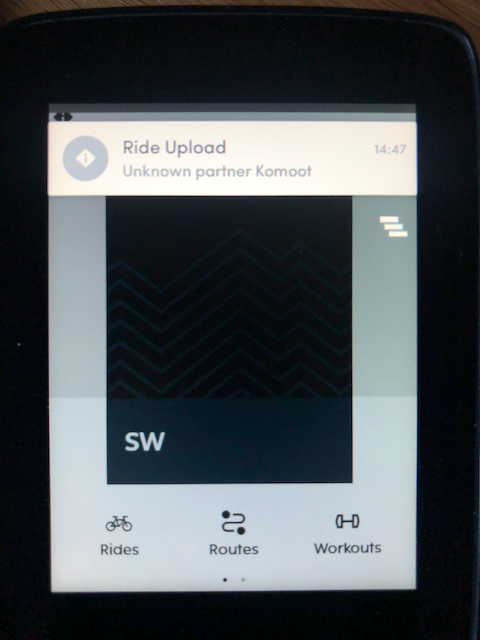
I was a bit puzzled why I saw this since I don't believe I'm syncing rides to Komoot right now (at least, they are not appearing in Komoot).
Just a minor update to the above: I see that Komoot is a connected service on the K1 and the Dashboard but there does not seem to be any way of configuring this service. Furthermore, Komoot does not appear to have a means of controlling access from their web app either. So, what is the benefit of connecting Komoot other than the ability to import planned routes?
Any ideas what this notification was about, please?
Steve
-

Hey Steve. I appreciate your effort to bring this point to us.
We have already identified this concern and this was under the radar of our software team. They have found the reason for this notification and solved it for the next release.
If you have the automatic ride upload enabled and have the connected Komoot account on the Dashboard, Karoo will now attempt to upload a completed ride to Komoot. This will not work because it is not supported in our cloud, and will result in “Unknown partner Komoot” showing up as text in the Ride Upload completed notification.
Komoot is not set as a direct integration on the Karoo as Strava, RWGPS, etc. You can only import the Routes from the Karoo to the Dashboard using the URL web link of the Route from Komoot. Direct sync is not an option.
Please sign in to leave a comment.
Comments
1 comment