What about allowing to use own maps and stylesheets?

Actually I'm using maps and a customized stylesheet from Freizeitkarte-osm (or openandromaps) on the karoo 2 and they fit my need in showing Cycle paths, streets and POI. (e.g. want more POI on bicycle holidays)
The only problem seem to be that some routes are showing "Map unavailable" and therefor can't be used.
This can only solved by also having the hammerhead maps on the Karoo.
Allowing to use own maps and stylesheets or at least make it possible to select routes although the map seem to be unavailable would take the Karoo a great step forward to become the "Next-generation cycling computer".
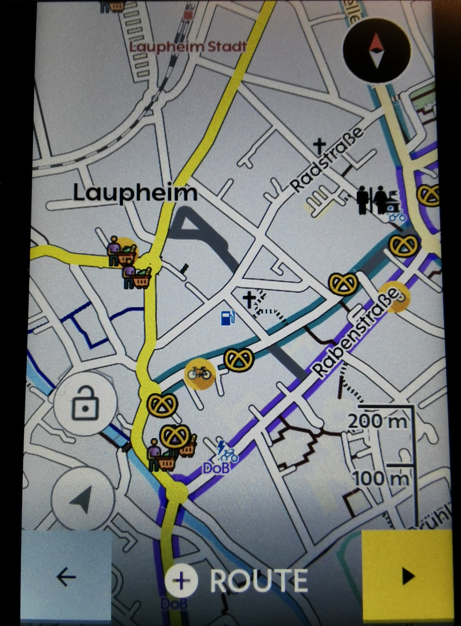
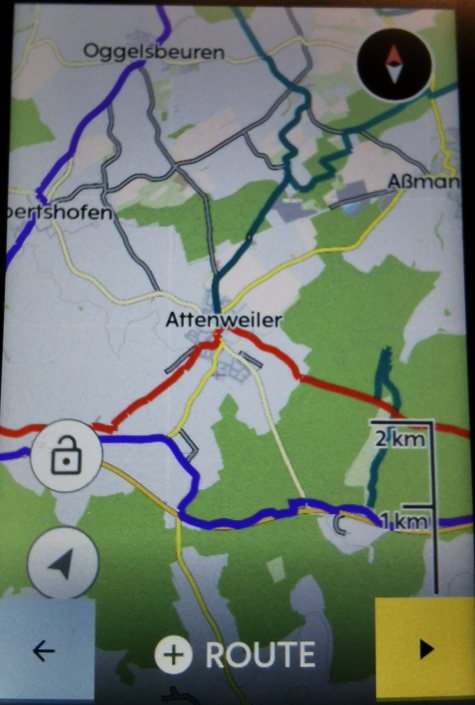
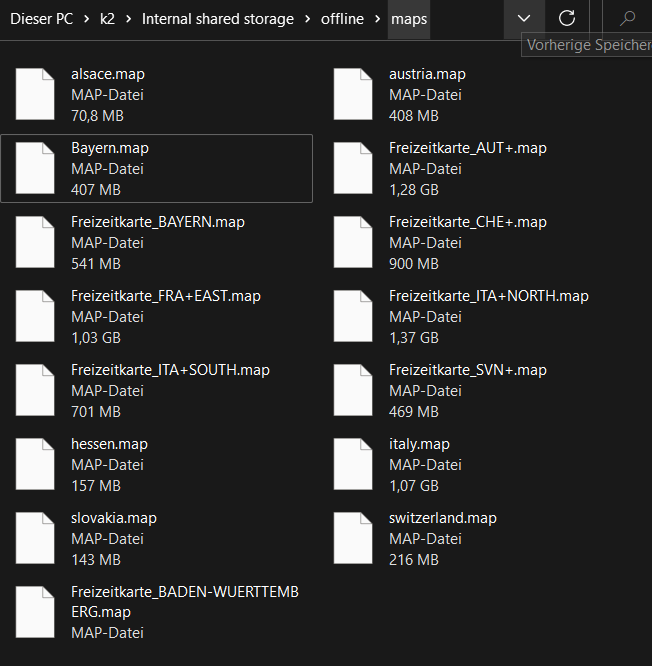
-

There was a similar thread about 9 months ago:
https://support.hammerhead.io/hc/en-us/community/posts/1500000096241-Map-Style-Improvements
I think there was some issue with the maps being overwritten or something. Never really tried it.
-
Dear Joen,
I just would like to have it officially that it will work in the future.
And as Steve wrote some things can be overwritten within an update.
As i have both maps on the Karoo the map itself is not the problem. But there is an XML-File that defines the look.This file will be overwritten or replaced in the future.
Furthermore I can't decide which map I want to use. Actually it works.
How to:
You have to connect the karoo to your computer, activate the developer options and set the option "Select USB Configuration" to MTP. Now you can access the K2.
Download the maps you need from https://www.freizeitkarte-osm.de/android/en/ (only Europe) or https://www.openandromaps.org/en and place them in the folder "offline" .
Now you need the map-style (https://www.freizeitkarte-osm.de/android/en/design.html or e.g. https://www.openandromaps.org/en/legend/elevate-mountain-hike-theme ).
You find an XML file and some folders called Symbol and patterns (Freizeitkarte) or ele-res (openandromaps).
The files and folders has to be copied to the root folder.

Rename the original "offline_v7.xml" just to get back if you want.
Now rename the new XML-File to "offline_v7.xml". That's it. You can customize the XML as you want.
-

@RainerHormann. i use the maps from andromaps, and the XML form elevate locus theme with the ele-res map for POI. It never says maps unavailable? For MTB it is only a pity the smaller tracks just show up when you zoom in to about 50Meters. Would like to see them sooner. Or can i change that in the xml also?
-
Hi John,
"Map unavailable" shows up only when selecting routes without having the original hammerhead maps on the karoo, too.
You can change the zoom range in the xml. (zoom-min and zoom-max}. But beware. It depends also on the maps what's the minimal zoom level. That means you can change it in the xml but it could make no difference. There's a lot of try and error. The elevate theme is a little bit confusing because of the different options (city, hiking, mtb, etc)
You can also try to take the themes from "Freizeitkarte". Could work, too.. -
I'm using the "https://www.freizeitkarte-osm.de/android/en/design.html" fzk-outdoor-contrast-theme, but modified it for my needs. For example i love to see bakerys in a very low zoom-level and change the symbol-width. (not because of the cake of course :-)

And I replaced some of the POI Icons with Icons from e.g. https://www.svgrepo.com/vectors/restaurant/ and other websites...
Onedrive: https://1drv.ms/u/s!Au2gFYirkIAKqaZ24xSK8ByNAw-iAA?e=gjQ3cB
-
@rainer Thx. Indeed, if HH maps are not there TBT does not work also i understood. And the xmL needs upgrade after hh upgrades their maps, happened only twice sofar i believe.
I wil try to adjust the zoom factor from MTB single tracks. I like the elevate XML sofar, MTB is on it with s1-5 classification,Local, regional routes ( also your German Knotenpunkte :-) ) contour lines, and it is good to see the surface f roads. So, in case of gravel, i can see wether it is a tarmac, gravel or grass road... We all have our own wishes :-)
-

@ Rainer
Thanks for the write-up. Yes, this is exactly the sort of thing HH should encourage with some basic tools (front-end in dashboard for editing the XML, one mode just exposing existing fields as well as a CodeMirror-based raw editor for the techies) in my opinion. With open source infrastructure already in place they barely have to build anything...None of the alternative themes I've seen so far have caught my fancy (most actually look terrible imo, haha) but will definitely edit XML to differentiate gravel, and change POI icons.
-

I have created custom maps for my Garmin Edge units for several years, using OpenStreetMap extracts. You have full control over what features to display and how to symbolize them. Besides that, if there's a feature that's not mapped that you want to see on your GPS, just add it to OSM, get a new download, install it in your GPS, and there you go. I do this all the time. You can decide what landmarks you want to see while riding, and how they look. I am not impressed with the Karoo's maps at all. I agree it would be nice if Hammerhead would give the user the option of creating their own custom maps. This is one reason I will probably stick with Garmin for now.
-
Some Folders have not been visible on the Karoo for a while. If you access with FTP or a file manager installed locally via adb, you can see them all. It is enough to rename the folders for a short time and then to undo the whole thing again. Now they are also visible in Windows explorer.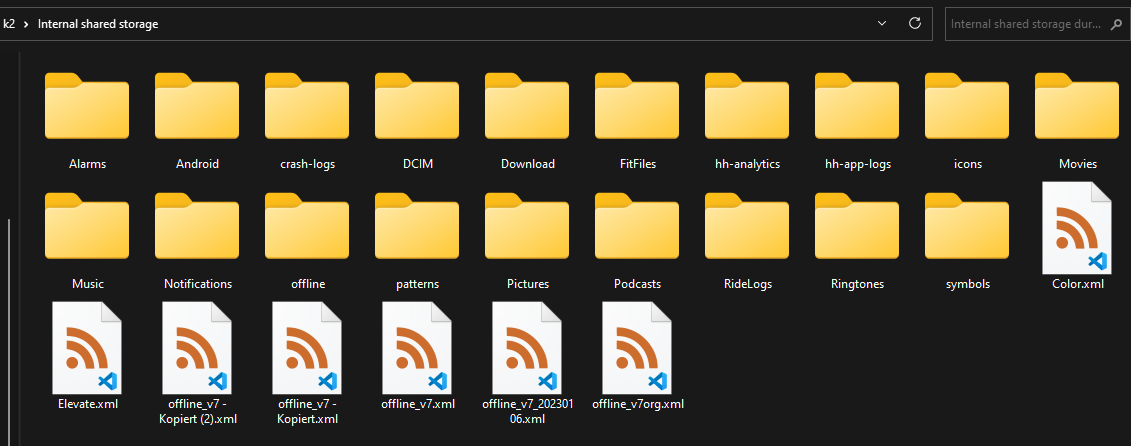
-

Looks like not only me is satisfied from the Karoo’s interpretation of OSM maps. But my case is different - I like the style, but I am getting irritated over the pathing which tells me that I cant ride there with bike even though there is a Cycling trail shown on Karoo map. Looks like there is some sort of errors with OSM layers that it gets recognized incorrectly. I have several examples but HH support is not responding.


Please sign in to leave a comment.
Comments
17 comments