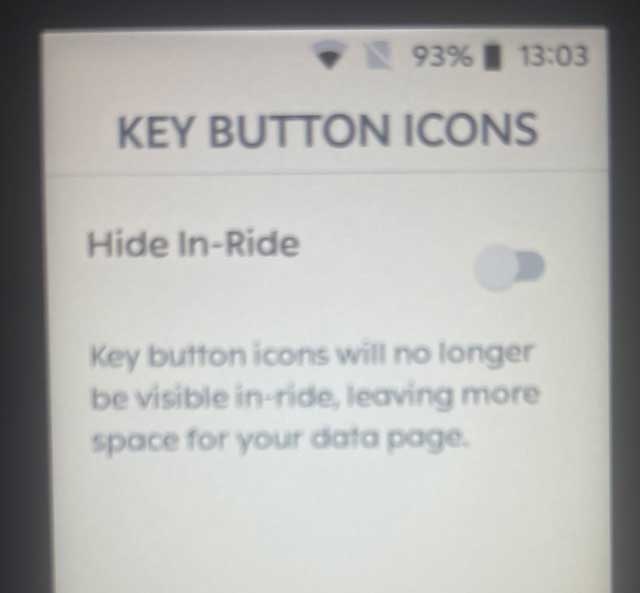
Remove/hide lap & pause button.
Answered
Hi this is such a annoying issue and something that I've ruined so many rides for me. Imagine you are doing a race or a training session. You work really hard to push those numbers, the sweat is pouring, the heart i beating. A drop of sweat lands on the Karoo 2, unfortunately the sweat flows down to the bottom of the screen, accidently, pauses the ride or starts a new lap. You have no idea as you are all into the ride, pushing those big numbers. It's just after a while that you notice that the ride is no longer recording due to it being paused.
How can the lap/pause icon be hidden so we can avoid this? I have stopped counted have many rides that have been affected by a single drop of sweat. Some might enjoy the icons but I'm gladly using the the side buttons for laps and pause. How can these be hidden completely so we avoid ruined rides and races?
It's a easy fix, hopefully!
Sincerely
Benjamin
-

I like to lock the screen if there is a chance of rain or sweat or rain getting on it.
https://support.hammerhead.io/hc/en-us/articles/360056813834-Touchscreen-Lock
-

@Galeb I have that option enabled but the key button icons still show up.
Further to that, I have auto-pause enabled and have no need to ever use the lap or pause buttons. However, I often trigger laps while trying to zoom the map in or out, which is puzzling as that shouldn't happen on the map screen.
Worse, when wearing gloves during the winter, it is easy to accidentally pause a ride because the buttons are so near the bottom of the device - there is very little room under the buttons to stabilise your hand.

Please sign in to leave a comment.
Comments
3 comments