UK SIM Cards Compatible with Karoo 2
Answered
Hi,
I just received a free 200MB Data Reward SIM Card from Three here in the UK and installed it in my Karoo 2. It seems I ordered a data SIM rather than a cellular SIM which may be the cause of my problem (I wasn't aware we differentiate).
This is what I see on my Karoo 2:

The Karoo 2 knows it has a SIM card installed, but does not seem to be showing me signal strength.
Does anybody know what I need to do to get a UK SIM card working in my Karoo 2, please? The Support articles are kind of sketchy on this.
Thanks,
Steve
UPDATE: I just tried the Three SIM card from my iPhone in my Karoo 2 and it seemed to work as expected. I guess I need to order a PAYG Phone SIM rather than Data SIM.
-
Thanks, Ian.
I had to put the SIM card in my iPhone temporarily in order to receive the temporary registration password when I registered it on three.co.uk/my3. The Data SIM is now registered - and appears to be working - but needs topping up. I thought this Reward SIM gave me 200MB data free per month.
Looking at the Three website, it seems to be offering me a 2GB add-on for £15 which is only valid for 30 days. Or I can add the lowest amount of International Credit for £2 (which looks as though I can use it in the UK or abroad):
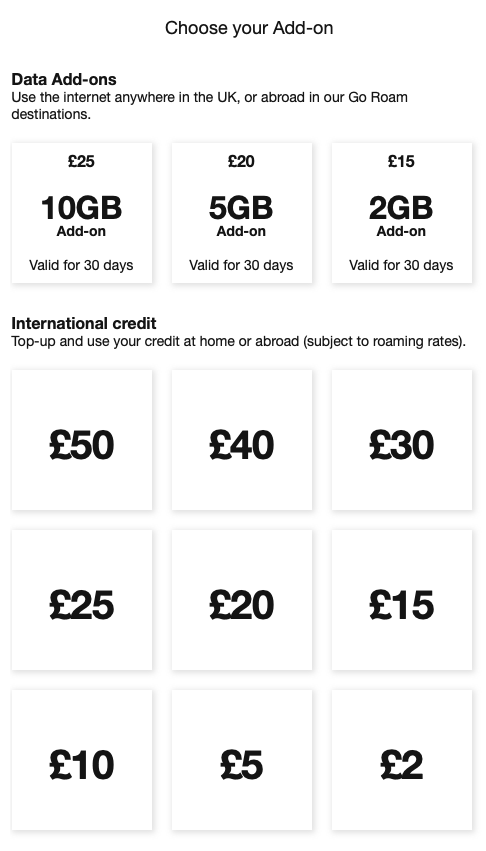
The thing I'm a little confused by is that the Hammerhead Support topic on this explicitly states:
NOTE: Karoo 2 only supports cellular-SIM-card, data-SIM-card will not be supported on the unit.
But I've installed a Mobile Broadband (Data) PAYG SIM and it appears to work (despite having no data available).
I'll probably just put £2 International Credit on it and see what happens. It doesn't say if this also expires after 30 days.
Ideally, I just want a SIM card that doesn't expire, but I guess they are hard to come by for obvious reasons...
-
Just in case this helps anybody else, the Three Mobile Broadband (Data) SIM works fine in the Karoo 2, after adding some International Credit to it. I validated it was working by doing the following:
- Added £2 of International Credit to my Three account (three.co.uk/my3)
- Created a new route in the HH Dashboard
- Turned off wi-fi on the Karoo 2
- Turned on cellular data on the Karoo 2
- Open the routes app
- New route appeared almost instantly
It looks as though International Credit doesn't expire, like some of their other data add-ons:
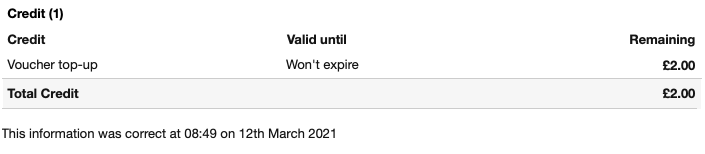
I can't imagine the Karoo 2 uses much data (unless you're downloading offline maps and software updates over data rather than wi-fi) so I'm happy to keep topping it up as required. I can keep and eye on my data allowance via the Three app on my iPhone and top it up via that if needed.
This seems a relatively cheap, no contract, method of maintaining a data connection on the K2.
Hope this helps others.
-

Hi Steve,
I'm in the UK and got the following SIM which works great: https://www.1pmobile.com/
Costs only 1p per MB used and only have to top up every 120 days I think. I just topped up with £10 initially and I'll see how far that gets me.
Hope this helps!
-

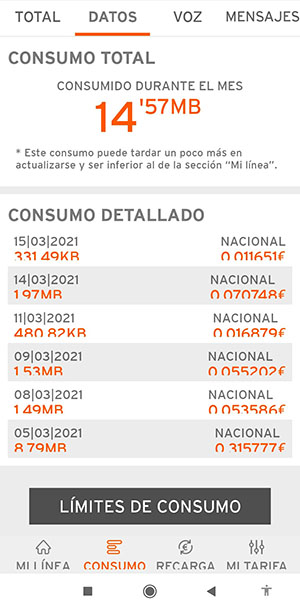
Also using what we call "pre-paid" sim card in Spain. You top it up when needed (you must top it up every 3 months even if you haven't used up your megas)
So far i've used only 14mb in 16 days
Latest ride 1,97mb with live tracking active
Notice i have Telegram which increases the data use. I recommend setting this type of apps to download media only when in wifi.
==
-
I'm using a Three PAYG Data Sim with no issues here, Mark. I will probably switch to 1pmobile when this one runs out.
You do need to activate the SIM on the Three web site and add some credit it to it (steps as described above) before it works. I am able to sync rides and upload over 4G using my Three SIM. The credit seems to last for ages as well.
-

Thanks Steve, I just coulnd't activate the 3 Sim... i only put a tenner on it so i'm fine to lose that.
OTOH, my 1pmobile SIM arrived today, activated it online, and within 10 minutes was ready to rock and roll. Into the K2 and it is working.
Now, livetracking works but it is showing my wife that i am cycling around the North Coast of Northern Ireland.. despite the fact that she sat at her office about 15 metres away from me in East London. Oh dear... will have to have a look around the community to figure out the fix for this one.
-

After all the positive press on 1pmobile, I got one. 1 ride and it's eaten 693 Mbytes ! So nearly £7 for a 100km ride. That's more expensive than the tea and cake half-way round. What went wrong? Do you think it uploaded loads of routes or a system update off cellular data rather than wifi?
-
@Gordon
It all seems that you have downloaded maps or big updates through mobile data. Like any phone, the karoo is a phone in the end, you need to set certain uses to wifi only unless you have a cheap or unlimited plan in your SIM.
Too late now, but go to settings and change whatever necessary so you don't waste 7 pounds for every ride.
Regards
-
@Antonio Thanks, but I can't see any option on K2 to control/ limit what the cellular can download.
I know it was set up for wifi before I put the SIM card in. So at some point maybe it lost the wifi connection and then did this big download. But I can't see a way to stop that happening?
-
I don't believe it's currently possible to limit large downloads when not connected to wi-fi on the K2. My mobile data is almost always turned off unless I actually need it.
I've had a Three (3) network SIM card in my K2 for at least 6 months now and I've used £0.08 (8 pence) of data since I installed the SIM card. I rarely use mobile data on the K2 but, when I do, it's usually to sync a route or a ride in areas where I don't have wi-fi. Sounds like you've been running system updates or downloading maps over mobile data, Gordon.
You can probably avoid this by turning the toggle switch - under Settings > System Updates > Auto Download - to OFF.
Hope this helps.
-

@Gordon In Settings → Cellular Dara → Data Usage you can scroll down and see a list of apps/services that used data.
I have disabled Background data for the OfflineRegionService (map updates?) and System Update. Everything else I kept as is.
I did this some month ago (after it pulled bot system and map updates over mobile), and everything still works for me: live tracking on mobile, sync of routes and rides, system updates over WiFi etc, no problems.
-
@gordon - sorry to hear that happened! Looks like you've been given you the fix for that mishap on settings!
I have it on solely for the purpose of live tracking. Average observed cost of a 50-70km ride is £0.02 on 1pmobile (which i.e 2mb per ride). I typically turn my computer within range of my wifi and certainly check to make sure there isn't an update i've missed before riding.
Fit and forget / set a reminder to top it up once a year to keep the sim active (if i'm still using K2 or have moved onto the next shiny new toy!)

Please sign in to leave a comment.
Comments
16 comments