Cannot Download Offline Maps
Answered
There is no option to download offline maps when I go into this application. I have updated to the most recent Karoo 2 software, Build V 1.200.1016.12, and I have verified that WIFI is working, even toggling on and off airplane mode.'
I am going on a multi-day backcountry ride and need offline map capabilities.
-

I've just tested this on mine and confirm I've not experienced any issues downloading offline maps for a couple of other European countries. The download is very fast for me.
I would expect Hammerhead to notify us if there is an outage of some sort (which they have not).
Suggest you check your internet connection again and verify that your Karoo 2 is getting an IP address (tap on your wireless network name/SSID to view connection details). Also verify that you are able to sync your Karoo 2 with other Hammerhead services like the Dashboard. A good way of testing this is to create a new route in the Dashboard and verify that it downloads to the Karoo 2. It should appear in the Routes app of the Karoo 2 almost instantaneously. If not, then there is clearly a networking issue between the Karoo 2 and your wireless access point(s)/router.
If you still cannot connect then I'd recommend performing a factory reset and sign into your account again.
-
Kathleen, it sounds as though a few things might be messed-up with the connection between your Karoo and your wireless access point/router.
If you are able to see your connection to RwGPS on the Dashboard, but not on the Karoo, that suggests that the Karoo is not talking to the Hammerhead's servers and replicating the configuration you have stored there. When everything is working correctly, your Karoo should mirror the connections you have on your Dashboard (Settings > Connected Accounts):
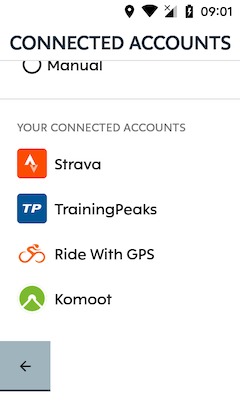
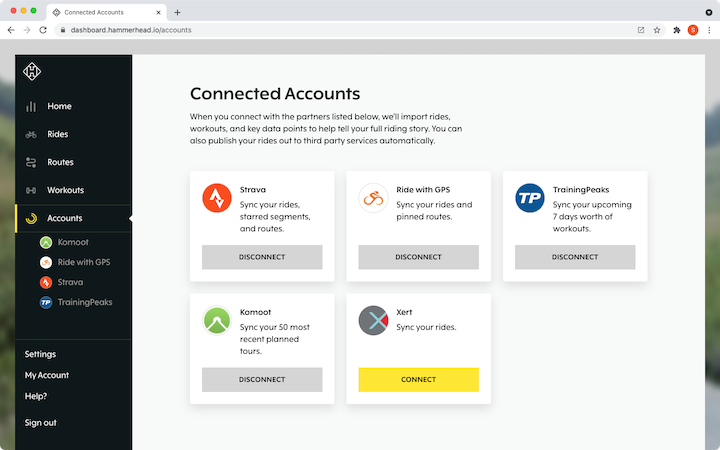
You may assume that there is nothing wrong with your Wi-Fi connection, but this sounds like it may be the problem in this case.
A few things you might like to check:
- Sign-in to the Hammerhead Dashboard and make sure that your connections to your partner integrations (Strava/RwGPS/Komoot, etc...) are visible and connected (like mine are in the screen capture above).
- Ensure that Wi-Fi on the Karoo is turned on and the device has a valid IP address (Settings > Wi-Fi > {access_point_name}). You should see a screen that looks like this (my SSID and MAC address are redacted by the red line so you will not see this):
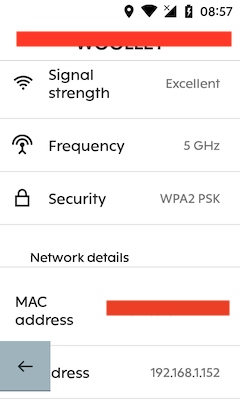
Note the IP Address field at the bottom of this screen capture. Your IP address will probably be a different number, but the important thing is that a number is displayed here. - Try creating a simple route on the Hammerhead dashboard and make sure that it synchronises correctly in the "Routes" app on your Karoo - it should appear as soon as you save the route in the Dashboard.
- Create a hotspot on your mobile phone and try connecting your Karoo to that, instead of your home wireless access point. If this works, but your home wireless access point doesn't, that suggests a configuration or compatibility issue with your home wireless access point.
If none of this works, I would suggest a factory reset of your Karoo should be the next thing to try.
Let us know how you get on, as I see no reason why this should not work for you.
Steve



Please sign in to leave a comment.
Comments
6 comments