Navigation popup from top?
Answered
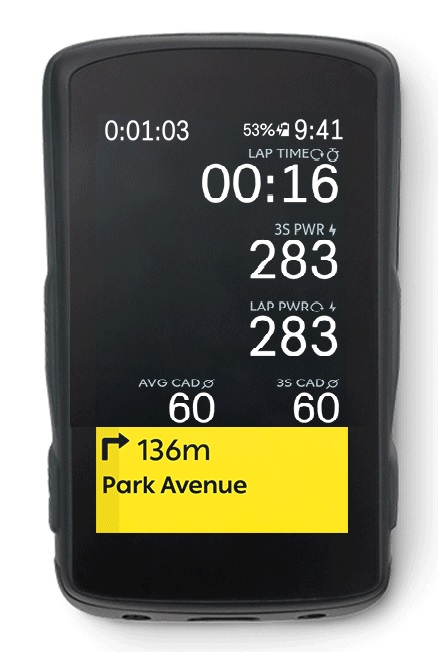
Currently the navigation popup slides in from the bottom and thus obscures part of the map. If the map is small, because some data fields are displayed above it, almost nothing of the map remains visible when a navigation hint is displayed. On some "complicated" crossroads I would often prefer to still see the navigation line on the map, because the yellow navigation hint is not enough to choose the right path.
The same is true for the Live Segment display and messages from the phone. I would prefer to have them popup from the top.
-

+1 for this. What I thought could be useful was for an option in settings for the screen to be compressed when the navigation popup (or any of the bottom drawer) is displayed. That way you could see all the fields except smaller height wise. This would not be for everyone as i'm sure some people don't care about the first row of fields (or the bottom of the map) but some would. Given it's Android OS, this should be relatively easy to pull off.
-

Have you considered changing the layout of your profile page such that the map is at the top of the screen - with data fields below - rather than the other way round?
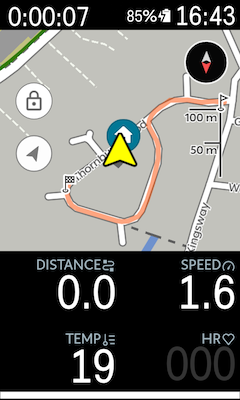
I believe this is precisely why this profile page layout option was provided.
Where will the Quick Settings Menu appear from if you want the navigation coming down from the top? That's where that lives, currently.
-

Another alternative: turn off turn by turn popups in settings (or mute button in the drawer). You still have the beeps and the turn indicator as you approach the intersection. It's good enough for me 99% of the time and for the 1% I can call up the street name when needed by pressing both bottom buttons together.
-

Hey all!
Thanks for the suggestions/feedback - I will pass these along to the team!
One workaround for this suggested by Steve is to change the map layout of your profile to display the map at the top of the screen with data fields below. This will allow you to still view the map data & TBT. Another option is to close the Drawer: by either swiping it down or pressing the Back hardware button.
Please refer to: In-ride Drawer system
Please keep providing regular suggestion & feedback! We appreciate this.
Please sign in to leave a comment.
Comments
6 comments