Karoo 2 not loading routes on location (‘Unknown’)
Answered
Hi,
Today I wanted to ride an in my dashboard uploaded route. Everything seemed fine at home, but when I was on location outside at the starting point of the route, Karoo 2 marked all routes as ‘Unknown’ and I could not load the route for navigation. This was very annoying! Restarting Karoo and waiting for several minutes did not help. Back home (on wifi… (?)) all routes did show up - a little bit to late :-(
Any suggestions?
-

Hey Rob,
If the routes were not loading on the Karoo 2 and if you have performed a hard reset on the device previously, then account information and data would have not synced completely from the Hammerhead account. Once the Karoo 2 is connected to an active internet data source, it will download all the information, and all the routes get loaded.
If you have not performed a reset on the device then there might be a software update check which would have prompted the device to reboot and this error would have happened. If you are still facing issues with the unit then please write to us at support@hammerhead.io and we will help you further.
-
Hi Bijit, thanks for your answer. I did not perform a hard reset on the Karoo and do not understand your second option: why would Karoo try to do a software update check when it is not connected to the internet? Before I go outside for a ride I always turn on Karoo inside ( = wifi) to see if everything is fine (battery etc); if there are updates available, Karoo starts the update. Then I switch the Karoo off and turn it on again outside when I want to start my route. I also performed this routine last Sunday, but then the routes were suddenly Unknown.
Things seem ok now, I tested Karoo outside yesterday. This afternoon I go for another ride. See what happens...
Cheers,
Rob
-

I am also experiencing this problem. I attach a screen grab of the route tagged as 'Unknown' and the associated spinning graphic that never stops spinning. Like Rob, everything was OK at home, on WiFi but when I arrived at the start of my ride, the Unknown Tag appeared and I could not access the route/ride. I had to connect the Karoo2 to my iPhone and use the iPhone as a Wifi HotSpot until eventually the unknown tag disappeared and I was able to access the route. This has now happened twice in the last few days.
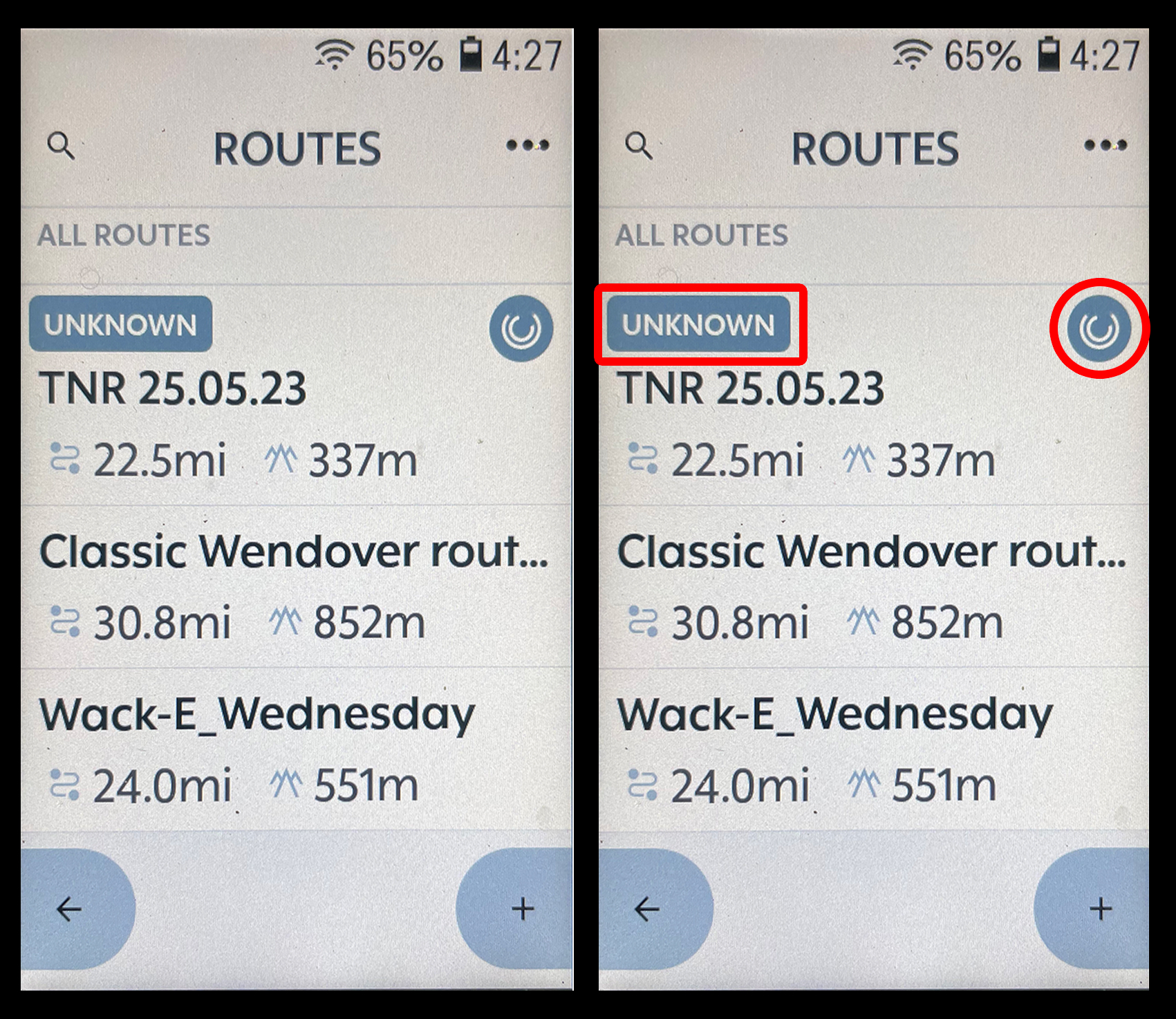
-

Hi All, this is a known issue and we expect it to be fixed and working after the Major map update of this year - planned in a few weeks. This happens if after the download of the maps, the Karoo is shut down, while the processing isn't finished and offlineregionservice doesn’t have time to fully initialize, and so the route does not get marked as available. To fix this, let it be connected to the internet for some time without shutting down the device or re-download the maps region.
-

This happened to me too today. Did not download or update maps, just added a route and the Karoo shut down after 15 min idle - as it should. The route appeared fine at home and was “unknown” and not accessible once we wanted to start riding. Quite frustrating, but good to know that this is a known error and will be addressed
-

I am having the same issue with the "unknown". Steps I've tried: Kept the unit plugged in overnight, I installed the latest update when it came out. After that, the "unknown" turned into "map downloading". I then left the unit on and plugged into a power source overnight. After that, I did a hard reset and waited for all my accounts to sync and when I tried to sync a new route, now I'm back to the "unknown" on the new route maps. Any other options? I travel often with my bike and karoo, and I hope there's a fix for this soon, I really don't want to break out the Garmin after years of Karoo. Fingers crossed.


Please sign in to leave a comment.
Comments
11 comments