Free custom field app karoo-sdk based

I am android developer and be creating an app for karoo 2 custom fields. If you want to test it download from my drive and send your feedback:
https://drive.google.com/file/d/1jvC62G5z-zezSGEOuHLiEc_YFB4mzRUn/view?usp=drive_link
best regards!
-
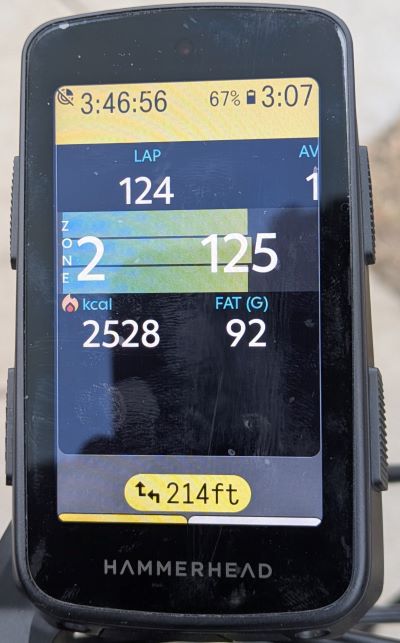
This is caloric expenditure. Instant calories burn speed in calories/hour, instant calories speed from fat, instant calories speed from CH. Graphical relationship between fat speed al CH speed, total expenditure in fat or CH grams. Also instant heart rate, power, cadene and total calories.
-
From top to bottom and left to right:
1- Instant calories burn speed from fat and from carbohydrates graphical relationship. Yellow is % from fat and blue from CH.
2- Center in graphical instant calories burn speed (kcal/h)
3- Bottom of yellow curve: Instant calories burn speed from fat
4- Bottom of blue curve: instant calories burn speed from carbohydrates
5- Total energy substrates expenditure in grams (fat/carbohydrates).
6- Right corner: heart rate
7- Below heart rate: total calories burned
If you have power meter instant power is also shown
-

Hi Carlos, that sounds very interesting!
I have no idea about Android and no idea how to install something like this.
Is it possible that this cannot be installed on the Karoo 3?
https://support.hammerhead.io/hc/en-us/community/posts/25940221488539-Enable-SDK-for-Karoo-3?page=6#comments -

Ok, but "Total energy substrates expenditure in grams CH" is probably incorrect, I could not burn 332g during easy recovery ride:
-
You must configure your theshold data in hkvin user profile. Algorithms are correct but your configuration perhaus not. Threshold, diet, gender, and Ctl are very importat parameters to accurate measures-
Review in HkVin main menú: Heart rate thresholds and estimated caloric expenditure parameters.

-
Today, after 3 hours, I received an almost identical value (completely different training than last time)

I also have a question about notifications because it only appears on this screen, when another one is selected, only a beep is heard and the notification does not appear.
Is it possible to create a basic field (not graphic) that counts time in the heart rate zone?
-
Hi Artur,
please share with me your activity file (.fit) to review saved data. This fat/ch relationships is normal in high medium-intensity training. In z1-z2 with medium carb diet training caloric expenditure relationships use to be 45-55 betwenn fat/ch kcal. 1g of fat has 9 kcal, 1g ch 4 kcal.
Which training zones touch in this training? In my yesterday training I get 130 fat and 462 ch for 5h45min extensive ride (share image 2). However, in a xcm race i get 33 fat and 655 ch, race pace (share image 1).
Text notifications only appear in hkVin screens, not is possible show it in others but beep can be launched.
Custom field that count time in zone can be created but i think karoo 2 inbox has a graphic screen for it. How do you want this new field? count time in z2 fixed zone? Z1, Z2, Z3... counters in diferents fields?
Screenshots from Vin android app https://play.google.com/store/apps/details?id=es.antplus.xproject&hl=us.
Race pace

Endurace pace
-
Screen 1 - zone 1:
File: https://lost-it.pl/screen1.fit
Screen 2 - zone1/zone2 + intervals z3/z4/z5
File: https://lost-it.pl/screen2.fit
Custom fields:
Z1, Z2, Z3... counters in diferents fields as time
Yes Karoo have graphic but count in % so it is almost unusable.
-
@Artur, yes, is possible. I need to create a new configuration screen to set hr or power zones in hkVin. I cant read karoo user profile, SDK not allow it, so....
Later I will create new fields for time in zone 1, 2, 3... hr or power. I will notice you when ready to download new version.
-
Hi Javier,
I upload today the first version for K3 with new SDK. You can download it here:
https://github.com/maduwatas/Vin-HkE/releases/download/latest/Vin-HkE.apk
New SDK allows a lot of new features... I have developed an instant chat between a rider and "his team manager" thats will be wonderful for long duration events like i like to do.
Is a beta version, please be patient if you find any bug and please give your feedbak.
-
Hi Carlos, thank you very much for the app, it is now also running on my Karoo.
I used it for the first time today, with an Elite Direto roller trainer. The speed was displayed at over 200 km/h, sometimes up to 270 km/h. The distance is also incorrect at 166 km. I cannot find a setting with which I could influence these values. What am I doing wrong? Do you have any recommendations as to which view should be used in which layout and do you have any explanations of the individual values of the different views?
Thank you and greetings from Zurich
Matthias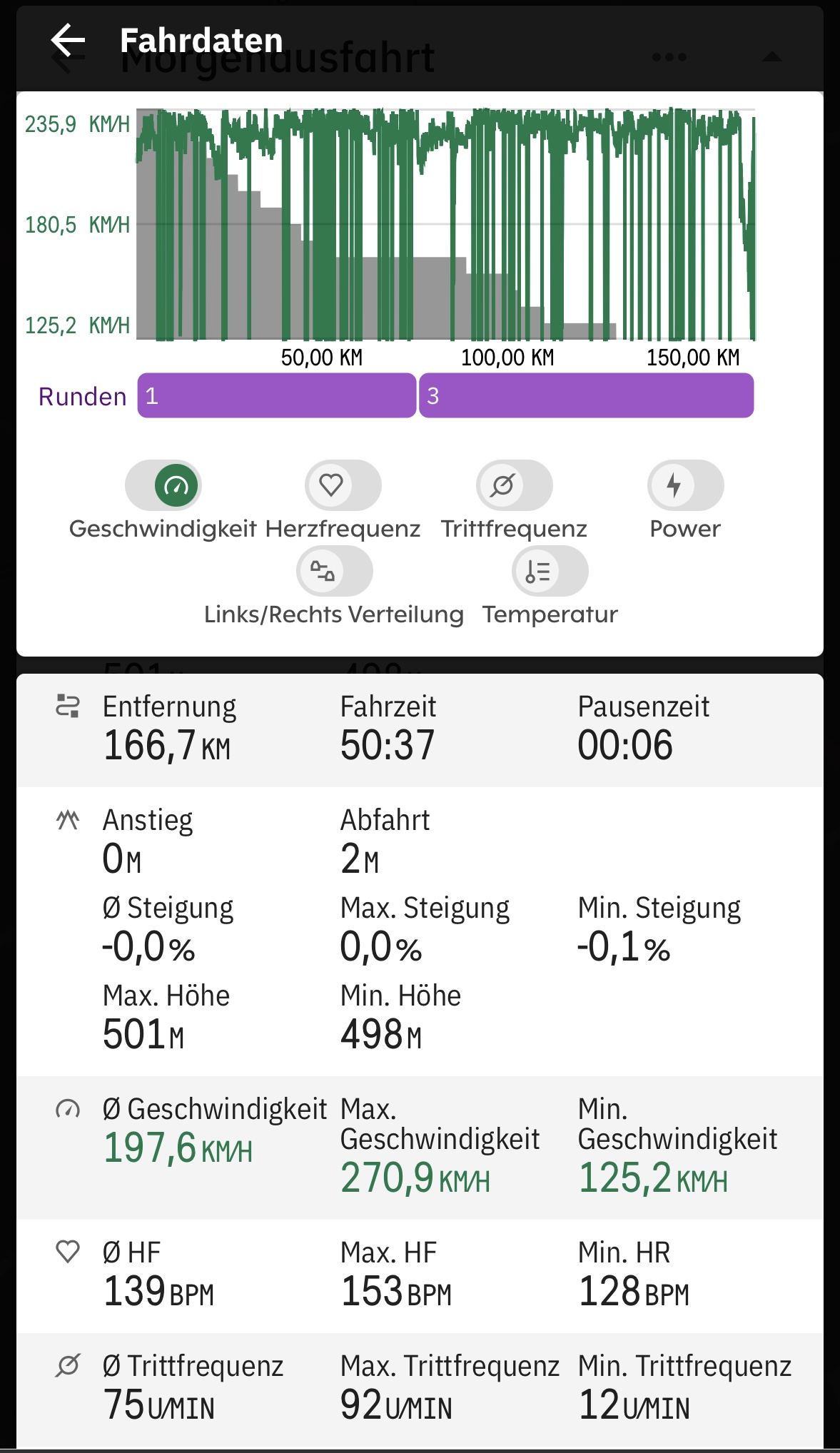



Please sign in to leave a comment.
Comments
40 comments