Wanted: Statshunters for Hammerhead

.I would like to have the possibility of a map page on which you can display the tiles of Statshunters. This way you can see at a glance whether you have crossed a tile or, in the case of route closures, whether you can reach the tile by a different route.
How do I imagine this? A page with a map on which the tiles are displayed. It would be good if the tiles that have already been completed could be colored. Another function would be to see the route. Who can program something like this?
What is StatsHunters?
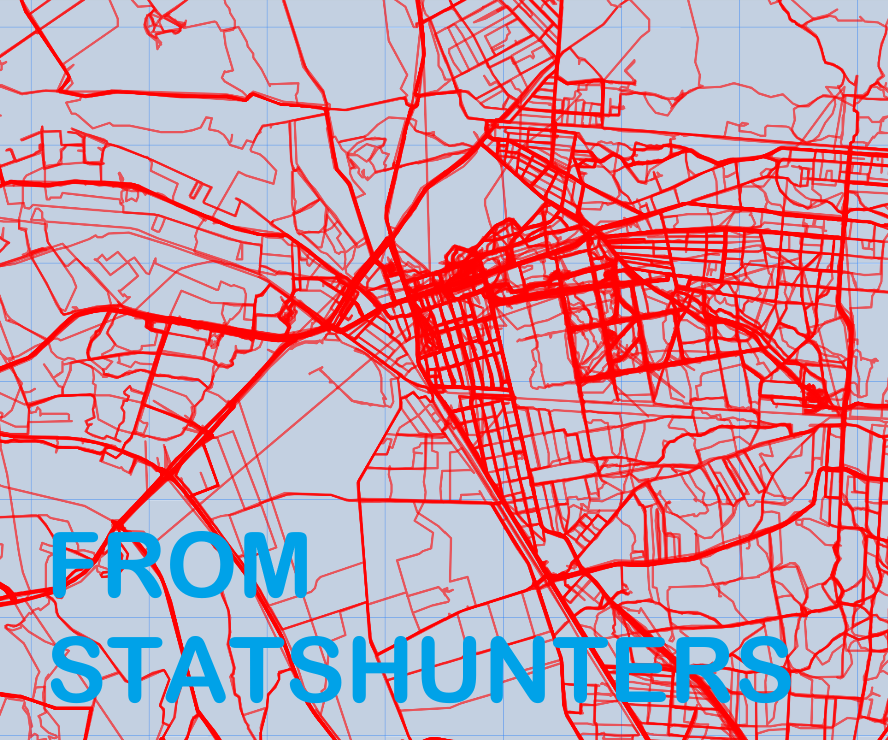
StatsHunters is a platform that displays heatmaps and more from your Strava. But there is also a Chrome plugin of the same name that optimizes your tour planning experience on Komoot. It not only shows you which routes you have already ridden, but also helps you to discover new routes and areas that you have not yet explored. With this tool, you can customize your tours even more and always experience new adventures on your gravel bike.
How does StatsHunters work?
After installing the plugin, StatsHunters is integrated directly into your Komoot account. When planning your next gravel bike tour, it automatically shows you on the map which routes and trails you have already ridden. These are highlighted in color so that you can see at a glance where you have not yet been. This allows you to create new routes and make your tours even more varied.
-

Hi, Timklge is working on it. Here is the link to his application.
-

I tried my hand at building an extension for StatsHunters: https://github.com/timklge/karoo-tilehunting
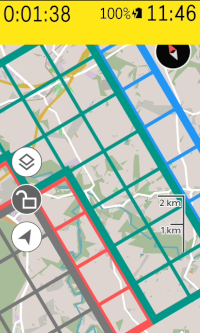
After you have installed it and entered your sharing code obtained from StatsHunters, it will draw the outlines of explored and unexplored tiles around your location onto the karoo's map. It uses colors similar to the StatsHunters page, so gray means unexplored, blue means explored in biggest square, green means explored in cluster, red means just explored. You get an alert if you ride into a previously unexplored tile. If you want to navigate to an unexplored tile, you can use the karoo's native routing by scrolling to it on the map and dropping a pin there with a long-press. If the tile outlines get in the way too much while riding, the karoo allows you to hide them the same way you can toggle the native heatmap.
Both the extension and hammerhead's support for drawing stuff onto the map are very fresh, so there might be issues with it still. I currently can't do much real-world testing because the weather is continuously bad at my place.
Currently, the app will always draw the tiles around your location in a fixed range of 3 tiles, and will not render more tiles when you scroll far away on the map, only when you ride there. I hope hammerhead will add support for extensions to do that in a future SDK update.
If you try it, I'd appreciate any feedback here or on github :-)
-

@timklge I don't try it yet but I will this! Please, tell me, does your ext. download information about your squares and store it in Karoo's memory and use it durning ride in offline mode? If yes, it is very, very good! Please try with Squadrats to! It seams to be better than Statshunters. More possibilities and lighter in my opininion.
-
Yes, it downloads all your explored tiles from statshunters.com and will store it on the Karoo so you don't need an active internet connection while riding.
I am not very familiar with squadrats.com, but I like its design. It looks a bit cleaner than statshunters, and the tile concept and everything is the same. However, the link sharing functionality of Statshunters is what enabled me to build the extension in the first place, because Statshunters allows to instantly download all tiles and activities for a given share link. I considered downloading activities directly from Strava instead of statshunters, but the Strava API doesn't encourage bulk downloads and heavily rate limits requests, so downloading tiles and activities could take a very long time and would require an intermediate web service I have to run to enforce the rate limits. It looks to me like squadrats does not have a sharing feature.
What I could adjust is the way the extension draws the tiles onto the Karoo's map. I could add a setting to use a color palette more akin to what squadrats uses, and maybe settings that disable the separate outlines and colors of the yards / clusters (currently green tiles) and biggest square / Übersquadrat (currently blue tiles) so that it looks simpler
-
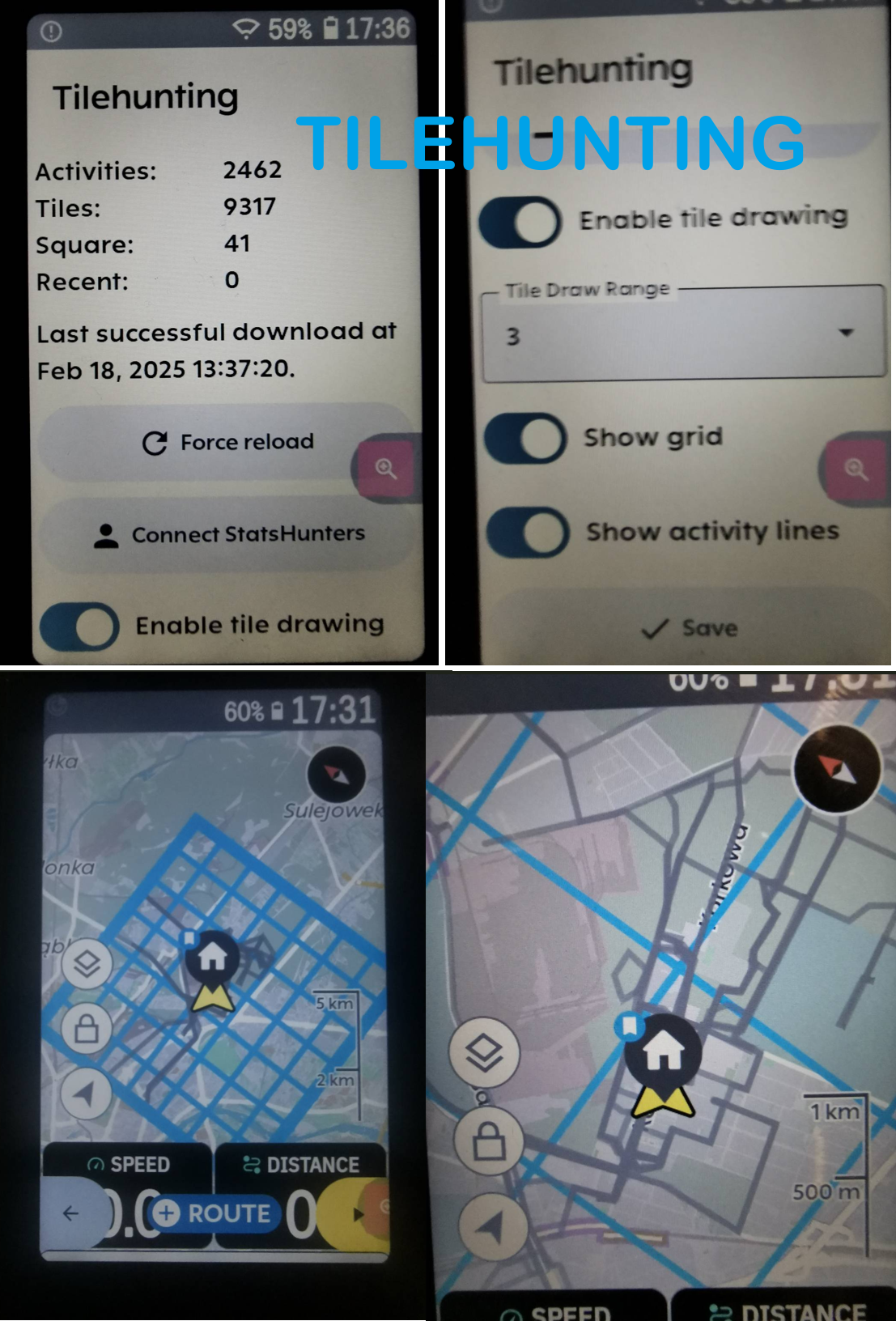
I did the first tests. I like the concept of the extension, but I haven't mastered it yet. It doesn't display my routes, some of them are there but only for a moment. The squares also disappear after changing the profile and I can't get back to them. I think I need to restart Karoo. After entering the extension settings, there's no way to exit it by touching the screen, so I do it with the left, lower button. How do I enter extensions during a ride? For example, to turn on/off or change the range of the displayed squares? I can't do that in K without using developer mode, where I have access to all applications.
@Timklge thanks for your job!
-
Thanks for testing the initial version! Currently, if you select the "show activity lines" option, it will try to draw the part of the last 50 lines of your activities that is inside the 3x3 tile cluster it draws. It will not draw lines outside of that.
There are some issues with how I have implemented the drawing; The extension tries to be too smart about it and only tells the karoo to draw lines that it thinks aren't on screen yet, which results in lines / tiles missing if they are dropped from the map for reasons the extension doesn't know about (e. g. by changing the profile).
I have not added a touch back button to the menu yet, you currently can only exit it with the physical back button.
You should be able to get to the karoo main menu by long pressing the lower left button during a ride, and Hammerhead has recently added the capability to cycle between open apps by long-pressing the lower right one, so that should open the tilehunting extension menu if you had opened it before.
I will work on the extension some more in the next weeks when I have time and let you know once I think I've stabilized it and done some testing myself. I've pushed an update to 1.0-beta6 though which should fix the issue of disappearing tile lines.
-
After some successful test rides, I am now confident that the extension is stable enough and the main features work, so I have labeled it as version 1.0 .
It's available for sideloading at https://github.com/timklge/karoo-tilehunting
-
Thanks! I'll add it in a future release: https://github.com/timklge/karoo-tilehunting/issues/29
-
Thanks! I'll do one more iteration of the extension before I consider it "feature-complete" and add statshunters achievements. I think that feature is not as popular as tilehunting, but I personally enjoy badge hunting and will try to tick off all the climbs in my area that have statshunters badges.
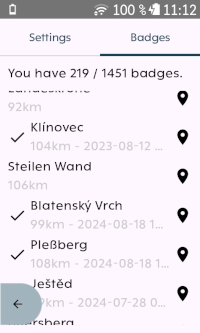
So the next version will pull in your achievements from statshunters (if you enable it for your sharing link). It shows a list of achievements in the menu and also adds them to the karoo map as POIs you can navigate to. You can also initiate the pin drop from the badge list.
-
timklge
Thanks! I'll do one more iteration of the extension before I consider it "feature-complete" and add statshunters achievements. I think that feature is not as popular as tilehunting, but I personally enjoy badge hunting and will try to tick off all the climbs in my area that have statshunters badges.
So the next version will pull in your achievements from statshunters (if you enable it for your sharing link). It shows a list of achievements in the menu and also adds them to the karoo map as POIs you can navigate to. You can also initiate the pin drop from the badge list.
Personally, I'm happy with the extension as it is, I don't need Statshunters Achievements.
Can you say something about the battery consumption of your extension?
I use it and have a very high battery drain.
-
Do you use the activity line drawing feature? That's rather unoptimized and likely has a big battery impact because it goes through all your activities and clips the path to the currently viewed tile area every time that changes, and this uses a lot of cpu even on the k3. I don't use it myself and am not sure anyone does, so I have not spent the effort to optimize it yet https://github.com/timklge/karoo-tilehunting/issues/7.
The tile drawing should not have that big of an impact, as the extension will only redraw the tiles on the map when the tile you are currently in changes. If you have set it to the default 3 tile draw range, that should be cheap to do and there's no heavy computation involved. Could you test if you experience less drain if you disable the extension overlay in the karoo map? The toggle is right next to the heatmap toggle. In the (unpublished) upcoming version of the extension, I've also added a toggle to disable the tile drawing so that you don't have to uninstall the extension if you don't want to use it for some rides.
On my device, I have it enabled all the time though because it's not intrusive. Together with the headwind, reminder, powerbar, routegraph and spintunes extensions I experience about 10 % battery usage per hour depending on the screen brightness, and there's not much difference compared to without any extensions.
-
Do you use the activity line drawing feature? That's rather unoptimized and likely has a big battery impact because it goes through all your activities and clips the path to the currently viewed tile area every time that changes, and this uses a lot of cpu even on the k3. I don't use it myself and am not sure anyone does, so I have not spent the effort to optimize it yet https://github.com/timklge/karoo-tilehunting/issues/7.
The tile drawing should not have that big of an impact, as the extension will only redraw the tiles on the map when the tile you are currently in changes. If you have set it to the default 3 tile draw range, that should be cheap to do and there's no heavy computation involved. Could you test if you experience less drain if you disable the extension overlay in the karoo map? The toggle is right next to the heatmap toggle. In the (unpublished) upcoming version of the extension, I've also added a toggle to disable the tile drawing so that you don't have to uninstall the extension if you don't want to use it for some rides.
On my device, I have it enabled all the time though because it's not intrusive. Together with the headwind, reminder, powerbar, routegraph and spintunes extensions I experience about 10 % battery usage per hour depending on the screen brightness, and there's not much difference compared to without any extensions.
I have to check this evening but I think I have not activated the ‘activity line drawing’
I have use statshunters, reminder and kdouble as extensions and I have a consumption of 12-14%.
How do I deactivate the expansion overlay in the Karoo map? Do you mean that the tiles are not displayed on the map?
.
-
Yes. Hammerhead added a toggle to show / hide all map data contributed by extensions.
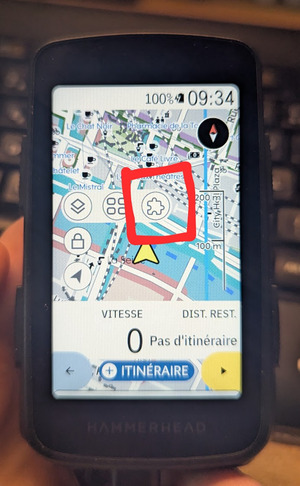
(Screenshot was posted by PierrickP on github)


Please sign in to leave a comment.
Comments
43 comments