Wanted: Statshunters for Hammerhead

.I would like to have the possibility of a map page on which you can display the tiles of Statshunters. This way you can see at a glance whether you have crossed a tile or, in the case of route closures, whether you can reach the tile by a different route.
How do I imagine this? A page with a map on which the tiles are displayed. It would be good if the tiles that have already been completed could be colored. Another function would be to see the route. Who can program something like this?
What is StatsHunters?
StatsHunters is a platform that displays heatmaps and more from your Strava. But there is also a Chrome plugin of the same name that optimizes your tour planning experience on Komoot. It not only shows you which routes you have already ridden, but also helps you to discover new routes and areas that you have not yet explored. With this tool, you can customize your tours even more and always experience new adventures on your gravel bike.
How does StatsHunters work?
After installing the plugin, StatsHunters is integrated directly into your Komoot account. When planning your next gravel bike tour, it automatically shows you on the map which routes and trails you have already ridden. These are highlighted in color so that you can see at a glance where you have not yet been. This allows you to create new routes and make your tours even more varied.
-

I've updated the extension to version `1.1.1`. You can now also temporarily disable the tile drawing in the settings to test if the extension is causing the battery drain.
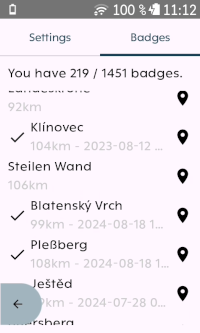
I've added a badge list. In your Statshunters share, enable "Badges" to give the extension access to your achievements. If badges are downloaded successfully, the extension will also add POIs to the Karoo map for all climbs that have a badge on statshunters within 200 km of your current location. You can trigger a pin drop to these locations via the icon in the badge list. Unlike with tiles, there is no notification or automatic update when you achieve a new badge.
You can continue using the extension without badges, just as before.
-

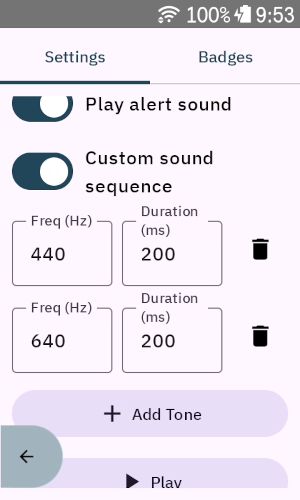
I like the extension and enjoy seeing grey lines turn green, but I have one complaint. The beep when you cross into a new tile is quite loud and disruptive, especially on a group ride. Could you put an alert mute in the app settings, or, better yet, allow the user to select the tone of the alert like Serge does in his Radar Sound Extension? Thank you for your efforts in bringing yet another great extension to the Karoo.
-
Fantastic! I look forward to the update. Thanks.
@Markus - I have the new Karoo. Last weekend, I did the 3 day Walla Walla, WA ride. I didn't take careful notes, but I wasn't below 60% on any of the days. The longest day was 4.5 hours of actual riding time, probably 5.5 hours of head unit powered on time, which equates to around 7.5%/hour. I have multiple sensors and several extensions loaded. Perhaps there is something else going on with your Karoo. -
I've tested the sound settings on my device and have now uploaded version 1.1.2, which includes them. https://github.com/timklge/karoo-tilehunting/releases/tag/1.1.2
-
@Markus
The head unit is the new Karoo with the latest firmware installed.
The rides were on my Specialized Creo 2, so I had their internal power, speed, battery, etc., data synced.
SRAM eTAP AXS
Garmin Vario radar and taillightFor extensions, I was running
Tilehunting with
Tile Drawing: Enabled
Tile Draw Range: 3
Show Grid: On
Show Activity Lines: Off
KXRadar Radar Sound Extension
Epic Ride Weather
KDouble
PowerbarAuto Brightness: On, or maybe off, see note below
Brightness Level: 25%
In-Ride Appearance: Light
Sleep Display: 5 minutes
WiFi DisabledThe Karoo is paired with my iPhone with live tracking turned on.
The Auto Brightness setting seems to have a bug, or I don't understand it properly. In the settings, it is set to On, but when I open up the Display Tab from the Profile, it shows as Off. Anyway, brightness level seems to be one of the huge factors in battery consumption. With my settings, I find it just fine for almost all conditions. The only time I adjust it higher is if the display is in steady sun, and even then, I've never had it on full brightness.
-
It should be possible to update via the device UI. Just select the extension from the list and it should show you an update option.
There is a Karoo bug that will prevent you from updating if you had originally sideloaded the extension via adb though (It will show "update failed" and uninstall will also fail). In that case, you'll have to sideload again.


Please sign in to leave a comment.
Comments
43 comments