Hammerhead Karoo 3: How Long Does the Battery Last in Real Use?

Question: how long does the Karoo 3 last on average on a single charge cycle?
or in other words: how can I set the Karoo 3 to last as long as possible on a single charge cycle?
does anyone have experience with this?
-

Hello all -
New to Karoo after the last 8 years with Wahoo (Bolt 1, Roam 1, Roam 2).
I have done three rides with the Karoo in the past week in very warm conditions and a very bright California sun.
Over the 7-8 hours of total riding I have done thus far, I am seeing a 8-10% / hour battery consumption rate. I have the brightness set to "Auto" and have a HR, power meter, Di2 (via Ki2 extension), and Varia 515 connected. I am also running the "windsock" extension.
While this is far short of the 5-6% per hour I was getting with my Roam 2, it is still likely sufficient for my needs.
-

Yesterady battery started from 79%, end on 6%! => 15% per hour. Unacceptable!
The whole ride ~5:20h, effective 4:30h. At 10% (~30 min to the home) I turned on energy save mode).
Sensors: speed, cadence, radar/light. Auto backlight with lowest limit.This was a day after map update.
As usual it showed me the wrong temperature 11° instead of 20°.Recently it was better at 8%, but the problem of high consumption returned again, even though I didn't change anything. I didn't install anything. If it's one of the extensions, then I need a tool that monitors energy consumption, like in every Android phone.
-
what light do you have connected to karoo 3? I noticed that bontrager flare RT accelerates battery drain - I discovered this completely by accident on a 240+km expedition.
I turned off autobacklight, setting it to ~7-9% with normal use of add-ons, like headwind / epic ride weather / powerbar / tilehunting / vin-HKE and it was enough for 10-12h of riding. When it dropped below 29% I connected it to a powerbank.
-
Yesterday similar conditions, 2h. ride and only 16% battery usage. I don't understand why? I just turn it on, choose a route and go, and the Karoo behaves completely differently.
In these two similar cases, I powered on the device and rode. I didn't do anything with the extensions, but I don't really know if all the installed ones are working in the background or not. After entering the extensions, each one has a button with the text 'launch'. Maybe a stupid question, but it's not clear to me whether launching with this button only applies to launching the extension settings, or does it then keep it in memory as a running process? Basically, I only use Tilehunting, but not always. I would prefer to have control over what is currently running. When I raid close to home, I don't need the extension to collect squares, so I would prefer to be able to launch a given extension when I need it, and not have it always work in the background and drain the battery. However, I don't know if the extensions are responsible for the high battery consumption. -

When you start installing third-party extensions, be it on your phone, tablet or bike computer, there is always a risk that something will break or the battery consumption will increase. Especially after a firmware upgrade or (in this case?) a map update (for extensions that use the maps).
That's why I stopped using Garmin IQ extensions and don't use the extensions on the Karoo. A few months ago I tried the radar thing and after uninstalling it, my Karoo lost all beeps and I had to reset and restart it three times before I had the beeps back.
That was another lesson for me to adjust my needs to the device I have instead of adjusting the device to my needs. Less is always more for me.
Without extensions, the battery drain has been pretty steady for the last 6 months, but I'm going to try the latest map update today and see what happens.
-
@Thomas, that's why I'm writing about the need to consciously manage extensions like apps on a phone. There's a startup manager and I decide what should start automatically when the device starts, and what manually.
Without the extensions Karoo has no advantage over Garmin. Especially when it comes to map personalization (e.g. visibility of road types, text size, active standard POI, multiple languages), application functions (e.g. SMS with a link to live tracking), available accessories (cases, screen protectors) and the biggest - battery life.
-
Yesterday's trip <9 hrs (7hrs riding), battery usage 100% -> 25%. Speed, cadence, radar sensors, Tilehunting extension works, navigation. Backlight set to 19% manually because it was a sunshine day and Karoo wants to set >50% in auto mode. So, it was good compared to my previous ride but.... How to achieve declared by manufacturer 15 hours???
-
For me, it's practically always the same for every ride: +/- 12 hours for the activity recording and about +/- 15 hours for the total ride time (during breaks sleep display after 1 minute). I always have five sensors connected (Bontrager headlight, radar, speed, cadence and time), auto brightness on, sometimes active navigation and often use the map screen as I like to explore unknown roads and paths. No third-party extensions.
Today a short lap in total sunshine with partial navigation of 2h47 activity recording and 3h38 total run time and 23% battery consumption.
I'm fine with that, it's exactly what I wanted from the Karoo 3.
-

I'm going crazy with the K3 :-)
Did I already say that the battery consumption is amazing?
When my device was new, I had 14-16% consumption per hour.
Today I ride for 5 hours and only 28% battery consumption.Display was set to 25% brightness and all sensors connected. I reduced the processor power but I don't notice any difference in performance. Navigation is running.
After 2 hours I connected to the iPhone and activated live tracking.
I have Reminder and Tilehunting running as extensions
-
Saturday trip. Connected speed, cadence and radar sensors. Brightness manually set to 15%. Tilehunting extension active. Navigation turned on. Long route in forest area. After 7.5 hours the battery dropped to 24%, I received a battery alert. I started turning off the display until I heard the navigation sound, then I turned it on to check where to go. After less than 10 hours there was 7% battery left and I connected the power bank to get there. For the first time since the old days when I still rode with my phone I had to have a power bank with me and use it because I estimated that 7% would be too little to get there.
-
@Tomasz.kaniewski like in the title of this topic "How Long Does the Battery Last in Real Use?"
User reports are welcome in this topic. The more reports the better. This is not a monologue, this is a collection of statistics.
So, I just report how it is in my device. Any advice on how to increase battery life is also welcome. The last piece of advice I just got from the team was to calibrate the battery. -
I mean what value have you set the display brightness to? 25% is a perfect value.
The behavior of your device is like mine when it was new. The battery apparently has to calibrate itself first. Let it run empty until the Karoo switches itself off. Then plug it in but do not switch it on and leave it connected to the power supply for at least 6 hours.
After that, the battery will slowly improve.
-

Tried the Display brightness to 25%. I can switch it off then because you can not see the display.
Today: 86k gravel mostly woods
Movement: 4h
On time: 4:50h
Powerpedals. Speed, axs, hr
Brightness to 25%, no automatic brightness. Energy saving on (wich is crap, need to see power and hr and route)
All off: wlan, apps,Rest energy: 75%
Enjoying the ride with the device: 19% -
1. Gravel forest area 75%, 6h of ride, 7h overall time, start at 9:40am. Speed, cadence, radar, navigation, auto brightness. Battery consumption 100% -> 20%. ~11,4%/h.
2. Gravel 50% of forest area, ride time 2:30/3:20. start at 10:10am. Speed, cadence, radar, navigation, auto brightness. Battery consumption 100% -> 73%. ~8,2%/h.
3. Evening gravel, cloudly, 50% forest, 1:40h (no pause), start at 7:30pm. Speed, cadence, NO radar, NO navigation, auto brightness. Battery consumtion 73% -> 60%. ~8%/h.
Better than recently but why is so big difference between 1 and 2? Maybe more forest area is the reason?
Probably my best result is ~8% per hour, so it should enough for 12.5h, not for 15h. Maybe with no sensors, no navigation, no map screen, no extensions will be enough for 15hours. But why sometimes the consumption increasing to 15%/h or more?
-
I asked the support about my fast draining device which needs to be charged after every ride and got that crap back:
Hi Tobias,
Thanks for sharing the information. As Bhagyashree is out of the office, I am taking over the ticket to assist you further.
Based on the serial number and the three FIT files you’ve shared, the observed battery drain rates were approximately 7.0%, 9.0%, and 7.5% per hour, respectively. While these figures are within expected parameters, it's likely that the drain could have been lower. A key factor appears to be the high number of brightness adjustment events—800 and 1,086 times during two of the rides—indicating frequent automatic screen adjustments. Additionally, the screen remained active for over 92% of the ride duration for all three FIT files shared, which significantly impacts power consumption.
On a more positive note, your most recent ride demonstrated a battery drain rate of just 4.7% per hour over a 295-minute session. Considering four sensors were actively connected, this is an efficient outcome. The projected battery life for that ride was 21 hours, which reflects strong overall performance.
You can also use Karoo OS - Battery Save Mode to have extended battery life during your ride.
Let us know if you have any further queries.
Best,
Bijit
Hammerhead -
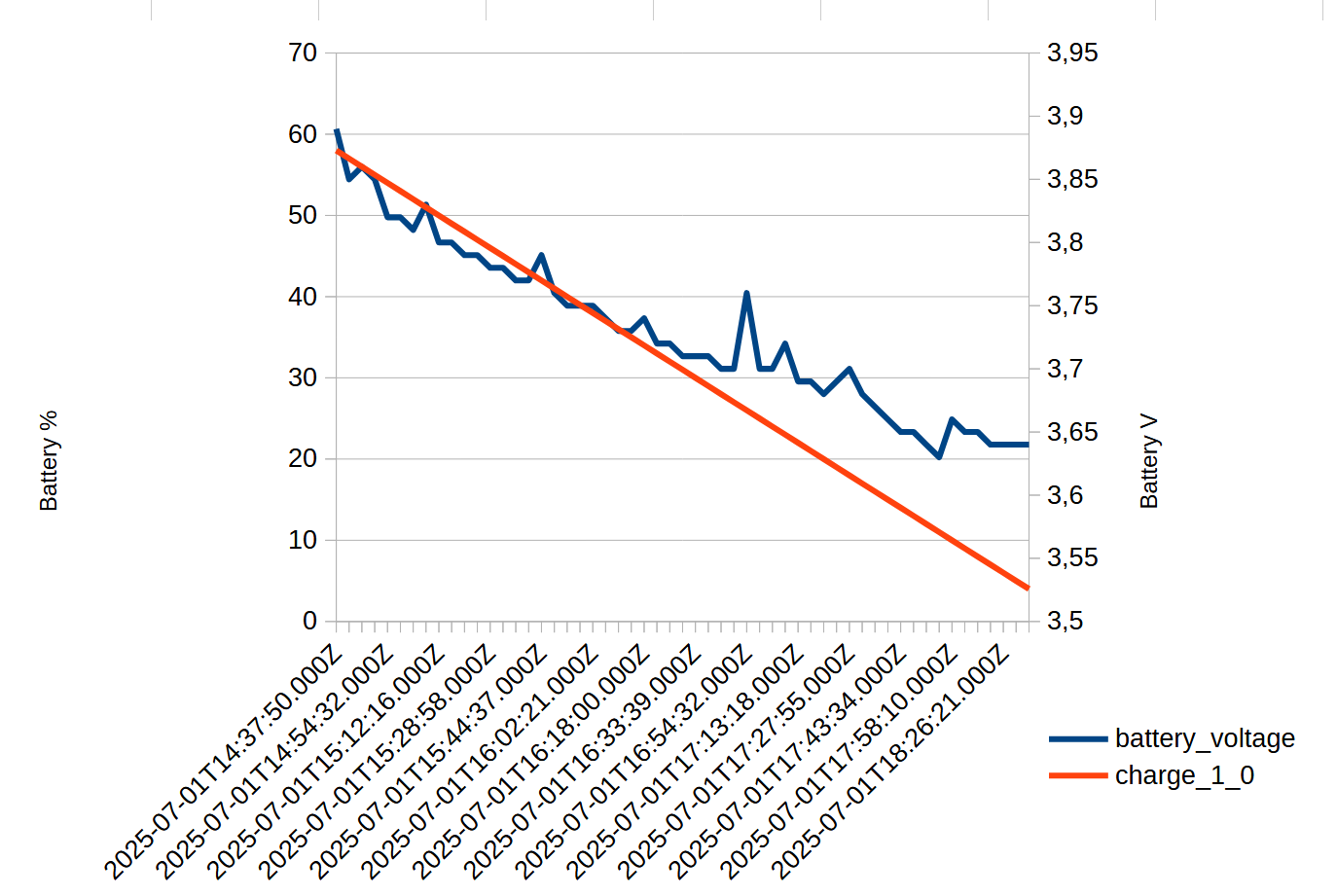
@Tobias, Interesting thing about this automatic brightness. However, I can't find this data in the FIT file. Maybe should I use different FIT decoder. Below is the battery usage from my last ride described above, taken from the FIT file. It doesn't look good. The usage is too high >13%/h. I also noticed that the device showed 61% after switching on, and in the file the first recorded level was 58%. Could it be that it used 3% to load the route and find a GPS signal? The first data row at start does not contains the battery level (empty field).
-
I have used https://www.fitfileviewer.com/
-
First tests after uninstalling all extensions, even unused ones. I only used Tilehunting and once VinHKE.
Saturday ride start ~9:24am, ends at ~7:10pm. Near to 10 hours overal time. 7,5h of moving time.
Battery start at 100%, ends on 46%. 54% /10h -> 5,4%/h. It is very, very good! Sensors speed, cadence, radar, hr. Manual brightness 15%.Sunday ride start ~9:15am, ends at ~5pm. 8:45h overal time. 7h of moving time. Battery start at 100%, ends on 35%.
65% /8,75h -> 7,42%/h. It is good! Sensors speed, cadence, radar, hr. Auto brightness with minimal limit.This test changes a lot. I will have to do more tests installing only one extension. I repeat my request to HH to make a monitor of energy consumption by launched applications. It would be visible which one may be problematic in this regard. I also ask for the possibility of setting the maximum brightness level for individual thresholds.

Please sign in to leave a comment.
Comments
61 comments