Things I miss on Karoo 2
Answered
Hi, I am using karoo 2 from last week, and I have a bitersweet taste. I try to sum up things I like and things that I miss.
+ karoo 2 has better screen resolution
+ notifications (oh yeah! finally working)
+ size
+ battery (on first charge was incredibly bad, but after 2 charges, battery time is at least same on karoo 1).
+ speaker for sound alerts
And things I don't like, some I think can be software upgraded and others not:
- INTERFACE SPEED. (it is slow sometimes, entering profile to begin ride is worse than on my garmin!!! this is a big step backward for me). Navigating between screens is laggy, loading map.... the last sofwatre update seems to be the problem as I experiencing similar results on karoo 1. Before with karoo 1 the more surprising thing for me was the speed of the device. I really enjoyed the usability of the karoo1. I hope this to be a software problem, not a device hardware related...
- AUTO BRIGHTNESS. I know it is not the more "battery efficient" but for me it is important because not having this option, forces user to be adjusting brightness manually, and most important, can adjust lights automatically to the current ambient light (day / night / darker zones as a tunnel ). I hope ant+ lights support to be added in the future, and don't know if there is no ambient light sensor on device.
- SCREEN SIZE. For me it is a bit small, I miss some more milimeters on width. To navigate over the map, pinch to zoom, is a bit difficult with big fingers. A search option to navigate from map directly without having to create a route is more necessary to me now.
- BUTTONS ON SIDES. The buttons on the bottom side of the device, using the garmin quarter turn adaptor, causes the unit to slide from one side to another. I am constantly centering device, it is frustrating as I can't use the new mount adaptor because of my aero handlebar. I miss some more solution from hammerhead to use the new mount developed for karoo 2.
-

Hey Ruben,
Thank you for sharing your thoughts on the usability of your Karoo 2 unit. We really appreciate you for taking your time and effort to test the unit.
I am sorry to hear about the features that you miss on Karoo 2. Let me assist you with this.
Interface Speed - Karoo 2 has a Quad-core 1.1Ghz, 32-bit CPU which makes it faster on the booting and between screen. I tried the change of screen and maps myself to ensure I could observe the lag and take it under discussion to our Product team, but could not reproduce it. I am sure it would be the software that would be causing this. Let me know if you still observe the latency even with the updated software.
Auto-Brightness - We had the feature "Adaptive brightness" on the Karoo and we found that it was consuming charge from the Karoo battery hindering the prolonged rides. We have removed this on Karoo 2; however, we have the default brightness set at KAroo. Certainly, you can increase the brightness on Karoo 2 (under Settings > Display) and the brightness level will remain as it set.
Screen Size - Karoo 2 has a high-resolution display panel and active display of 41x69 mm. With the Dragontrail Glass panel with Acid Etched Matte finish, we have ensured that the visibility of the data on KAroo 2 helps users even when they are out in sun riding. We value clarity of data and even if the screen size is reduced to a couple of inches, we have maintained the same resolution and size of the fonts to make sure our rides do not face the issue with clarity reading data.
I can understand it would have been difficult for you to zoom in and zoom out on the map screen on Karoo 2. We have implemented the zoon in and zoom out feature with the button as well. On the Map screen, you can long-press button A (top left button) to zoom out and long-press button C (top right button) to zoom in.
Button on sides - I would be interested to try this on my Karoo 2. I can understand it would have been upsetting for you to enter your unit on the handlebar every time during the ride. I am not sure if the quarter-turn adapter is inserted properly at the back of Karoo 2 before you mount it on your handlebar. Our hardware team has tested this to ensure there is no movement observed while Karoo 2 is mounted using the quarter-turn adapter on the bracket. It would be great if you can share a video for an illustration of this issue. Please send a short video to support@hammerhead.io.
-
Hi Abhishek,
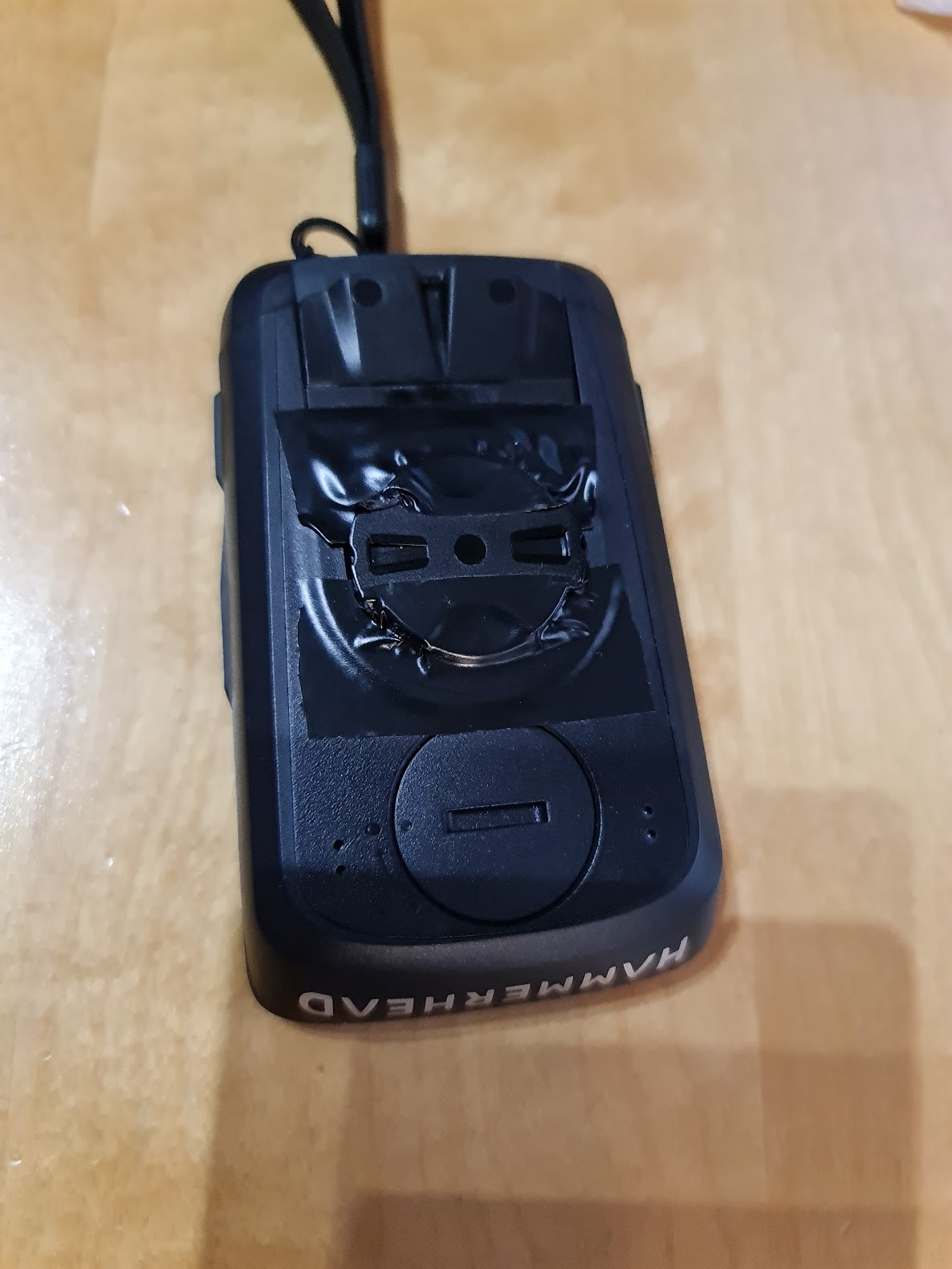
thank you for your answers, I'm sure that you will fine tune software in a couple of updates, I really think this device is capable of run android and all the apps smoothly without eating too much battery, the hardware you pick for it, is lightyears beyond other devices I've tested.I didn't know the long press function with side buttons, thanks for clarifying. I wrote to support with a video showing my problems with quarter turn adaptor. I hope that you will design and sell a non standard handlebar spoon type or similar support with your propietary mount for karoo2, but for now I managed to "fix" it putting some tape covering the back part (not ideal, but helps karoo2 not rotating when I push buttons on sides).
Thanks again for your support and keep improving!
-

@Abhishek Anand
I have to agree with @Ruben - the Garmin quarter turn adapter does not have a substantial hold on most Garmin style quarter turn mounts and activation of the lower buttons can easily dislodge the K2. This is something that needs to be addressed by the development team at HammerHead.
-
@Tom, @Mark - It is impossible to test all the available mounts. However, we had tested on all the commonly used ones including the Garmin mounts. But we have a solution which should improve it for other mounts. We have found that not all manufacturers had the same amount of gaps ratio.
I would like to inform you that we have taken your feedback on the issue with the usage of the quarter-turn adapter on the different mount. Certainly, we do not want our users to ride with the loose mount for the head unit. We are looking into this to see if there is any development required to ensure our users have a ride safely with the head unit on the mounting system. We will certainly announce if there is any change or development, upon confirmation.
Besides, as we recommend, kindly use the lanyard for the added safety on all your rides.
-

Hi Abhishek,
Does this mean that there is no ambient light sensor on the unit at all? So the unit will be unable to control lights like the Garmin Edge units can? This seems like a big mistake as surely you'd be aim for at least feature parity. Surely the battery drain issues you were facing were related to polling rate in some way? Is there any reason the sensor should drain battery if not polled? How does Garmin manage this? If there is no ambient light sensor it seems like Hammerhead has added one feature people were clamoring for (a beeper) and taken away another useful one... Is this the case?


Please sign in to leave a comment.
Comments
7 comments