Speed Interpretation Intermittently Incorrect on Strava segments

To preface this, I don't care about Strava segments, but I do care about the integrity and interpretation of the hardware and services I pay for... anyway...
Me and my friend have noticed erroneous data reporting in regards to speed and Strava's interpretation of segment data coming from the Hammerhead Karoo.
We are both running full SRAM setups power meter, etc.. No wheel sensors or anything of that nature.
What we're observing is speed data that has peaks and troughs when they don't exist. This results in erroneous reporting of max speeds (for a segment and an entire ride), and generally "lumpy data".
For instance, on the below segment, you can see the peaks and troughs on the data below. It shows we hit as high as 38.9 mph (in an erratic fashion), and as low as 23.9 mph. Neither of these are true.
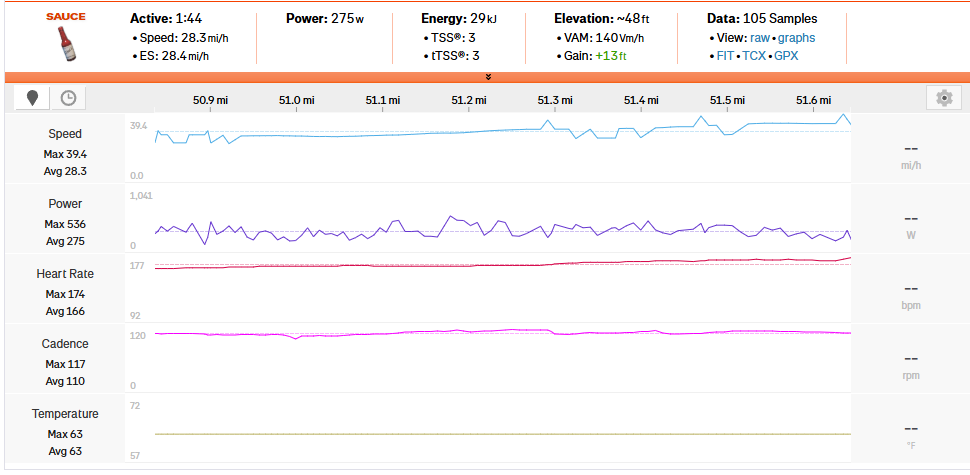
View ~ the same time slot on the Hammerhead dashboard yields this:

As you can see, the line representing speed is almost perfectly linear, with no peaks or troughs. This has happened to various segments on both of our data, with the determining factor unknown. Some of the segment speed is reported in a smooth, realistic, fashion. Some are like the erroneous example in screenshot #1.
Which brings me to my next point. Both of us are seasoned cyclists with experience on several platforms. Garmin, Wahoo, etc. We've not experienced this time of behavior from any of those units. We've also crowd sourced a bit, and only the select handful of us with Karoo (3) units are experiencing the issue.
Now, I understand this may be a "Strava issue". Yet, the fact that competing head units don't experience makes me think otherwise.
In conclusion, if this could be routed to a Hammerhead dev, or even someone who can shed some light on the issue, it would be much appreciated.
Thanks.
-

I too have this issue. I noticed when Strava showed my top speed at almost 40.0 mph and I knew I wasn't close to that. Sure enough, random segments show the same peaks and dips as you've posted.
There doesn't seem to be rhyme or reason to this. Some segments are fine, some aren't. It's not GPS issues, etc.. and does seem to be related to Strava's processing of the data. I too show the mph speed as solid when reviewing in the Hammerhead Dashboard.
-

Not only the speed is locking jagged. Also the power has many spikes.
Otherwise the Avg of 275 Watt and the Max of 536 shows that the ride was not so smooth as well. Also the speed is avg 28,3 to max 39,4. Are these measured values correct?
I just switched from a garmin 1040 to the karoo 3. I checked the latest Karoo rides in strava and the are the same smooth as in the karoo dashboard.
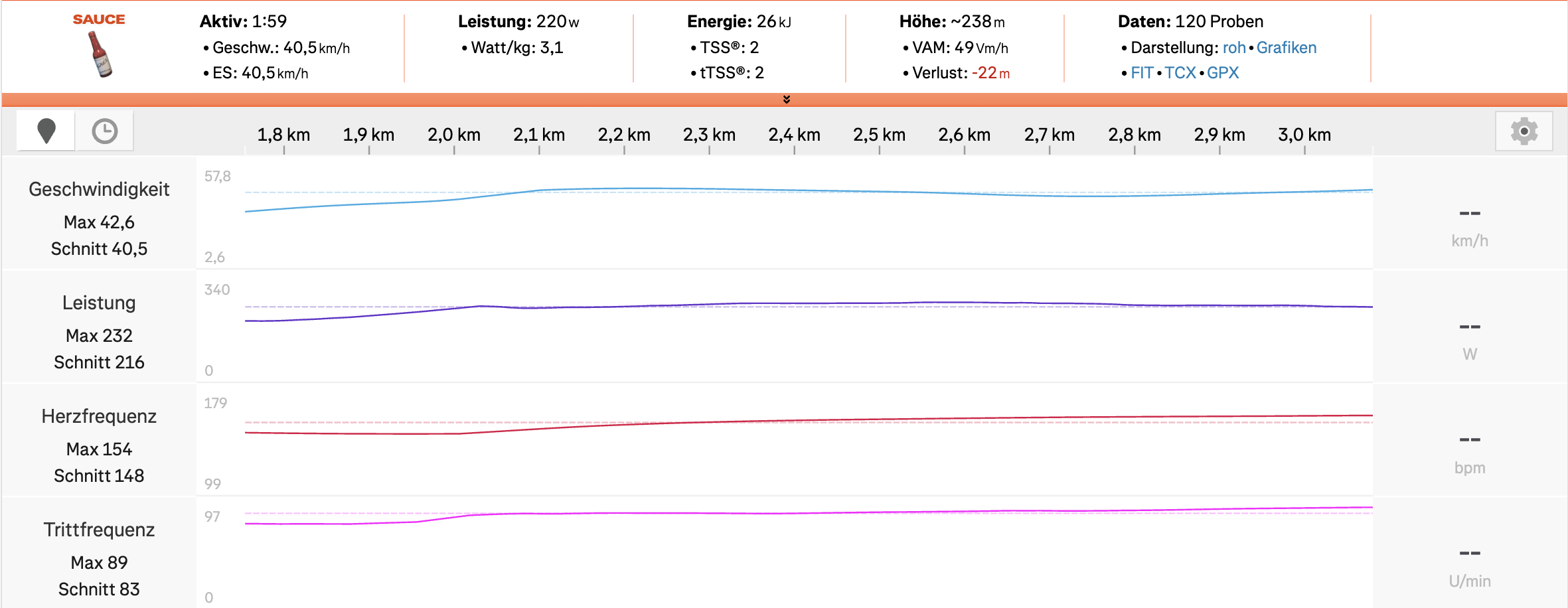
For me there is no difference from garmin to hammerhead on strava.
This does't solve your problem but it shows that it must not be a general problem?
-
It doesn't happen on every segment. For instance, 3 other segments on the same ride were perfectly smooth. The power is likely affected as well. The max isn't correct. I believe the averages in the end are correct.
My hypothesis is there is a difference in the data update frequency between the Karoo data and the Strava segment algorithm. I'm going to surmise that due to the difference, Strava starts doing all kinds of weird stuff to make the end result coincide with each other.
Again, it's segment selective and there seems to be no rhyme or reason as to why some segments exhibit this behavior, and others do not.
That's why I was hoping a dev would look into the issue.
-

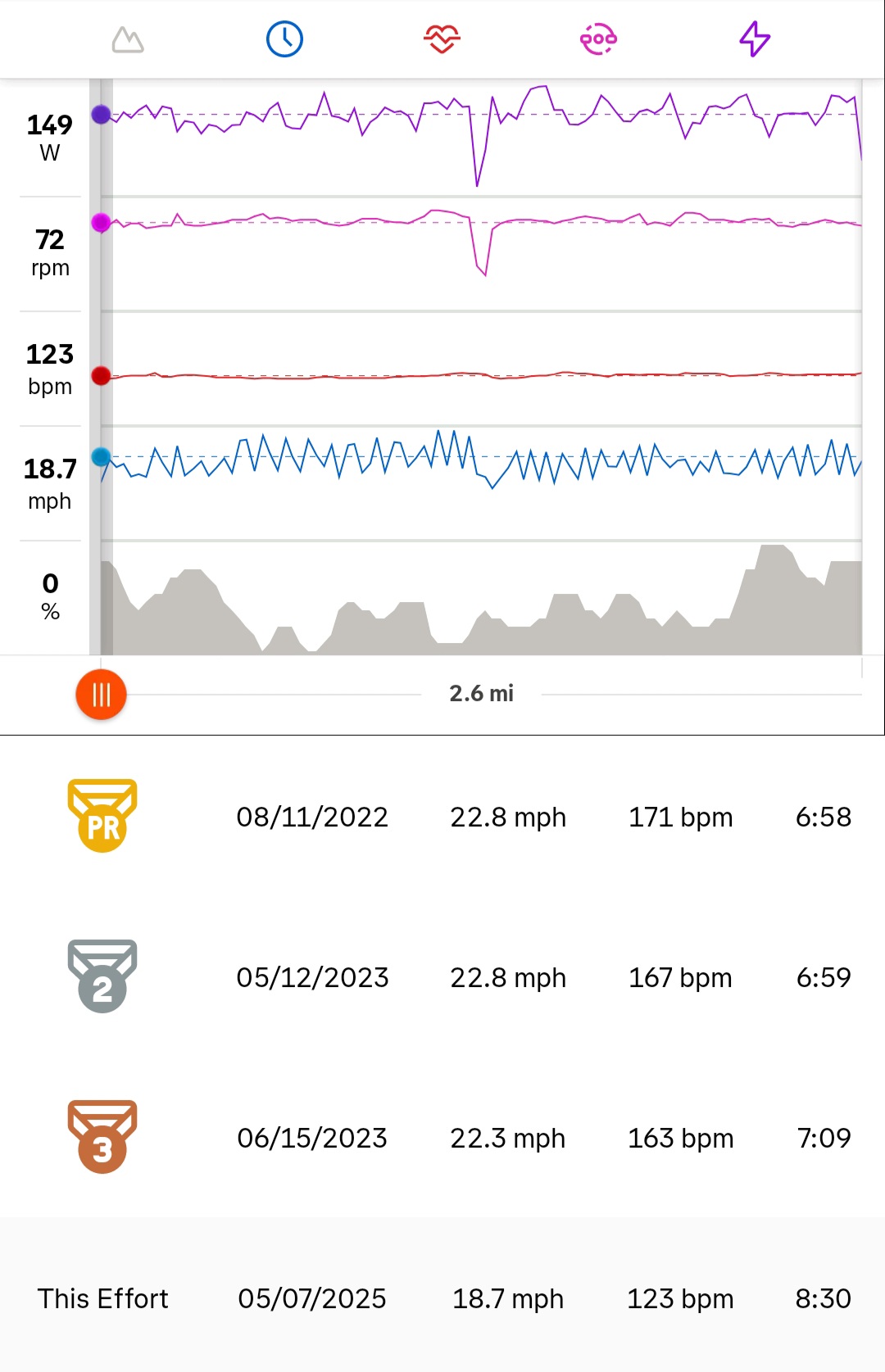
New K3 user here having the same issues described above. Upgraded from K2 to K3 and saw choppy speed graphs on all ourdoor rides. Flagged it to Hammerhead who were nice enough to replace the unit as it was still under warranty. While waiting for replacement unit, did a few rides with my old K2 and everything was back to usual- nice smooth speed graphs. Replacement unit finally arrived and took it outnfor a ride and same issues - speed graph looks like a chainsaw blade. See picture for reference. I am wondering if this is a bad batch of K3 units with poor QC?
-

Yet another K3 user here experiencing the same. I have confirmed that speed data is very smooth and accurate in Hammerhead and Trainer Road, but get these erratic/jagged speed readings only in Strava. It's not for the whole ride, but for random chunks of time, it will show up very erratic. Here is an almost 8 minute part of my ride where the speed fluctuates:
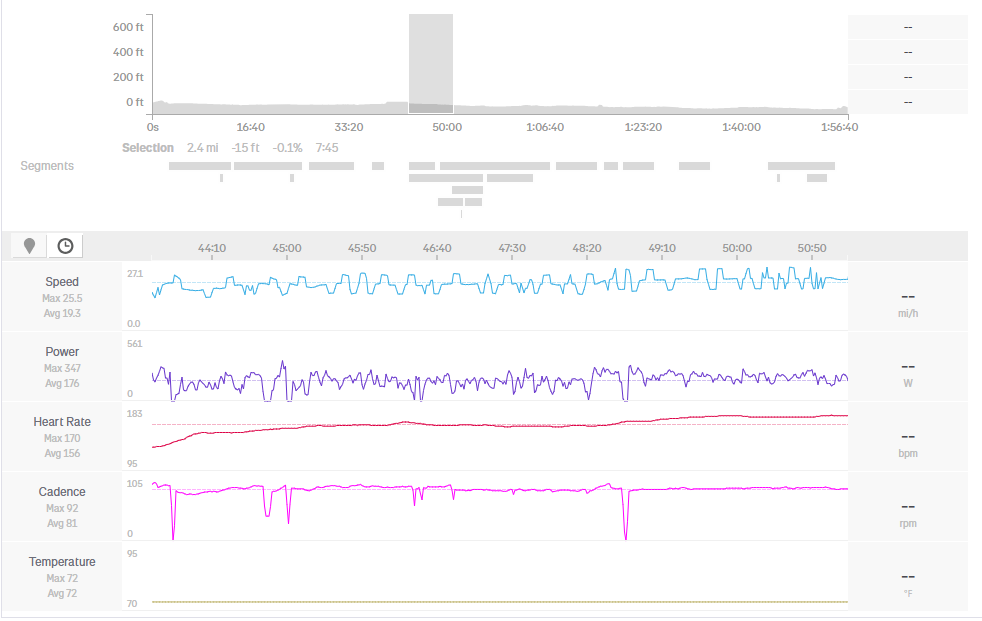
And here is the same timeframe from Trainer Road:
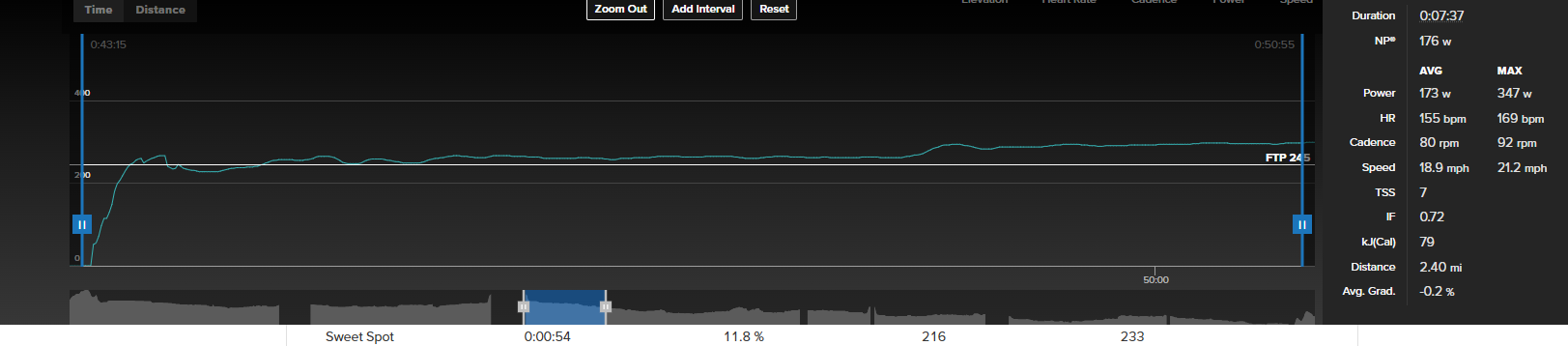
Any new info or resolution for this issue?
Thanks.
-
I have opened a ticket with Strava. Not sure if anyone can see the ticket but here's the link: https://support.strava.com/hc/en-us/requests/3390333
It'd be great if anyone experiencing the same could chime in and comment to get more attention on this issue.
Thanks!
-
I had opened a ticket w/ Strava too but they don't think its an issue as their response was basically "its not happening enough for us to believe its an actual problem". I have been riding around and the "problem" is that sometimes the speed graphs are fine and sometimes they are not. I have a seperate ticket open with Hammerhead support for this issue. They initially suggested do a ride with both my old K2 and the new K3 and then compare and ofcourse, there were no issues..lol..so i closed the ticket thinking it resolved on its own. Couple of days later, the same issue w/ the speed graphs resurfaces again. I have reopened the ticket, and Hammerhead support's latest suggestion is as follows:
"try creating a new profile on your device, without connecting any sensors, and then take a short ride. This small test could really help us isolate whether the issue is coming from the current profile or from a particular sensor connection."
I haven't tried that yet. However, i did alert the Karoo support team on this thread so they are aware I am not the only one facing this issue. I feel at this point, Karoo support should acknowledge this thread and collectively look into our issues as I am starting to believe this might be a QC issue with certain K3 units otherwise atleast take up the issue w/ Strava.
-

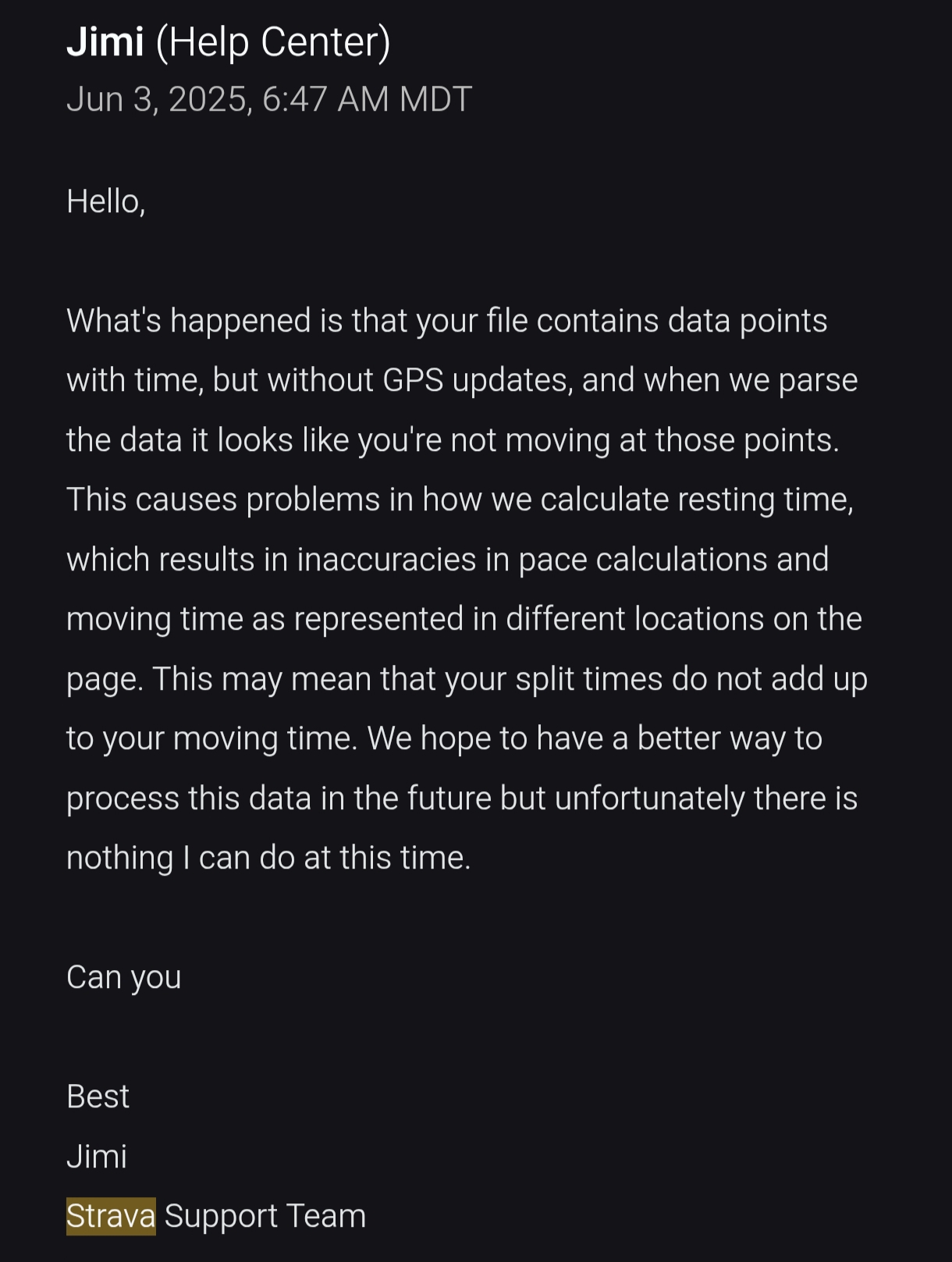
After reading Strava Jimi's reply, my random wild guess was that maybe this is somehow related to russians messing with GPS (jamming signal etc.) in Baltic region (Im from Latvia). But this would not explain short GPS signal loss in other regions and that other software can see and display speed/GPS data in graphs just fine.
-
Final response from Hammerhead support:
As we've observed, the speed graph appears jagged on some platforms but not on others. To better understand this, we consulted with the Software team. Based on the discussion with the Software team, let me clarify this to you.
Platforms such as Hammerhead Dashboard, TrainingPeaks, and DCR Analyzer display the speed graph directly based on the data from the Karoo FIT file. These platforms do not perform any recalculation of the speed data—they simply visualize the raw data as recorded.
On the other hand, platforms like Strava, Ride with GPS (RwGPS), and Komoot apply their own processing or recalculation to the uploaded data. This post-processing can result in a smoother or altered speed graph, which is why you may notice differences across platforms.
Unfortunately, this behavior is outside our control, as it depends entirely on how each platform chooses to handle the uploaded FIT file data. If needed, you may consider reaching out to the respective platforms to inquire further about their data processing methods.
We understand this might be frustrating, and we’re sorry we can’t offer a direct solution in this case. Please don’t hesitate to reach out if you have any further questions—we’re here to help.
Have a great day!Hector
-
Yeah Keith, pretty much that.
It may not be a big deal to some users but to me it is a real bother. I really like to dive into all my numbers after a tough ride or race and I don't want to see a speed graph that looks like a saw blade, swinging up and down by as much as 10 mph.
Honestly, if I would have known about this I would have stuck with Garmin products. The mediocre battery life also isn't great.
Hector
-

I also struggle with this problem, and just stumbled upon this thread.
If the problem doesn't exist with Garmin or Wahoo products, then I'd say it actually is a Hammerhead problem.
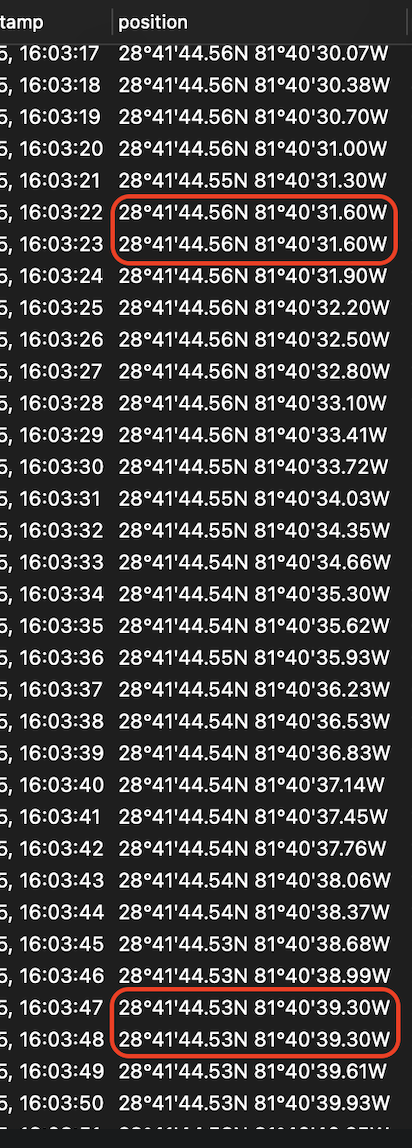
The duplicate coordinates with a different timestamp is probably the cause of the problem.
Today I looked at the TDF Femmes, and noticed Kasia Niewiadoma also uses a Karoo.
If you look at her data, the graphs are also sometimes smooth, sometimes jagged.
https://www.strava.com/pros/95677654
Pitty neither Hammerhead or Strava are putting in effort to fix this.
-
Funny enough, I saw a ride from a buddy, using a Garmin 1030.
There was 1 point where the same occurred as with entire Karoo rides.However this was maybe a couple of seconds of a whole ride.
Sometimes entire Karoo rides display this behaviour with Strava.Therefore I still think that in its core it is still a Karoo problem.
-

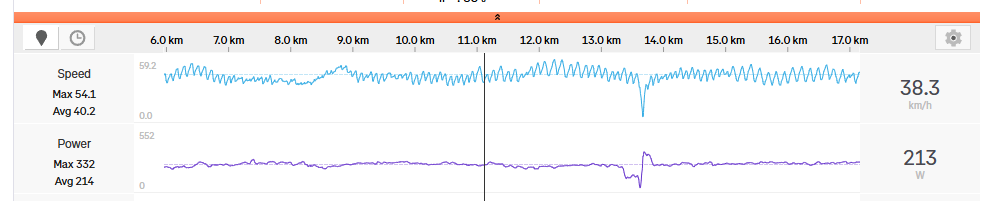
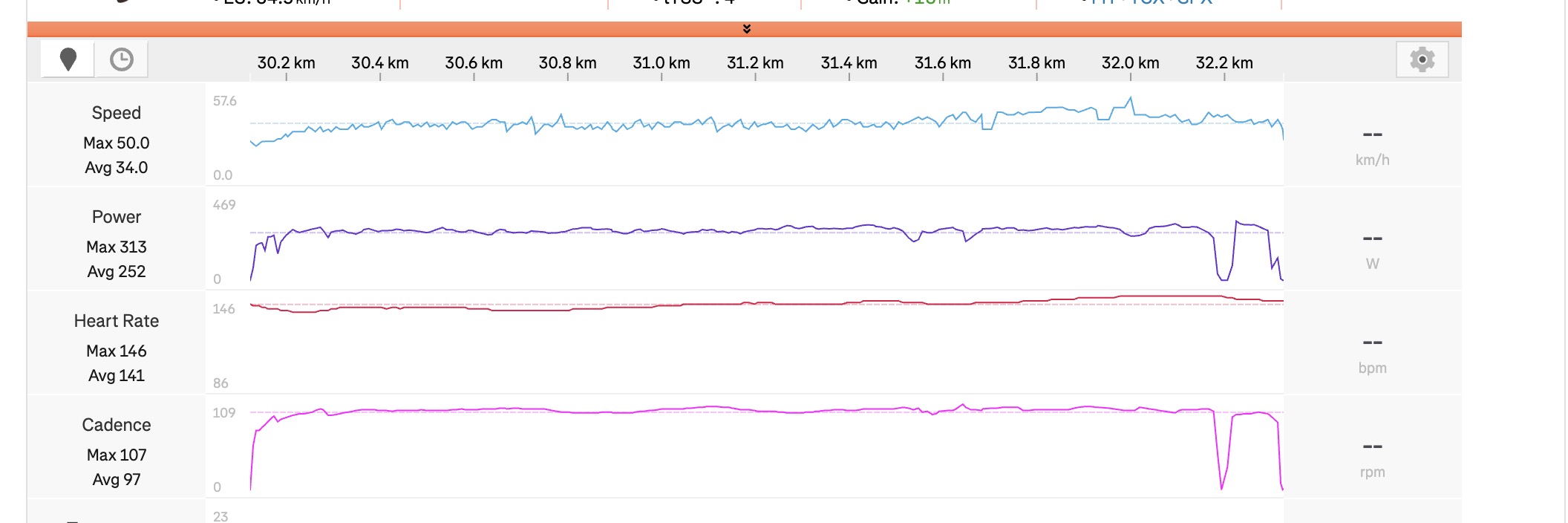
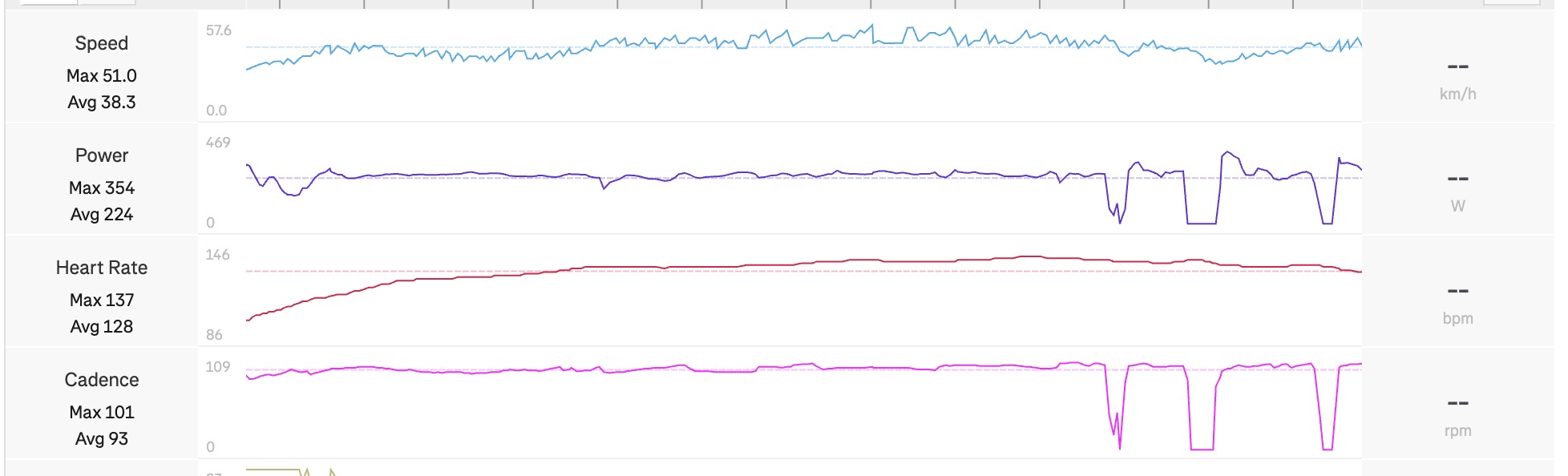
I’m having an issue with the way my rides look on Strava.
The speed graphs from my Karoo 3 are very jagged and generally look quite messy. I’ve tried riding both with a speed sensor and without one, but the graphs still look the same.
I previously used a Wahoo and never had this issue the graphs on Strava looked much smoother.
I really like Strava segments and I pay quite a lot of attention to them, so it’s frustrating to see the final activity looking like this, even when the actual ride was smooth and the speed was fairly consistent.


Please sign in to leave a comment.
Comments
21 comments