RouteGraph extension

Hi,
while the Karoo is great for seeing "the road ahead", I found it to be a bit lacking for seeing the route ahead. During some long distance events, I was struggling to perceive where I was on the track, how far away the next checkpoint / refueling stop was and how to pace myself getting there. Hammerhead has added some cool features to the SDK that allow extensions to access the current route, so I tried my hand at building an extension that helps in these situations.
It adds a couple of datafields, mainly an alternate elevation profile datafield:
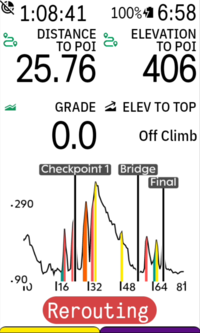
Compared to the native karoo elevation profile data field, it adds POIs and climbs. By default, it is fully zoomed out to show the current route, but can be zoomed in with a tap. The "Distance to POI" and "Elevation to POI" datafields are also provided by the extension.
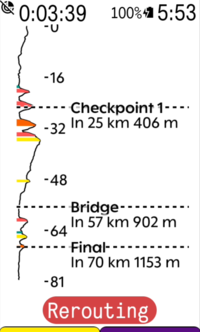
Alternatively, there is a vertical elevation profile, which shows more details and is supposed to mimic the instruction sheet the pros tape onto their stem:
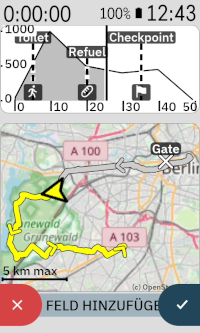
Another feature I had some fun with is a minimap datafield. It can be placed on any data page and is supposed to provide an overview of where you are on the route without fiddling with the zoom on the main karoo map. It will auto zoom to fit the whole route by default, but can be zoomed in with a tap and will then try to fit as much of the upcoming route on the field as possible. It uses simple OpenStreetMap raster tiles downloaded via the companion app during riding.
There is some more features I had some fun with, but which are even more experimental. I tried to replicate the gradient-colored chevrons featured on Wahoo devices on the Karoo:
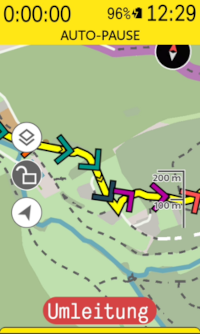
They work, but are a bit clunky at the moment, mainly because their sampling frequency is too low. I'll look into improving them in the future.
Lastly, I have tried obtaining traffic incidents from HERE Maps and showing them on the Karoo map and the extension data fields:
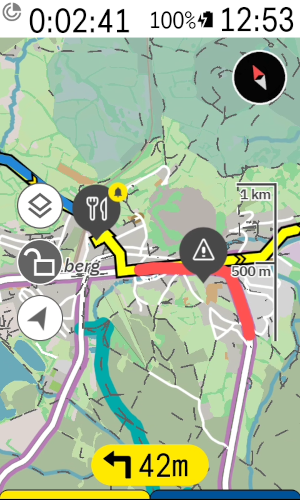
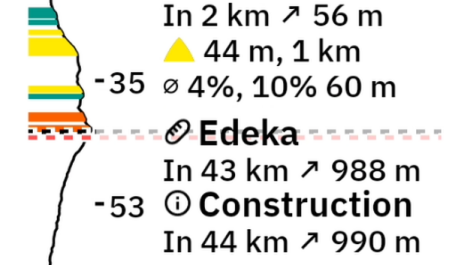
When loading a route and this feature is enabled, the extension will query the API and fetch a list of known traffic incidents (construction sites, road blocks, closures due to planned events, major accidents) along the route. I found the reported incidents to be quite accurate, but this will obviously depend on the data quality for your location. To my knowledge, the business model of HERE Maps mainly targets freight companies, so incidents on high traffic roads are likely to be reported while a blocked multi-use path is not.
You can try the current version of the extension by downloading it from here: https://github.com/timklge/karoo-routegraph . If you do so, feel free to let me know if you encounter issues and whether the features are useful to you. I use the extension during all of my rides and like the increased awareness of the upcoming climbs and POIs.
If you try it, please be aware that there are currently a few caveats:
- The experimental traffic incident reporting currently requires obtaining a HERE Maps API token (free, but obviously clunky to set up).
- The minimap will currently only start downloading tiles when it is visible on screen to save battery and this can take quite a few seconds per tile due to the low bandwidth of the BLE bridge
-
Thanks.
@Stevejgalbraith: You can register at https://platform.here.com . Then, you can register an app (the name doesn't matter) and obtain an API token. Unfortunately, they recently removed the "limited" tier where you could just create a simple account; now, you have to enter billing details, but the free tiers are still there and you won't be charged. You can use the rest of the features of the extension without this.
@John Pfennings: There is a setting in the menu to disable them ("Show gradient indicators on map") , and they are disabled by default as I thought that they are rather intrusive on the map. Were they enabled on your device?
-

Nice looking app! Just curious, if there is significant rerouting when underway, or a new POI is added on the fly when riding which changes the route, or one changes to a completely new route, will the extension lose the correct distance to POIs and elevation profiles?
Maybe I am confused by the internet connection requirement. Will the app get data on the karoo 3 via my phone's internet connection and the karoo companion app?
-
@D Fel: When you are navigating to a POI, that will become your new "temporary route" and the extension will show the elevation profile for that, but only global POIs as the temporary route has no POIs of its own. When you arrive at the destination, drop the temporary route or load a completely different route, the extension will show the elevation profile and POIs for that route instead. It reads your current position on the route from the Karoo "distance to destination" datafield.
Yes, the extension will use your phone's connection if you have the companion app set up with a Karoo 3.
-
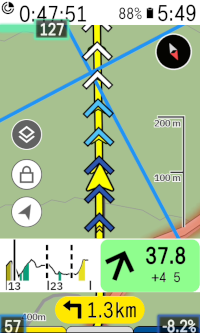
I've pushed an update with some new features that I want to use during some upcoming bikepacking trips. On the elevation graphs, you'll now find a button with a pin drop icon to open a POI info screen:
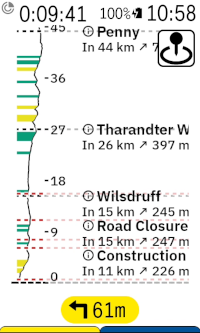
There's also a new datafield that just contains the button, and there's a new button to open it from the main settings menu. When you press it, a new screen opens that shows all set up POIs and buttons to initiate navigation. By default, the POIs are sorted by the linear distance between your current position and their position, but you can change the sort order to "Ahead on route", which will sort the POIs by the remaining distance on your currently loaded route.
There's a separate tab you can open that allows you to search for nearby OSM POIs of certain categories (e. g. supermarkets, train stations, drinking water supplies etc.). You can also choose to search for POIs ahead on your route here; so it can be used to look up upcoming POIs that require as little diversion from your route as possible.
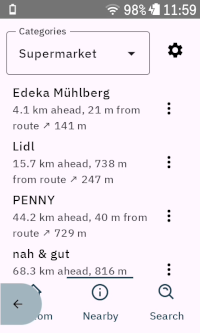
You can "bookmark" each POI, after which it will appear on the main karoo map and on the route graph elevation data fields. The extension will also show an approach alert if you get within 500 meters of the closest point on the route to the POI (configurable in settings).
Lastly, there is a third tab that allows you to look up POIs (e. g. by address or something like "Brandenburg gate").
The extension uses overpass-api.de and Nominatim for POI lookup. Both are great software projects that make it easy to implement features like this; but since they are API-based, you will need an active internet connection to use it while riding (via companion app on Karoo 3 or SIM card on Karoo 2).
I've also reworked the gradient indicators; they now use the karoo color palette for gradients in addition to blue hues for descents. There's still some minor issues with it that only Hammerhead can fix because it is related to how the SDK handles symbols that extensions draw on the map; the chevrons will not rotate with the map if you unlock it and pan around, and they rotate a little bit delayed when you turn. Maybe they'll fix that at some point, maybe they won't.
-

Hammerhead has added new functions to the library: elevation, ascent, and navigation distance for POIs. Will these new options improve Routegrahp?
-
@John Pfennings: Thanks! I currently use it during rides to look up upcoming gas stations that I don't have to leave the route for, and add them as POIs. I'll also use it in an upcoming bikepacking event to look up shelters for sleeping spots along the route, I'm curious how that will work out.
Hammerhead has added new functions to the library: elevation, ascent, and navigation distance for POIs. Will these new options improve Routegrahp?
Yes, I'll update the extension once the new SDK capabilities are part of the public Karoo software. The extension will then no longer need internet access to display the elevation profiles and climbs, as it can get the data from the Karoo instead. The climbs shown on the elevation profile data fields will then also match the climbs shown in the Climber drawer.
The nearby POI search function will still require internet access, as it uses the Overpass and Nominatim APIs and the offline OSM maps on the Karoo are not available to extensions.
-

Hi Tim, this is a great extension. Two things I noted:
1. When using a radar, the "swim lane" on the left covers a majority of the climb profile in vertical mode (if a car is behind). No deal breaker but still not ideal.
2. The amount of text available in vertical mode is rather low. I put names of climbs, time and power targets; e.g. "Kühtai (07:20, 200W)" which was too long. Would be nice to have a more condensed or smaller font.
-
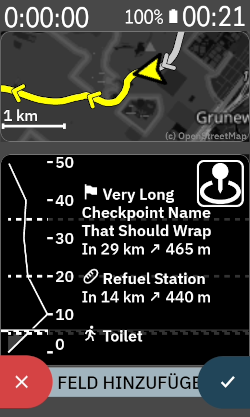
Thanks, I agree both of these can be improved. I've made changes to wrap long text labels and reduce the font size and spacing for the next release. It might result in long names taking up all the available space though; I might cap it to three lines in a future update.
I've also added some code that moves the route graph over to the right when the radar is detecting a car, I'll test if that works correctly.
-
I agree it would be cool to have, but I can't implement it at this point because extensions don't have access to the map data. So it would require Hammerhead adding new features to the SDK; they would need to expose the route the Karoo thinks you will take and its elevation data to extensions.
I don't know what their long term plans for SDK capabilities are. There are other parts of the extension where access to offline OSM map data would be great; e. g. the POI lookup uses the overpass API, but in theory, the Karoo has downloaded all the map data that also contains the POIs, so it could be handled offline if extensions could access the map data. I'd also like to indicate gravel sections on the route graphs like strava does, but the extension has no way of knowing the surface conditions (without accessing yet another online API).
-

This weekend I tried your extension and it's very useful for finding out the distance to POIs. Great work! It's something I've really missed, as most of the time routes are divided into several parts and I only had the total distance to the end, not the distance to the intermediate stop.
Do you have access to the average speed? Could you calculate the estimated time to the POI?
-
@Hector: Yes. There's already a github issue for it: https://github.com/timklge/karoo-routegraph/issues/39 . I'm not sure yet what the best approach would be though. I could try to replicate the ETA algorithm that Hammerhead uses, or I could try to be very smart about it and factor in upcoming climbs etc.
-
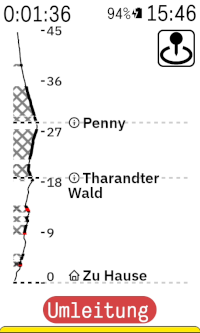
I've now added surface condition display to the elevation profile datafields. This has to be enabled in the settings menu, and requires granting file access permissions to the extension. If the permission is granted, the extension will use the mapfiles on the karoo's shared storage to look up the gravel and offroad sections on the currently loaded route and indicate them on the elevation profile datafields. This is rather complex, but I found it to be working well; it would be much easier if Hammerhead just exposed the surface cues through the extension SDK.
Also, I've added a "Features" section to the README file, as the extension has gotten quite complex: https://github.com/timklge/karoo-routegraph
-
@John Pfennings: It should work anyways. I'm not sure why it does not on your device - it would be great if you could update to version 1.0-beta24. I've added a debug label to the settings menu underneath the toggle that enables the surface condition display. It should look like this after you enabled the setting and have a route loaded:
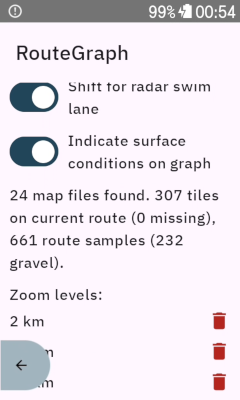
I'm not very happy with the current implementation of this feature as it is quite clunky. When you first grant the permission, android will terminate the app and you have to reopen it, and there is no way around this that I am aware of. When you load a route, the app will then take a sample of your route in 100 meter intervals and look up the closest OSM way in the mapsforge files on the Karoo that it can find. If this is a gravel way, it will be marked. This would be much simpler if Hammerhead included the surface cues in the route information available through the SDK, as they have done for the route elevation profile etc.
In the newest version, I've also added support to download POIs onto the Karoo. It will download OSM extracts from my webserver at https://routegraph.timklge.de . It enables searching for nearby POIs / POIs along the route without an active internet connection.
-

Great extension. Thank you so much.
One question: i have once ensble showing pois on the karoo map - but i dont like it too much because of the large icons. Especially when zooming out this clutters the map. Now when i disable them they dont go away but stay on the map. Any idea ?
Btw: where are the poi stored in the karoo file system ? -
Thanks for reporting this; I have looked at it on my device and you're right, I made a mistake that led to the POIs always being drawn onto the map regardless of the setting as long as you had the categories selected. I've pushed a new update to version `1.0.0-beta26` of the extension that fixes it.
The POIs are stored in the extension's private data directory, which is "/data/data/de.timklge.karooroutegraph/files/pois.de.db" in the android filesystem. They are saved as indexed SQLite database files downloaded from my webserver at https://routegraph.timklge.de/ . The POIs are extracted from the OSM worldmap (https://planet.osm.org/). I originally wanted to use the POIs stored in the offline maps already downloaded to the Karoo, but they include only those the Karoo displays on the map, and I wanted to have more (e. g. trainstations, shelters, ...).
-
Thank you very much.
This directory is invisible from outside via usb I suppose ?
It is interesting that you could access the map data from within your extension. I am really wondering how this basically works at all. I have tried to add a seperate set of maps files downloaded from Openandromap alongside the karoo ones. To my surprise this works and the maps are correctly rendered using the elevate xml. Would be interesting if the maps are somewhat merged ?
This openandromaps seem to contain much more details than the stock karoo ones…Regards
Uwe -

Hi,
i just found your extension and it´s pretty impressive. Unfortunatels i can´t display surfaces to the profiles.
i planned a route with a lot of gravel and route samples says 0 gravel.
i permised file acces. Am i doing something wrong, or do you still need some time to develope the feature.
-
The implementation of the surface condition lookup is very complex for what it does; the extension samples your route in 50 meter intervals and looks up the path at that position in the offline maps on your karoo.
If you have a route for which the extension shows "XXX samples (0 gravel)" and the route doesn't reveal your location, it would be very helpful if you could send me the route gpx to timklge@gmail.com . I might have missed some OSM tags that indicate "gravel". It might also be the case that the tags are not part of the HH mapsforge maps. I have tested the feature on some of my regular routes and found it to be working fine.
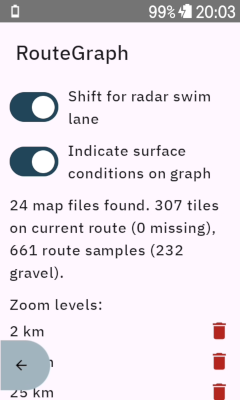
In the long term, it would be much simpler if Hammerhead exposed the route's surface conditions via the SDK (similar to how the route elevation profile is read currently), I have asked them about it. The Karoo has all the data already, as you can toggle the surface condition warnings in the TBT drawer.This directory is invisible from outside via usb I suppose ?
It is interesting that you could access the map data from within your extension. I am really wondering how this basically works at all.The POIs are not read from the karoo maps, because the Karoo maps don't contain them. The POI database is downloaded from my server instead. The surface conditions are part of the Karoo maps and the data would be too large to download, so I tried reading them from the Karoo maps instead.
-
@Joachim Lutz I've pushed a new version `1.0-beta27` where more surfaces are considered gravel. Would be great if you could check if the gravel sections on your route now are identified correctly.
I've also fixed a dumb mistake I had made in an earlier version which resulted in climbs not showing up on the elevation profiles while on route.
https://github.com/timklge/karoo-routegraph/releases/tag/1.0-beta27


Please sign in to leave a comment.
Comments
52 comments