Start a route from app

-

Dear Fraser, Thank you for sharing your feedback.
I understand it may not be very clear, but the app and Karoo transfer data over the Bluetooth channel. You don't need an active internet connection on Karoo, nor do you have to sync it over the internet or a Hammerhead account. You will, however, need internet on your phone to create or sync a route from a third party. The app will transfer to Karoo without internet. So this syncing of data over Bluetooth can be termed as "sending it to the head unit". If you mean anything different than this, please elaborate so I can pass it along to our Product Team to improve this functionality with more clarity.
In the meantime, you are probably already aware of this. Although it isn’t currently possible to start a route directly from the companion app, you can share a pin from the app and navigate to that location. Companion App - Sharing Location
-
Hi there Aishwarya, thanks for responding.
I suppose what I'm asking is that we generally create a new route on our phones (on the app) then in order to start that route, we have to sync the phone with the Karoo, before going through the menu to find the route and then selecting it.
What would be more logical is to create the route on the app (phone) then have a share option for the route, similar to how from Google maps we can just share a pin to navigate to. Does that make sense?
Essential what I'm saying is that most of us are creating a route on our phones, then wanting to start that route straight away.
-
Oh thought I'd mention that iv had a few issues in the past while been out and about, where I crested a route on the companion app, and even after 30mins or so, it's not appeared in the Karoo 🤔. I'm managed to force it, by turning on the mobile hotspot on my phone, but that's a LOT of messing around to just get a route into the Karoo 🥺
-
Well iv been doing a bit of testing. If I create a route, it won't transfer to the Karoo unless Iits connected to WiFi.
However if I try sharing a link from Google maps to the Karoo (which works) then it will transfer the route (via Bluetooth) to the Karoo.
I'm thinking that their maybe a bug? When I check in the app it always shows it as connected, but I'm trying it's not actually?
-
Hi all, thank you for sharing your concern.
We’ve tested this on our end, and everything is working as expected.I kindly request you to try the steps below and check if the routes are still not syncing over Bluetooth. I’ll be happy to assist you further if needed.
-
Open your Companion App.
-
Make sure your phone has an active internet connection.
-
Ensure your Karoo is showing as connected in the Companion App.
-
Create a route on the Companion App and save it.
-
Tap the Sync button on the Karoo.
-
Check if the route syncs with your Karoo.
Note: Please ensure you are using the same credentials on both the Companion App and your Karoo.
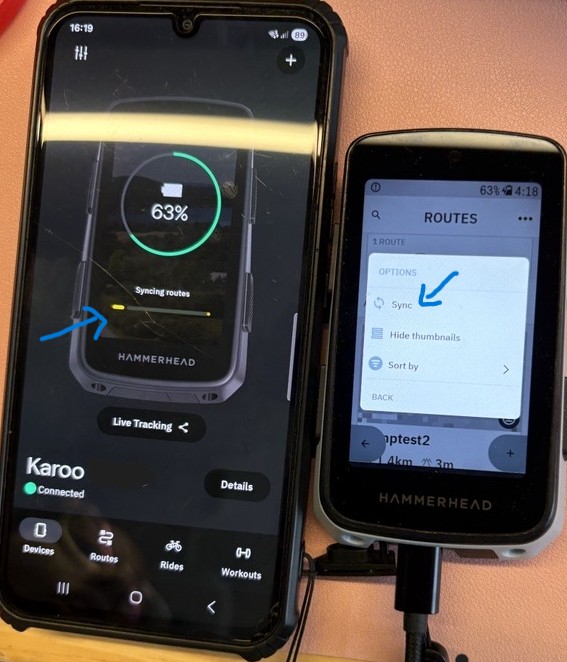
-
-
Yea that's exactly what iv been trying Aishwarya, but it fails to sync. Iv always made sure that my K3 is marked as Connected in the app (or says it is, at least) Iv also tried the same, with hitting the sync button at the top off the Routes page on the phone app, but neither have worked.
As I said before, iv had it work sporadically. If I try using google to share a link first, then it sometimes seems to re-establish the connection, but the only real sure fire way is to turn on a mobile hotspot on my phone and have the K3 connect to that.
Not sure what you mean about the same credentials? I connected the K3 to my phone via the QR code (done this several times in an attempt to fix the issue), or is there something else you want me to check?
-
I'm not sure if its related or not, but a software update arrived on my deice over the weekend, and it now seems to be syncing perfectly. I did also try removing the device from the Hammerhead Companion App as well as removing it from the connected devices under Bluetooth on my phone, before reconnecting it via scanning the QR code on the app. (Maybe it got its wires crossed and was dropping the connection sporadically?)
Its now syncing perfectly. Maybe if the others that are having the same issue try that and report back?
-

Yeah, it’s oddly clunky for something that should be seamless. Having to sync, hunt for the route, and then start it feels outdated one-tap send and ride would be way better. Funny how even smooth systems trip over basics, kind of like UI quirks people point out in games such as Nulls Brawl.


Please sign in to leave a comment.
Comments
13 comments