Route Management Sans Computer (from your phone) Needs Improvement

It would be extremely beneficial if routes could be added more easily from 3rd party services, e.g. Strava, from a mobile device. Occasionally a person may forget to upload a route to their Hammerhead dashboard, or they didn't receive the route prior to the ride, or they just want to create a route from Strava and have it sync to their Hammerhead Dashboard and device while on a ride.
Currently, this is unwieldy from a mobile device requiring multiple steps, apps, and authentication (to the hammerhead dashboard). If you're using Strava, first, you need find/create the route you want and "star" from their app. Then switch over to a browser and navigate to the Hammerhead Deashboard and authenticate. Next, you navigate to your routes, and force sync your routes from the dashboard. Alternatives include using the URL for the route or uploading the GPS file, neither of which is easy from a mobile device. Finally, if you don't have a SIM card, you'll need to connect your K2 to your mobile hot spot so it can sync the route to your device.
In contrast, with a Wahoo, you star the route in Strava and it shows up on the device automatically (as long as your phone has Internet connectivity).
It's hard to recommend the K2 for ease of use when getting routes onto the device is a chore when you're not at a computer. I understand the need for Internet connectivity for the K2 is a necessary evil to sync routes onto the device (although I'd be curious if this could be improved some how.) But if that were the only hurdle, it could be forgivable; however, it's only about a 1/3rd of the process.
Route addition from a mobile device needs to be improved, especially if routing is being touted as one of the major benefits of the K2.
Starred routes from Strava supposedly sync automatically to the dashboard, but in my experience that hasn't happened and always requires a manual "refresh" from the dashboard. With the dashboard being protected behind a username and password (for obvious reasons) and only accessible in a browser, this becomes a cumbersome process very quickly.
-

I have similar issues. What I have found is that my strava routes will sync pretty much after I hit refresh, the ride with gps routes take about 24 hours. In order to get the routes I create in Ride with GPS to show up, I have to go to the main website get the sharable link and click add and paste that link. It's a pretty cumbersome work around.
-

@India Delgado:
You can easy up your life a little bit by installing this Chrome-Addon:
https://chrome.google.com/webstore/detail/karoo-route-grab/fmgakapefkckdimkoglpoooaamfpfhld
or for Firefox:
https://addons.mozilla.org/en-US/firefox/addon/karoo-route-grab/
Then just load you route in "RideWithGPS" and click on the "Grab"-Icon. The route will be automatically imported and is displayed in the Hammerhead Dashboard immediantly:
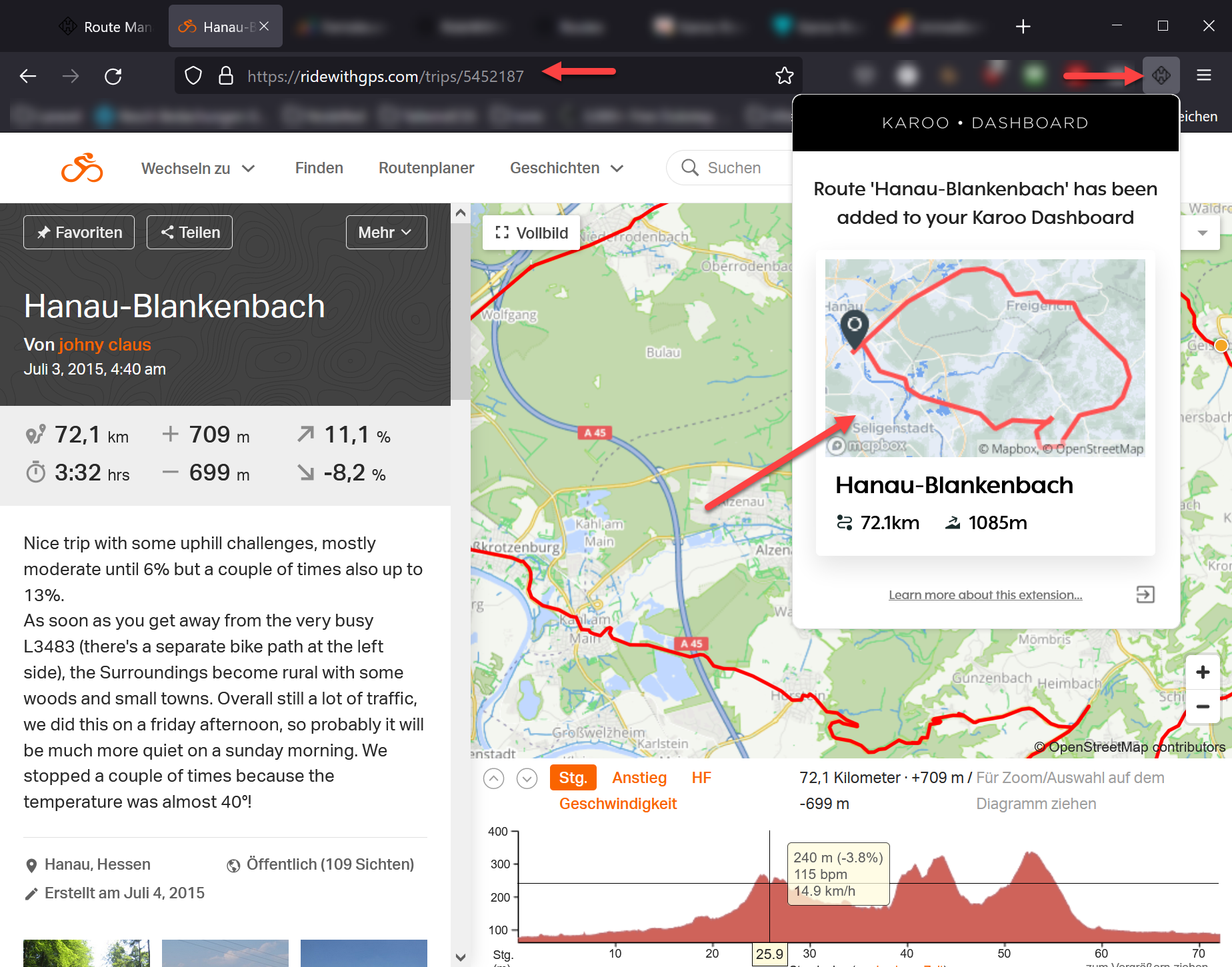
Regards,
Marc
-
I already use the add-in. I've synced from Strava, Komoot, and RWGPS. Route planning and syncing from a computer is great. I don't have any issues there. The problem is entirely with mobile and more specifically if you've already left the house. For instance, going from someone sharing a route via text on Strava to getting it on your head unit is cumbersome. The process would be to click the link. That opens the Strava app. You star the route. Then close the Strava app and open the Hammerhead dashboard. If you're not logged in, you'll need to login. Navigate to the routes dashboard and click the sync button. Finally, if you don't have a SIM card, you'll need to turn on your mobile hot spot and connect your K2 to your phone and wait for the route to sync down.
If hammerhead could simplify the first 2/3rds of that process it would make it a lot nicer. Obviously, the K2 needs an Internet connection to get the route; however, if that portion could be simplified some how (such as an app), it would make it that much easier as well.I ride with some older people and they like to ask me about my K2. If I had to tell them they had to bounce around between apps, perform a manual sync, and then enable their mobile hot spot just get a route on their device when they're not at home, they'd look at me like I was crazy.
-

It happened to me the other day. In the middle of my ride I had to replan the track. On my mobile I built a new track with Komoot, switched to HH dashboard "app" (where my Komoot account is already linked), resync', started the hot-spot (which was already saved in my K2) and I could open the new route to keep on riding. The whole didn't request any interruption of the recording.
This kind of things appears a bit complicated only the first time you do it.
On my former Edge 1000 I simply couldn't access any app (CIQ) during a recording. I had first to stop the ride, save it, then access the Komoot app and finally start a new recording.
There was no need for a hot-spot though. -

Isn't it possible to open a GPX file wich I recieve in Whattsapp in the Karoo app? Now I need to open it in Komoot (in a browser on the smartphone), make it accessible for everyone with the link, and then import it in the Karoo app. As said before, it is quite complicated and I can't explain it to people who consider buying a Karoo. I think Hammerhead is missing new customers here.

Please sign in to leave a comment.
Comments
8 comments