Full route pre-defined map zoom level
Answered
When out on the road with my K2, I often want to know where/how far round my route I am. When planning my routes I know where, for example, I've planned my cafe stop etc - and I know the general route layout (with north at the top of the screen) - that's what's in my head as I'm riding.
When using the pre-defined zoom levels, the map is orientated to the direction I'm heading (as its what I need whilst riding) - but would be good as I hit the zoom button, to cycle through the pre-defined zoom levels, have the largest zoom level as my entire route, with north at the top with a blue dot to show where I am - similar to the view when selecting the route on the device.
This would help me with visual representation as to my progress through the ride, if I'm close to my cafe stop, and understand my positioning in relation to wind direction.
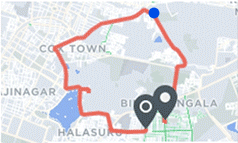
-

Hi Tom,
Thanks for the suggestion - I have shared that with the Product Team. I also replied to your support ticket with a way to get the view you are looking for. I will include those steps here as well in case anyone else is looking to do the same!
- Zoom out to the level where you can see my whole route - you can do that with a pinch gesture on the screen or by pressing and holding button A (top left) to zoom out until you get to the appropriate level. For reference, button C at the top right zooms in if you press and hold it while on the map screen.
- Tap the compass at the top right of the screen to put the screen in north-up mode - you'll now see the entire route in north-up orientation.
- Tap the "recenter" icon at the bottom left on the map to resume directional map orientation, and then cycle back to the predefined zoom level that you prefer as you normally would.
I hope that helps you see the view you are looking for!
-
I appreciate that I could manipulate the zoom and rotation myself, but I'm not sure you ride a bike, and use a head unit, in UK weather, doing all the steps you mention simple would be impossible whilst avoiding pot holes, dodgy cars and wearing gloves. The zoom out feature by holding the button alone is hard enough, I always find once at a zoom level I want, and releasing my finger, it then skips to the next zoom level.
This is why I'm suggesting it as a pre-defined zoom level, 1 button to press, basics of good UX design.
-

I agree with Tom here, an easy way to see at a glance where you are versus your ride would be really great.
Going through all the steps Jami points out while cycling is way too dangerous.
Coincidentally, I was talking to a friend the other day about how great the K2 is, only that this feature is really a miss.
Please sign in to leave a comment.
Comments
3 comments