Map and stats UI is backwards from how it should be (Map should be on top)
Answered
Edit: As pointed out below, I was either missing an obvious feature or my K2 was glitching out prior to a software reset (and most likely the former). This post can be disregarded. 🙂
I can't help but notice as I start to climb more hills with my K2 that the UI is altogether backwards (or more accurately, it needs to be user selectable).
When you're climbing a hill, or doing a segment, or even just getting a turn-by-turn direction, the panel slides up from the bottom. That part is fine.
However, if you're using any layout that has data fields AND the map, all of them but one put the map on the bottom. (The one that puts the map on top only allows one big data field, making it useless for me at least). The Climber/TBT/Live Segment panel slides up covering the bottom half of the screen. So if you're in an unfamiliar area, when Climber shows up, you can't actually see where you're going. (There's like a tiny sliver of the map showing but that's it).
If you prioritize what's on the screen, Climber data is high priority of course. But if I then had to prioritize my data versus knowing where I'm going in a town I don't know at all, well the Map is by far highest priority. Data on the other hand? If I can't see that during a climb it doesn't matter to me.
Now, I'm sure there are others that need the data first and foremost. But that's why we need more layout options so that each user can decide what's important. And honestly, coding a new layout seems like the absolute easiest of some of the things that the K2 needs work in. 😉 Is it XML? I could probably modify that myself in a few hours if you let me. (Kidding, mostly. 😂)
-
Thats kind of what I mean though. If the map was on the top portion of the screen, and my four data fields were beneath that, when Climber slides up from the bottom of the screen, it would cover data fields, instead of covering the map. So you'd see Climber and the map simultaneously, and temporarily only lose access to the data fields.
-

However, if you're using any layout that has data fields AND the map, all of them but one put the map on the bottom. (The one that puts the map on top only allows one big data field, making it useless for me at least).
Are you on the current software update?
Maybe I misread your post, but I can have multiple data fields below the map, see the attached photo.
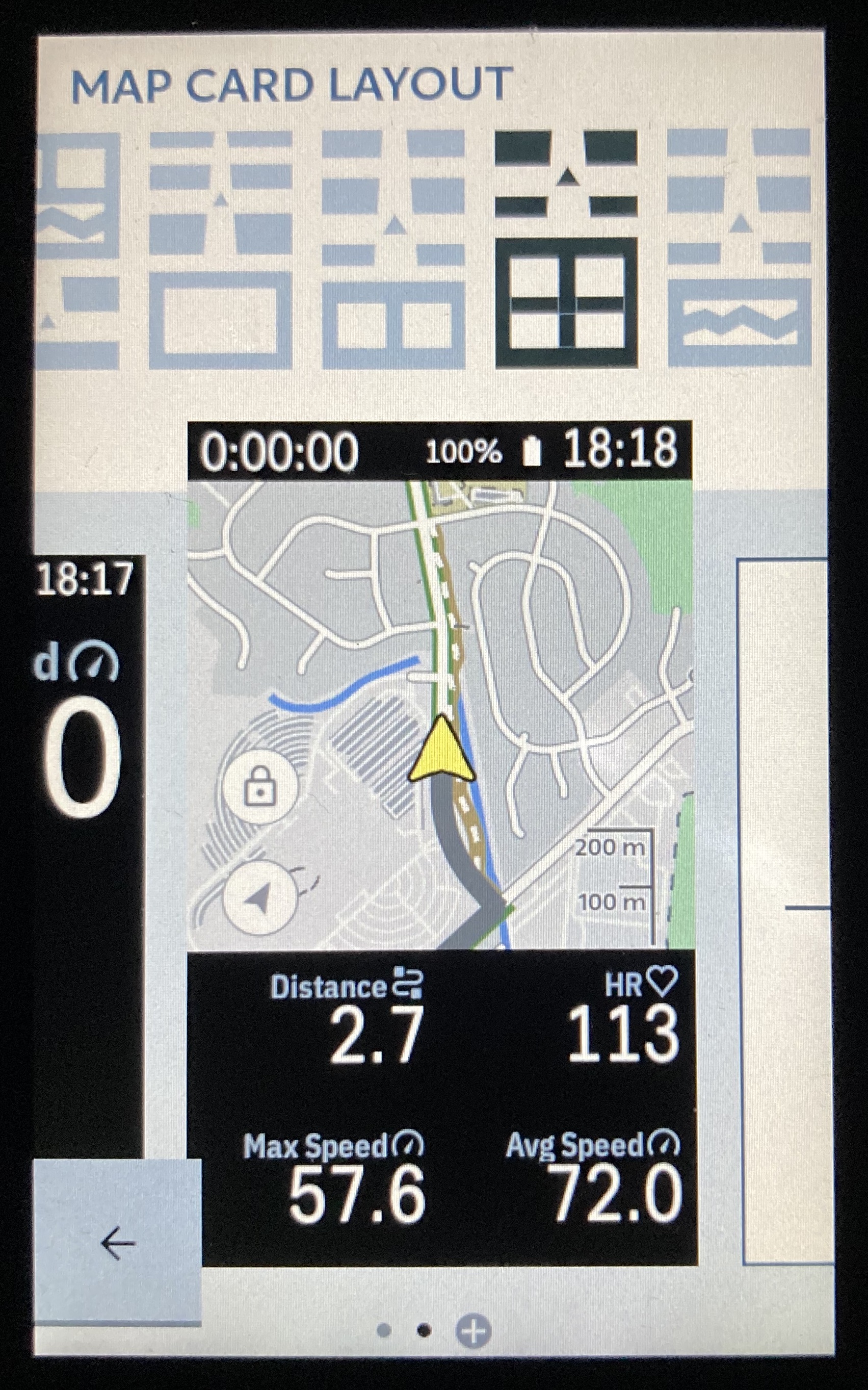
-
Huh. Nope, you're not reading the post wrong. I literally looked for that before making the post and didn't see it there, but it's there now. Either I'm blind, or my unit was glitching out until I factory reset it last night for different reasons. Probably just I'm blind. My bad, disregard this post.

Please sign in to leave a comment.
Comments
5 comments