Climber drawer auto-hide feature

I would like that after some X time when Climber drawer appears, it drops back down automatically (it autohides it self). Now when it appears, it stays there. I didn't test it yet how long it stays, but for me it too long, when looking on other important data. I have to swipe it down, which I don't like when in some very steep climb.
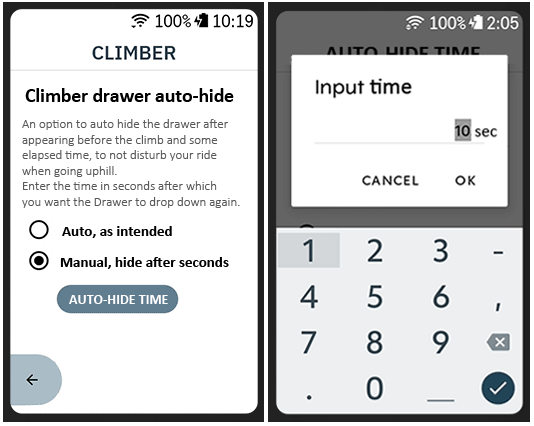
It should be a feature which should be turned on of off. If turned on, X should be manually set in seconds.
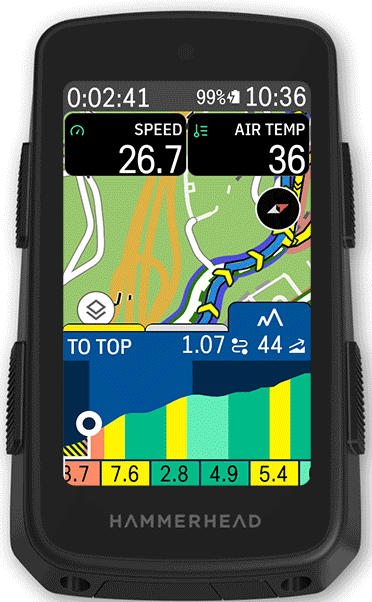
Climber drawer appears like this before the climb:
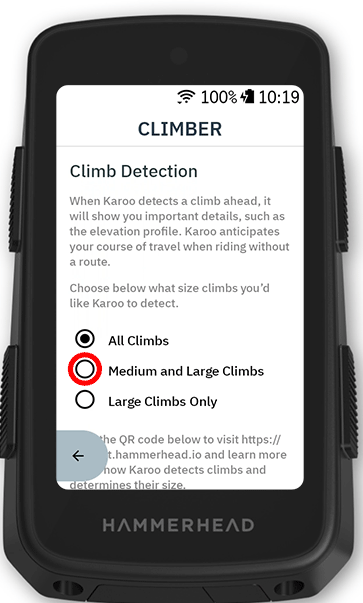
Personally I would put this particular feature in here as:
Autohide Climber drawer
---
And should look something like this:
That would really make my day, and I'm sure to many other users of this amazing device.
best regards
-

If I am not mistaken, drawers generally stay until the corresponding event is over (climbs -> climb over, turns -> turn made or missed, etc.). So it's less of an info or popup but contextually persistent information. The benefit is that the drawers are available by simply swiping up instead of changing pages (so it's generally a toggling mechanism vs. page "searching", which I find very beneficial when I want to toggle/switch between my favorite page and, e.g., the climb drawer).
While I like the current behavior as-is, I understand that an auto-slide-down may be desired by people, so why not have it. My question would be if it should always disappear after a time-out or only if it is activated automatically (for the climb drawer: disappear X seconds after the climb has started, or *also* X seconds after the drawer has been pulled up?).
-
Good question.
Would be good having both scenarios covered (so two options to set, not just one, as in my 1st post), although pesonally I would only like to have to auto hide in cases when "auto appearing" for now. But woulnd't mind auto hiding it after manually showing/app it as well.


Please sign in to leave a comment.
Comments
5 comments