Karoo Ride Meter – a graphical dial data field (speed, power, HR, cadence)

Hi all,
I made Karoo Ride Meter, a extension that adds a graphical dial to your Karoo ride pages.
It started as a hobby project and has grown with feedback from riders here and on Facebook. Version 1.3.0 is out now
What it does
A big dial with a red pointer for speed. You can also pick power, power 3s, heart rate or cadence instead, as separate fields:
Ride Meter Power, Ride Meter Power 3s, Ride Meter Heart Rate, Ride Meter Cadence.
The scale fits each one: power is based on your FTP, heart rate runs 60–200, cadence 0–140.
Average under the value: distance or average speed under the speed, and the average under power, HR or cadence.
Three round fields below the dial, which you choose yourself (slope, cadence, power, HR, …). They’re coloured by your zones.
Two spots above the dial:
by default, your shifting battery (SRAM AXS, Campagnolo, or Shimano Di2 via the Ki2 extension) and your current gear (e.g. 52/14);
or temperature, grade, altitude, elevation gain or distance to finish.
Light and dark mode: follows your Karoo’s theme.
Imperial units: follows your Karoo’s units (mph, mi, ft, °F).
Full page or half page: works in both layouts.
https://github.com/Ericbakkertje/karoo-ride-meter/releases/latest
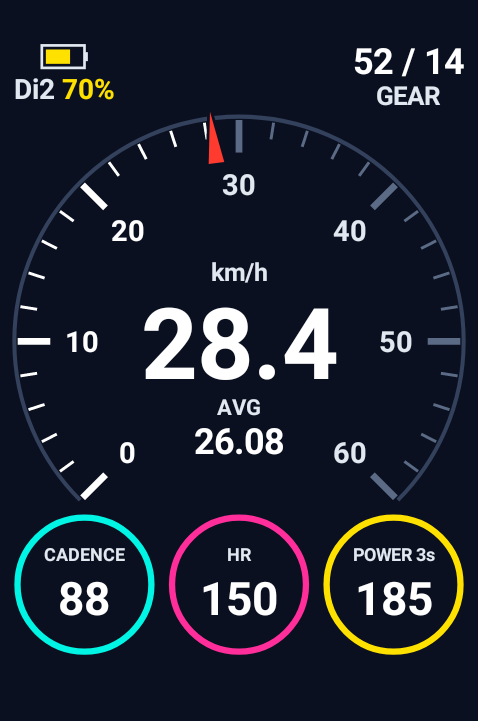
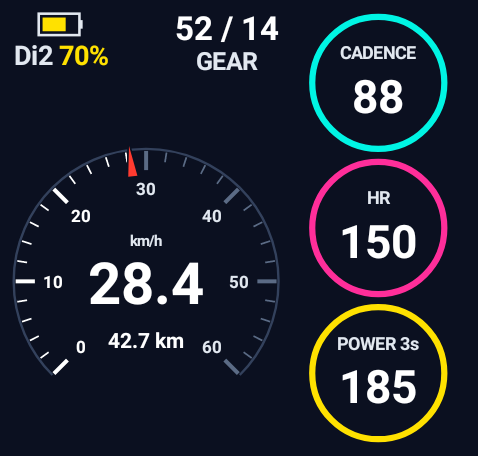
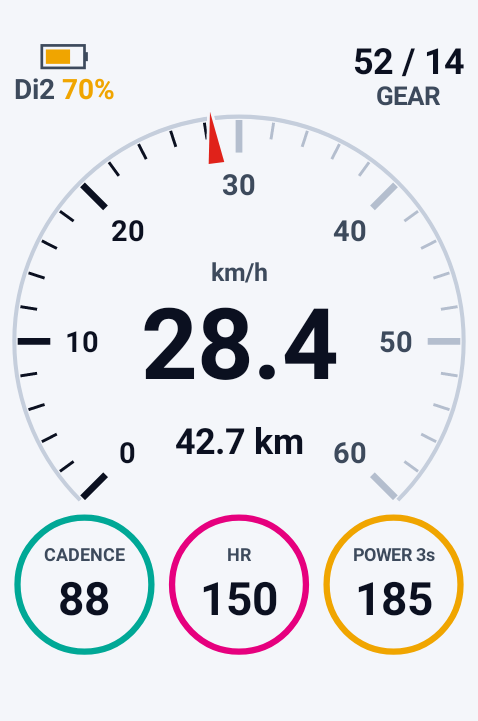
-
Hi Marc, thanks for trying it and for letting me know!
"Transfer failed" usually comes from the connection or the way it's shared, not from the app itself. A few things to check:
1. Karoo model: sharing from the Companion app only works on the Karoo 3. On a Karoo 2 you need to install it with adb from a computer.
2. Companion app version: at least 1.36.0 on Android or 1.12.0 on iPhone. Updating it often helps.
3. Both online: the Karoo must be on Wi-Fi and your phone needs internet. Keep the Karoo switched on and on the home screen.
4. Share the link, not the file: on the release page, long-press KarooRideMeter-1.4.0.apk and choose Share → Hammerhead. Don't download the file first and share it from your downloads. The Karoo downloads it itself from GitHub.Direct link to share if needed:
https://github.com/Ericbakkertje/karoo-ride-meter/releases/latest/download/KarooRideMeter-1.4.0.apkIf it still fails, let me know which Karoo you have and whether you use Android or iPhone, and I'll help you further. 👍
-
Thanks Marc, that helps! Your setup looks right, so let's narrow it down:
1. Karoo software: on the Karoo go to Settings → System → Software update and make sure it's up to date. Sideloading through the app needs a recent version.
2. Connection: open the Hammerhead app and check that your Karoo shows as connected. Keep the Karoo switched on, awake, and on the home screen while sharing.
3. The exact link: on Android, long-pressing sometimes shares the release page instead of the APK. Try this:
- copy this link: https://github.com/Ericbakkertje/karoo-ride-meter/releases/latest/download/KarooRideMeter-1.4.0.apk
- paste it into Chrome's address bar, but don't press Enter
- or paste it in a note/message to yourself, long-press the link there and choose Share → Hammerhead4. Quick test: does another extension (for example Headwind or Ki2) install fine with Share on your Karoo? If that one also fails, it's the phone ↔ Karoo transfer; if only mine fails, please tell me and I'll dig into it.
If nothing works, installing with a computer always works: enable USB debugging on the Karoo and run
adb install -r KarooRideMeter-1.4.0.apkSorry for the hassle, and thanks for your patience! 🙏
-
Good question! All settings are in a separate app on the Karoo, not in the page editor:
1. Go to the Karoo home screen and open the apps list (where your installed extensions are).
2. Open "Ride Meter Settings".
3. In there you'll find, from top to bottom:
- Speed scale (0–30 / 45 / 60 / 90 km/h)
- Under the speed (speed field): choose Distance or Average speed
- Above the dial: what the top-left and top-right spots show
- Colours: Normal (neon), Bright or Classic
- Round fields: number in a circle or small dial with needle, and below that Field 1, Field 2 and Field 3, each with a dropdown to pick what it shows (slope, cadence, HR, power, distance, …)Changes are saved straight away; an open Ride Meter updates within a second.
Note: in the Power, Heart Rate and Cadence versions, field 1 always shows speed, and the other two show your choices.
-
Thanks Alastair, glad you got it working, and great to hear the install went smoothly! 😄
For anyone else wondering: every choice in Ride Meter Settings is saved the moment you tap it, so you can simply leave the screen with the Karoo's back button or by closing the app. Nothing gets lost, and an open Ride Meter picks up the change within a second.
I'll add a clear "Done" button in the next version so that's more obvious. Enjoy your rides! 🚴


Please sign in to leave a comment.
Comments
12 comments