Feature Request: True 'Screen Off" when on Battery Saver
Answered
Request: When in battery saver mode, and when the user select the Screen off option, obey. I live in a hilly area, and when the climbing mode kicked in, it continuously would override the screen off user input (climb starts....screen off pressed....2 seconds later, screen back on...repeat).
I was on a century ride and failed to make it home with the GPS powered (battery depleted). Having the unit obey user input is important. If I want the screen on to see climbing, I'll turn it on....
-
Official comment

Hi All,
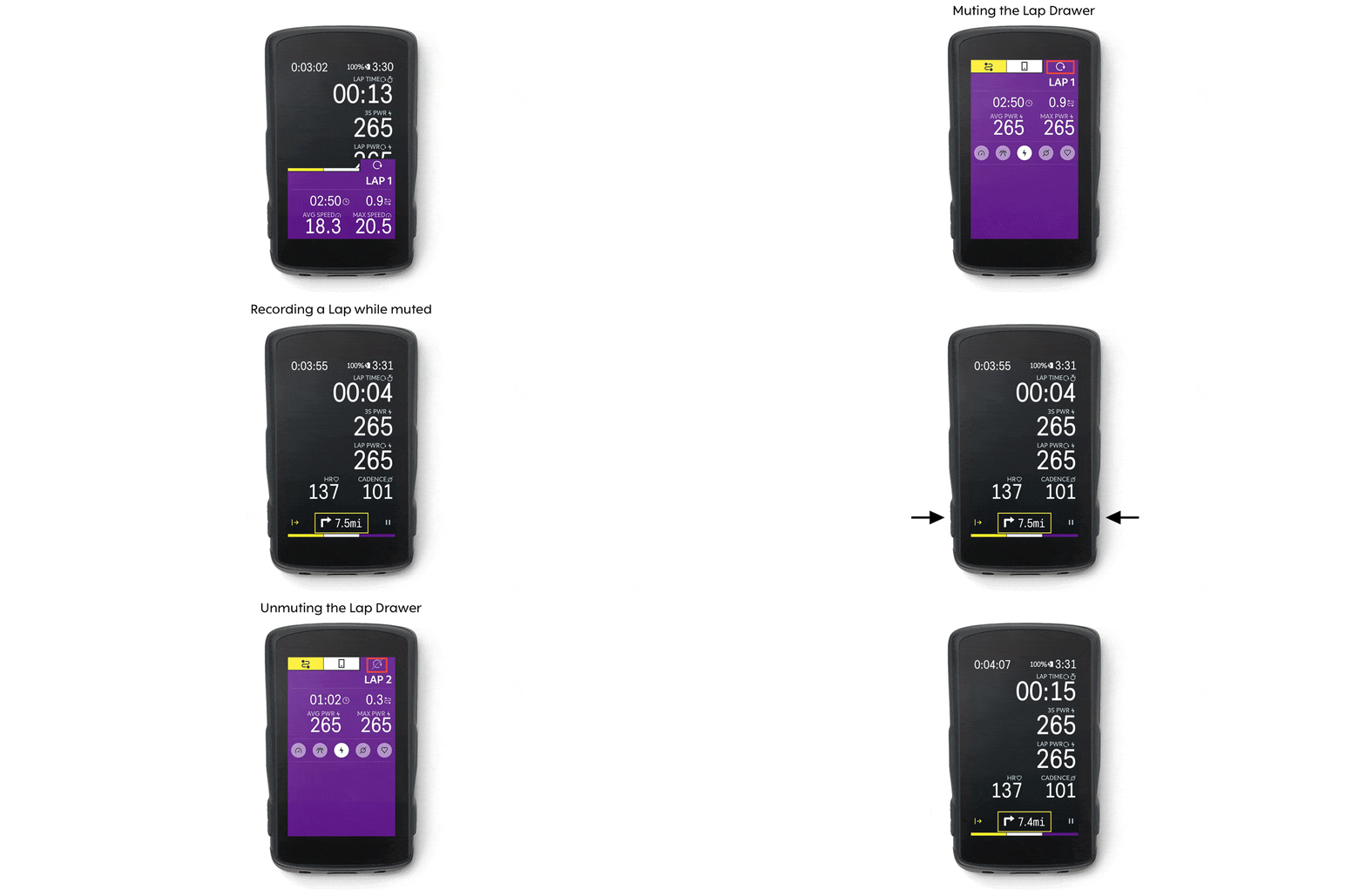
Apart from disabling the Climber feature, another suggestion we have is to mute and unmute automatic alerts through the drawer. Please see the GIF below:
 Comment actions
 -

Does muting the Climber notification tab now keep the screen off when Battery Saver is enabled? I had requested this awhile back but didn't see any firmware update that fixes it, and haven't checked its behavior recently - https://support.hammerhead.io/hc/en-us/community/posts/4485483486363-Battery-saver-mode-is-disabled-when-Climber-is-actively-tracking-a-climb
-
We did make some changes and those were around the importance of the data during a ride.
If you are on the ride screen, and if the Drawer events are important to you - Battery Saver Mode currently gives an option for the rider to look into the Drawer data when they require. To better utilize the Battery Saver Mode, a rider can stay on the home screen and not be bothered by the Drawer elements. Through the beeps, the rider can switch back to the Ride app if they want to look into the Drawer Elements.
If saving battery is important and Drawer events are not, the rider can disable them completely.
-
Shruti - to clarify, does muting automatic alerts though the drawer keep the screen off when battery saver is enabled, as you suggested in your earlier reply? This would be an ideal solution as it allows the screen to remain off in the Ride app with Climber enabled. It lets you quickly turn on the screen and view Ride data if needed, otherwise save battery with the screen off.
Your most recent reply implies that the screen remains off only in Home Screen. This isn’t great since to view ride data, one would have to turn the Karoo screen and open the Ride app. This is a lot of button presses/more distractions when riding - it would be better to optimize for remaining on the Ride app, and disabling the screen turning on in battery saver mode, if any particular notification is disabled.
-

Hey Dan, muting the drawer on the ride app - wouldn't work as per your expectations. It however works closer to your expectation if you are on the home screen. Now, it is true that it would require an additional button press to go to the ride, apart from a button press to wake the screen.
Using the button D - (bottom right) could be the best bet, to minimise the distractions. Button D is where you will see a small rider icon which takes you to the ride app. So pressing it twice when in ride, will wake the screen and take you to the ride app. Press it again to go back to the home screen after reviewing your ride data.
I have taken this feedback, and will be sharing it further with the team to see if we can do more with the customization so it fulfil your needs.

Please sign in to leave a comment.
Comments
6 comments