Display Grade data to updated Dashboard Ride page

Answered

Comments

10 comments

  • Avatar
    Steve MacMillan

    +1 Why is the grade not displayed? It is one of the most relevant metrics during a ride!

    0
    Comment actions Permalink
  • Avatar
    Patrick Peeters

    Just came here to say that the new ride overview page with the elevation overview + second-by-second metrics is a big improvement - keep it up.

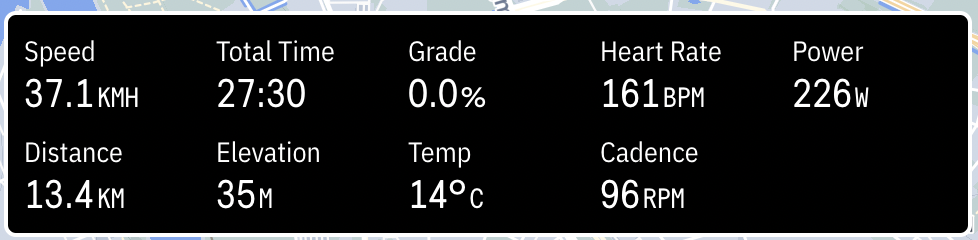
    PS: grade is displayed on the ride I did this morning?

    0
    Comment actions Permalink
  • Avatar
    Ali

    Thanks, Patrick. Yes, the grade should be visible on the black box that displays the instantaneous values.

    0
    Comment actions Permalink
  • Avatar
    Steve MacMillan

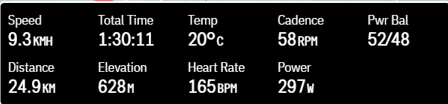
    Here is my screenshot 

    0
    Comment actions Permalink
  • Avatar
    Steve MacMillan

    No grade displayed but have a Pwr Bal field instead. Also, the other fields are in a different position to Patrick's. Any explanation Ali?

    0
    Comment actions Permalink
  • Avatar
    Ali

    Steve, are you reviewing today's ride or previous rides?

    0
    Comment actions Permalink
  • Avatar
    Steve MacMillan

    Previous rides

    0
    Comment actions Permalink
  • Avatar
    Tom Schmid

    @Ali... My ride from today, 5/20, displays 10 fields, Grade now being one of them. Previous rides only display 9 fields with Grade being the missing stat.

    0
    Comment actions Permalink
  • Avatar
    Ali

    We added grade on the FIT file, on the release version 1.292.1211. So any rides prior to this may not have the grade on the black box, but all the recent ones should.

    0
    Comment actions Permalink
  • Avatar
    Tom Schmid

    Makes sense. Thanks for the details, Ali.

    0
    Comment actions Permalink

Please sign in to leave a comment.