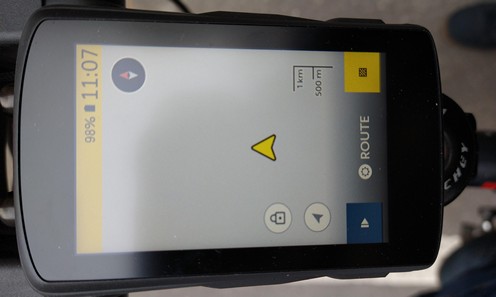
display does not show map
Answered
I just received my Karoo 2 and of course wanted to test it immediately. When I start up the device no map is shown on the display (see enclosure 1), although I did download the map of my area for offline use.
It is possible to record a ride and save it, but when I open it on the Hammerhead dashboard it says "other error" (see enclosure 2), which is not really very helpful.
It looks as if the GPS signal is not picked up properly? Any idea how to solve this issue?
Many thanks.
-
Dear Ali,
Thank you for your prompt reply. Location was on, but I just found out that GPS had been deactivated. It was on before, but something must have happened after I connected my Karoo to a speed sensor. I see now the following listed under "sensors":
- first line: my external speed sensor
- second line: Built-in GPS
Are these the correct settings and is this the correct order? Does it indeed mean that for speed and distance the external speed sensor takes priority over the built-in sensor (which is how I would like to have it)? And if for some reason the external speed sensor does not function does the Karoo sensor take over automatically?
Many thanks
-

Thanks, Leo - yes, this seems to be correct settings. Also, yes to your question that the speed source falls back to the next available option.
Check : https://support.hammerhead.io/hc/en-us/articles/360052365593--Customising-Sensor-Precedence-
Please sign in to leave a comment.
Comments
3 comments