[WARNING All Karoo users!] Karoo 1 stops working and freezes after internal storage full!
Answered
[update see the solution here below] Hi everybody, i am a happy user of Karoo until now since i suddenly cannot use it anymore. After my last ride, wanted to save it but saw a notification internal storage full, free up space. How can i do this? If i want to start up Karoo it only show the same full memory messages. If i click on free up space, the only thing I see is the number 8.99 gb.
Now what, this shouldn't be possible, now my Karoo freezes all the time.
I want to ride!! Anyone has similar experiences? A quick warning for all Karoo users, frequently watch how much memory you have left on your machine en free up internal, because one day it will permananty freeze on you!
Cheers,
Rene
-

Hi Rene, this tends to happen due to the internal logs filling up the memory. However, this was solved in 2-3 updates back when the log file size was reduced. A factory reset on one of your non-training days should help clean this up. Your settings and Hammerhead account details will come back and you might just need to pair the sensors and wait for the offline maps to download.
-
Hi Ali, very good to hear from you, it worked perfectly.
I went to https://support.hammerhead.io/hc/en-us/articles/360003079393 and followed the instructions.
Problem solved! Thank you for your support! I now close the support ticket with Shruti as well. -

Same just happen to me... but the last step for factory reset doesn't want to happen... tried already a few times, if I push A too long the it restart (endless) to the 'full memory' screen and only option is to wait and 'shut down'.
Repeated again and again and it worked!!!
Complete reset.
I just lost my last ride :-(
-
Just to complete.
For me the "memory full" message appeared during my ride.
Then I saw the "clean memory" option. I cancelled and continued my ride.
At the end of it, impossible to save. Restart.... very very slow... "memory full"... tried to clean... then this message (attached) and frozen Karoo. But fortunately possible to shut down... then the "factory reset procedure"...
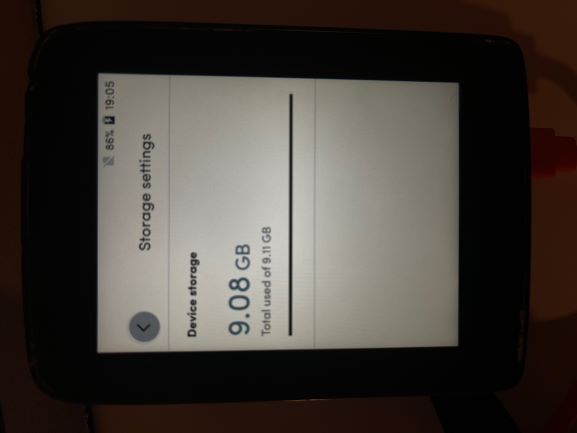
-

I am so glad I found this thread and am not the only one with this problem.
I am a Karoo 1 user and I update my unit whenever the updates come out so I find it strange that I am just having this problem now when the comments above from Ali say that this problem was fixed...apparently not.
Hammerhead - please can you look at this for the next update?
I ran the factory reset and it brought my unit back to life but pretty annoying to have to set it up again and really p*ssed to lose my ride data...data is life!
-

Hey KH- sorry about that last ride. I'm glad that you were able to get the reset done. That will have cleaned up your internal logs and things should operate more smoothly now.
Sorry about your ride as well, Greg. Updating the software would have corrected log sizes of files written since that update, but would not have cleaned up the registry. Completing the hard reset clears out the old logs. You should be good to go now. Again, sorry for the lost data. We are always working to bring improvements to our products with each new update.
As Serge mentions, you can also check to be sure you have the proper maps downloaded for where you ride. Maps are some of the largest files on your device and you only need the area you normally ride in. You can download other regions when traveling, then remove after.
-
Jami,
Thank you for your feedback.
I think it could be wise to have a warning when there is only a few % memory left (<5%?) to ask (force?) people to clean either past rides, routes or maps.
And do so before going out for a ride :-)
Still like the Karoo more than competitors... and will surely upgrade for the Karoo 3 in 2 years :-)
-

Really... I have had to do two hard resets and you say this was taken care of two updates ago? Well I have had at least two updates and nope I just had to do ANOTHER HARD RESET because I internal storage was filled up so no it did not take care of the problem. I just got another update build number 1.198.10007.3. So I know I am up to be date because this looks like the k2 screen on the k1 computer
-

I had this same memory full issue 2 weeks ago - and lost my ride then. I worked out from the internet how to do a full rest and followed the instructions. Then I reloaded my profile and maps. (China). Normal function was restored for my first ride since today. It worked well- then at the 30km mark I got a memory warning, cleared it and it functioned for the rest of the ride. Tried to save the 70km ride at the end and the same 'blank grey screen' 'Memory full' screen etc came up. It is now stuck in the same endless loop again. It is clearly not fixed in all cases by having the latest updates installed. I now no longer have a functioning Karoo at all. Please help- I'm about to go buy a Garmin- at least I got 5 years out of my 800, not my Karoo 1's 20 rides, of which 18 have successfully saved.
-
Hi Craig,
Did you check your memory availability before leaving for your ride?
I don’t know how much space your maps take but on my side I removed my old rides to free enough space (>2Gb) to be sure.
As from now I try to check the memory availability before each ride to avoid this issue.I would suggest to do a factory reset and remove some old rides unused maps before going for a new ride.
KH
-
OK! I think I am starting to work this out. I have done the full reset. I have downloaded and unzipped the China maps for offline use. That means I have 6.2GB on top of the system files- taking me to 5.4GB used of 9.4 just in offline maps. I go to the 'storage' section of settings and I am now at 3.55GB of 9.43GB after deleting every ride off the device. (which I'm guessing was about 2-3GB worth - the saved ride files must be huge?
Therefore I now have about 6GB available based on the storage setting and I should be OK. So is the tip now simply not to save rides to the device at all? Thanks sincerely for this advice- hoping I can restore faith in it- I have had may issues with mine.
-
Hi Craig,
I keep on the device the last 10 rides and then delete regularly as they are uploaded on Strava for my historic recording.
I presume keeping at least 1Gb before going for a ride is wise.
I don't know why there is no automatic cleaning when the memory is almost full and why not everybody encounter the same problem. Are we the only ones to keep everything on the Karoo? I don't know if it is possible to keep the rides on the web site but not on the Karoo... to check.
KH

Please sign in to leave a comment.
Comments
13 comments