Karoo 2 keeps disconnecting from my iphone mid ride
Planned
Can anyone help with phone connection problems with my Karoo 2
Karoo 2 phone messaging display is a big improvement from my Garmin 820 but unfortunately a message pops up mid ride 'Phone disconnected ' for no apparent reason.
Sometimes i can stop several times in a ride to reconnect my iphone , this is very annoying when i am planning to meet someone out on a ride.
.
-

Yesterday. Start my K2 and try to connect my iPhone XS several times without succeeding. Then after the 4th time it connects. During ride it flashes the phone disconnected message a couple of times and when I get a call it just sounds but no notification and after the caller hung up, the notification shows up saying I have a missed call.
-

Happened to me today as well. Had to connect my iPhone 12 pro twice until it worked. On the ride it stated „phone disconnected“ but reconnected. later during that right it turned on and off every 20s and the beeping made me turn the whole function off. Really annoying and not very reliable.
-

When I first started using this feature a month or so ago it worked flawlessly and I became addicted. Now it does not work; says it is connected but notifications don't come through, says its connected an Karoo but not on iPhone Pro 11, etc. Notifcations coming through consistently to my bluetooth smart-watch so I don't think its a blockage at iPhone end. Im looking forward to it working; especially with the new interface and bottom buttons hold its a great feature!
-

@Franz Yeah, thats not a solution, it’s ignoring the issue. Without a notification, you would still be disconnected from the phone and not be aware of it. The phone could be ringing or messages being sent and we would never know. This defeats the purpose of the feature entirely. Hammerhead, what are you doing to correct this issue? I’ve never had these issues with my garmin computer. It should maintain connection via BT or ANT+ from the short distance between back jersey and handlebars. Please advise!
-

Adding to my previous post: it worked flawlessly when the phone was in a backpack's front pocket. Not a single disconnection over a +30 mins ride.
I tried the same route backwards with the phone in my jersey's back pocket and I was constantly receiving "phone disconnected" prompts.
-
I just installed the latest update and went for a 20 mile ride. The Karoo 2 and iPhone were connected. I had several phone calls and messages during the right but was not alerted on the Karoo 2 of any of them. As per normal, the phone was in my back jersey pocket (inside of a bike wallet).
-

Hi there - same thing for me in that the behaviour is quite simple and frustrating with my iPhone 12 and new Karoo 2 in that:
1. I paired the phone on initial set up and then powered down the Karoo 2.
2. Set off for a ride and no notifications and checking the iPhone bluetooth settings not connected automatically when I switched the Karoo 2 on.
3. I can replicate this every time I switch the Karoo2 off and then on i.e. it doesn't auto connect and I have to pair again.
Guys this is really terrible and I'm in the Tech world!!
-
Just to add the main factor is that if your phone goes out of range of the Karoo 2 for some reason or bluetooth is weak as transmission is weak the connection is lost and when the iPhone comes close to the device it won't reconnect. A complete reboot of the Karoo 2 solves this so it seems to be an issue with an initial connection dropping and then the Karoo 2 not being able to reconnect as soon as the phone is in range again.
This would explain the behaviours above and the developers can just do this to replicate:
1. Pair iPhone with Karoo 2
2. Take phone out of bluetooth range of the device and see that the connection is lost
3. Bring the phone back next to the Karoo 2 - it won't auto connect.
4. Reboot the Karoo 2 and the phone will connect
Really not the best for when you're out riding!!!
-
Karoo Software Build Version 1.205.1030 seems to have fixed this issue for me. The phone never disconnected during a 4+ hours ride; I had it in the back jersey pocket
-

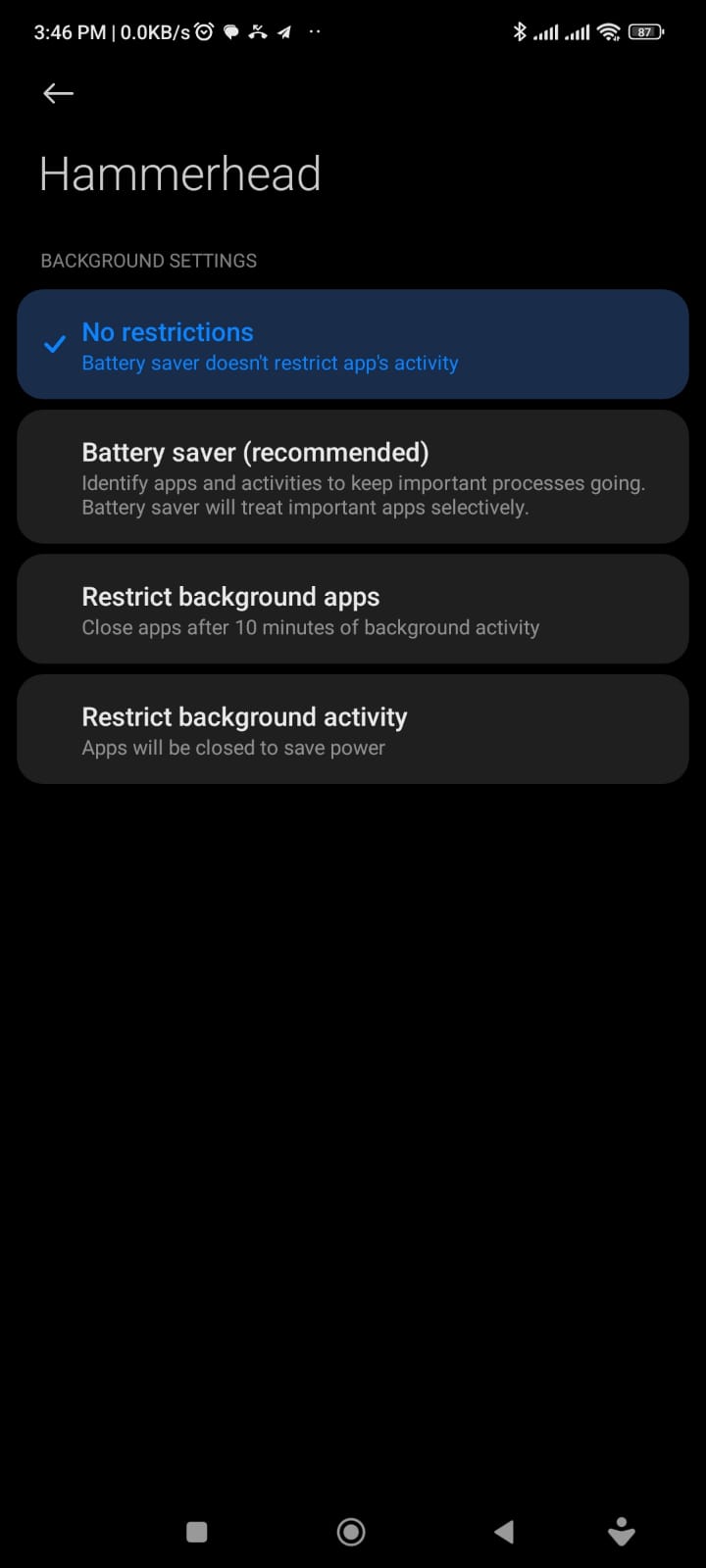
I followed the instructions on how to connect my HK2 to my android device here:
I realized the last instruction I didn't do which was: Ensure the Battery optimization is turned off on your phone for the companion app.
This seems to have worked well thus far.


Please sign in to leave a comment.
Comments
46 comments