Routes are gone

Answered

Comments

12 comments

  • Avatar
    Ali

    Hi Lee, we haven't seen this issue from any other rider, so would like to see if this is still an issue if you log out of Hammerhead account and logging back in, to see them on your account once again. Please let us know.

    0
    Comment actions Permalink
  • Avatar
    Ethan Bixby

    I have just had this happen, right before a ride. All gone on one unit, one left on other unit. Pinned rides still on RwGPS. Help!

    1
    Comment actions Permalink
  • Avatar
    Gordon Bowser

    This has just happened to me today. I can't relink RWGPS with Hammerhead account

    0
    Comment actions Permalink
  • Avatar
    Joe Wang

    Me too. All pinned routes are gone. I imported a route via url and that seems to work. I assume that when I turn on my unit there will only be this one route on it. This was fine yesterday.

    1
    Comment actions Permalink
  • Avatar
    Gordon Bowser

    Joe, I've posted this is as a new item on both Hammerhead and RWGPS forums, and put in support tickets to both. Hopefully they'll fix this quickly.  Glad it's not just me....

    0
    Comment actions Permalink
  • Avatar
    Gordon Bowser
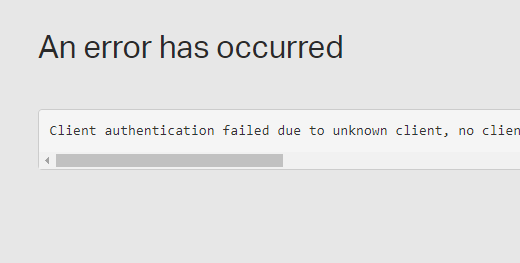
    This is the message I get when I try to link
    0
    Comment actions Permalink
  • Avatar
    Ali

    We have reported this issues to both the teams, and confirmed its broken.They are working on a fix. Thanks!

    1
    Comment actions Permalink
  • Avatar
    Ethan Bixby

    any work around?  We have a ride tomorrow morning and it would be great to have it working?


    0
    Comment actions Permalink
  • Avatar
    Gerard van Rijn

    @Ethan Bixby
    There is another pinned post by HH Support that states:

    Some riders have reported sync issues with RideWithGPS.

    New rides are not syncing to RWGPS and newly pinned routes in RWGPS are not syncing to the Dashboard.

    If a rider disconnects the RWGPS account from the Dashboard to attempt to reconnect and resolve the issue, they will not be able to reconnect and their pinned routes can disappear from the Dashboard.

    We are working together with RWGPS to resolve this issue. We will provide more information when it is available.

    We recommend not disconnecting your RWGPS account from the Dashboard so that your routes will not be removed. If your RWGPS account is still linked, you are able to add new routes from RWGPS to the Dashboard using the RWGPS URL.

    If you have already disconnected your account, you can download the GPX route from RWGPS and upload that to the Dashboard if you need to add a route.

    You will be able to upload all new rides to RWGPS after the issue is resolved. If you have an important ride that you need to upload to RWGPS, the FIT file can be downloaded from the Dashboard and then uploaded to RWGPS.

    Please reach out to Support@Hammerhead.io with additional questions.

    0
    Comment actions Permalink
  • Avatar
    Gordon Bowser

    seems to be working now!!!


    0
    Comment actions Permalink
  • Avatar
    Joe Wang

    Not for me. My pinned routes are all still missing from my Hammerhead dashboard. Hitting the sync button does nothing.

    1
    Comment actions Permalink
  • Avatar
    Todd Dry

    I disconnected/reconnected RWGPS and my routes came back but the new route that I'm trying to sync will not do so. And, this might be the most annoying part of it, my Collections are now all empty. Not going to be pleased if that is not resolved.

    0
    Comment actions Permalink

Please sign in to leave a comment.