Headwind extension

Hi,
using the new SDK, I've build a small extension that shows the current wind direction and speed relative to your riding direction in a datafield (i. e. the headwind). It looks like this:

In the picture, the wind direction is shown by the triangle on the right data field, indicating that the wind is coming from the left behind you. This results in a headwind speed of "-3 km/h", providing a slight boost. The extension periodically downloads weather data for your approximate location from the open-meteo.com weather API, which you can view using other data fields if desired:

The top right one shows the current weather conditions with absolute wind direction, speed and gust speed. The source code and APK for sideloading (now easy due to hammerhead's cool new sideloading support!) are available at https://github.com/timklge/karoo-headwind . Feel free to open issues at github for suggestions and issues you encounter.
If you run out of valuable data field slots on your map page, maybe the powerbar extension is a solution for you (also shown on the screenshots for HR) :)
-
Thanks. I agree that it takes up a lot of space (a full data field). Users on reddit have suggested to display it in a small widget on the map itself, similar to the compass, but unfortunately, this is currently not possible to implement with the SDK. Extensions can only draw into datafields. I will add a map widget if hammerhead adds support for it; you can follow the issue on github here: https://github.com/timklge/karoo-headwind/issues/14
-
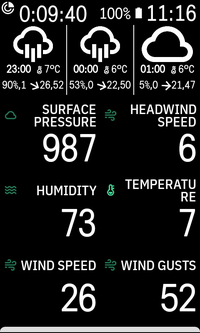
In the newest version available on github, I added a datafield with an hourly weather forecast.
Tapping the datafield cycles through the 12 hour forecast in 3 hour steps.
-
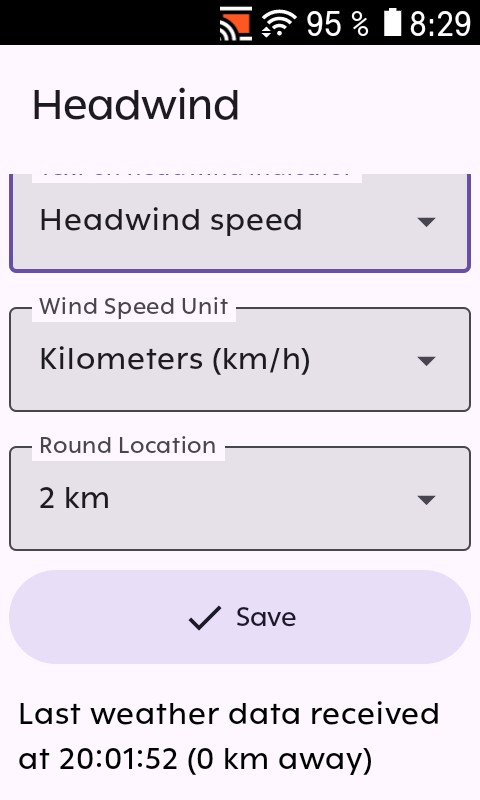
Thanks for testing! I reinstalled the latest version from Github on my Karoo 3 to check if there was an obvious issue with it but the app appears to work fine. "No sensor" will only disappear once the Karoo has a gps fix and the app successfully manages to download weather data for the location obtained via gps.
Danke fürs Testen! Ich habe die neuste Version nochmal von meinem Karoo entfernt und von Github neu installiert, um zu sehen, ob mir ein Problem auffällt. Es funktioniert aber so, wie es soll. "No sensor" verschwindet erst, sobald der Karoo ein GPS-Signal empfangen und die Position bestimmt hat und die App anschließend Wetterdaten für diese Position heruntergeladen hat. Ggf war kein GPS-Empfang vorhanden oder die Companion App nicht verbunden? Beim Aufruf über das Hauptmenü des Karoo zeigt die App unter den Einstellungen einen Hinweistext an, ob Wetterdaten heruntergeladen werden konnten. In einer der nächsten Versionen werde ich schauen, dass statt der Standardmeldung "No sensor" auch in den Datenfeldern "Warte auf GPS" o. ä. angezeigt wird.
-
I've pushed a new version to github: https://github.com/timklge/karoo-headwind/releases/tag/1.2
- Show no gps / no weather data error in visual data fields instead of default "No sensor" by @timklge in #20
- fix #23: Show date of weather data in weather forecast, main menu by @timklge in #24
- fix #22: Adds widget that shows current riding speed and tailwind by @timklge in #25
- Show preview in weather, weather forecast widgets by @timklge in #26
- fix #27: Make hourly forecast data field unclickable in preview mode by @timklge in #28
@Carsten Weigandt: The app now saves your last known position when you turn off your Karoo and will try to fetch new weather data for that location when you turn it back on. This should fix the initial "No sensor" message previously displayed if the data field is viewed before the Karoo has acquired a GPS fix.
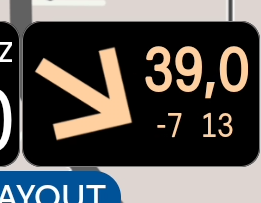
The new "riding speed and tailwind" data field is an alternative to the default headwind data field and shows your current riding speed along with the current tailwind and absolute wind speed. In this situation, you would be riding against a headwind of 7 km/h, with the wind blowing at 13 km/h.
-

Posted on GitHub just now:
WIll not update data fields more than once an hour Karoo2 #40
Really like the extension, but it will not update data often enough on Karoo2. With weather forecast in one field, it (and the other fields) only update once an hour and I think on the hour. That has been my experience, i.e., only 2 updates on my 2 hour and 15 minute ride -- same for previous ride. I swapped temperature for weather forecast with the same result -- no timely updates. In the relative field my speed is recording correctly but it shows a static difference below it and nothing next to it which should be absolute wind. Data connection direct from the K2 or through my phone's hotspot are the same and reliable. Rounding is set to 2km. How to troubleshoot? Thanks
-
I have recently pushed an update to version 1.3 that adds an initial version of my take on a "forecast weather along the route" feature. If you have added the forecast widget to one of your data pages, the extension will now show the weather forecast for points along the route instead of your current location. Currently, it will use a fixed estimate of 20 km / 12 miles which you can customize in the settings.

In a future iteration, I will look into drawing the forecasted wind onto the map and, once hammerhead adds support for extensions to access the route elevation profile, more sophisticated travel time estimation instead of the fixed 20 km intervals.
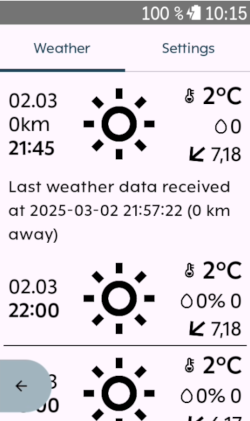
The update also adds a forecast weather display to the app's main menu, there is now a touchable back button and there now are additional individual forecast fields for temperature, wind and precipitation that use a bigger font than the compressed one. If you have added the 1x1 data field that shows the current weather conditions to one of your data pages, clicking on it will now open the app's main menu.
-

I side loaded Headwind to my Karoo 2 using ADB. The install worked fine, but when I went on a ride, my Karoo 2's screen and hardware buttons became unresponsive and the ride app kept crashing. I had to uninstall Headwind and reboot my Karoo. Then my Karoo worked perfectly again. Any ideas on what went wrong? Should I try installing Headwind again?
-
That sounds like your K2 is running out of memory. Do you have other extensions installed (or other apps sideloaded like Spotify)? Unfortunately, you might have to compromise there.
If headwind is the only extension you are running, I might have missed some optimizations, as I think it should be able to run a single extension. Unfortunately, I can not test it myself as I only have a Karoo 3, which has double the memory.
> I have been using the Headwind App for a couple of months on my New Karoo, and I like it better than the two weather apps that are offered in the Extensions library. Do you have any plans to add it to the Karoo Extension library to make it easier for Karoo 2 users to install?
Thanks. It is currently not part of the extension library, but Hammerhead might add it in the future.
-
@Johnny Pugh: As you have sideloaded it with adb, could you try to reproduce the issue at home and send me the adb logs to timklge@gmail.com? That would be great. Unfortunately, I have no way of remotely identifying issues like this as I've deliberately not included any telemetry or crash analytics in the extension and I can't reproduce the issues on my K3. Maybe it would be worthwhile to provide a separate build with crashlytics enabled to troubleshoot issues in the future.
If you have not sideloaded it via adb but have built it from source, please try compiling a release build or downloading one from github built by the CI. The debug builds perform poorly even on a K3.
Filtering the log output for the headwind extension should work with:
adb logcat --pid=`adb shell pidof -s de.timklge.karooheadwind
Thanks for your efforts!
-
I've now pushed an update to version 1.4.
Main changes:
- The extension will now interpolate between forecasted and last known weather data. This includes forecasted data along the loaded route.
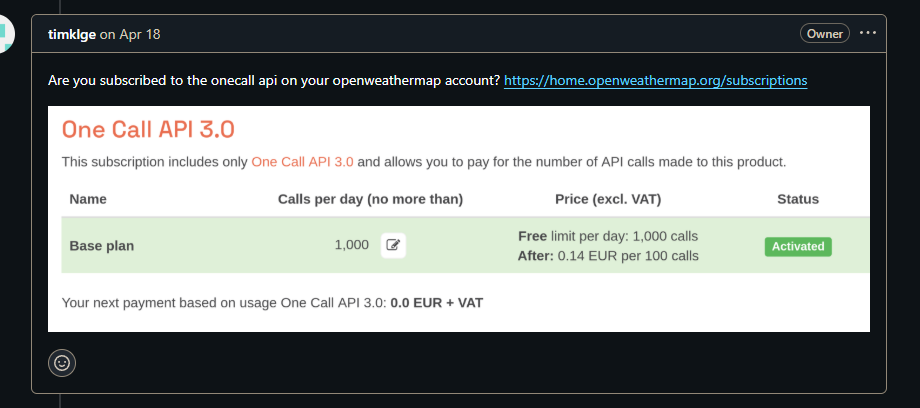
- Added support for OpenWeatherMap as an alternative weather data provider. If Open-Meteo data is inaccurate for your location, you can now register at https://openweathermap.org and obtain an API token. Note: Weather forecasts along the route are unavailable when using OpenWeatherMap. Many thanks to lockevod for contributing this feature.
Full changelog: https://github.com/timklge/karoo-headwind/releases/tag/1.4
With the added complexity, there's also added room for errors. If you encounter problems after updating to these version, please let me know on Github.
-
I've pushed an update to version 1.4.5. It fixes an issue that prevented the extension from downloading weather data through the iOS companion app. I've also recently fixed a major issue that caused the ride app to freeze on the Karoo 2 if you had a forecast data field added to your pages.
Many thanks to github users keefar and RustedRoot for helping me identify these issues!
-

This is a great extension thank you.
One issue … OpenMeteo works fine as Weather Provider for the Headwind Extension but the Karoo2 Headwind Extension won’t process the Openweathermap API Key.
SIM Card is in.
WiFi is ok.
My Openweathermap account is fully operational and delivers me an API Key without issue.
The “Test API Key” button in the Karoo2 Headwind Extension returns an APIKey fail “invalid or expired”.
Have uninstalled and reinstalled OFF/ON etc.
How to get the API Key to work in the Extension? -
I've pushed an update to version 1.5. The main new feature is line graphs for forecasted weather:
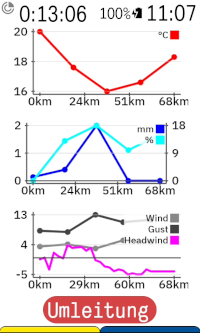
If you have a route loaded, it will display the forecasted weather for points along the route, including the calculated headwind (currently only when using the default OpenMeteo data provider). Otherwise, it shows the forecasted weather for your current location.
The new version also introduces colored icons and a new data field variant that shows the relative wind direction next to the absolute wind speed.
I've changed quite a bit of the code that handles the weather data in this version to try and simplify things. If you encounter issues, please let me know. It's gotten complex enough that I can't manually test all feature combinations on each revision anymore.
- If you use headwind fields in a VinHKE multifield, please note that because the new version handles all speed measurements in meters per second internally, the VinHKE field will now also show the wind speed in meters per second. The headwind extension's datafields will all display kilometers per hour if your Karoo is set to metric and miles per hour if set to imperial.
- I've removed the "show absolute wind speed on headwind indicator" settings. The headwind and tailwind datafields will now always use the relative wind direction. If you want to see the absolute wind speed, please use the new "wind direction and speed" datatype.
Full changelog here: https://github.com/timklge/karoo-headwind/releases/tag/1.5
-

I was wondering where the absolute wind speed had gone. Reading the above changes, it's clear. I'll try the speed+direction data field. Is the wind direction in this field absolute or relative to the direction of travel? (I would like to see the relative direction and the absolute wind, just like it was before the update)
Weather on route looks super useful too!
-
> Is the wind direction in this field absolute or relative to the direction of travel? (I would like to see the relative direction and the absolute wind, just like it was before the update)
The direction is relative to the riding direction, so it should match what you're looking for. There is no longer an option to have a graphical representation of the absolute wind direction, only the cardinal direction datafield (N, NE, E, ...).
> Update looks great, thank you. Using OpenWeatherMap I can cope with meters per second but would prefer a kph setting if that’s doable.
Sorry, I think I phrased that confusingly. The data fields will all display kilometers per hour if you have set your Karoo to metric or miles per hour if it is set to imperial. You will only see meters per second if you use the headwind data field inside a VinHKE data field, because the headwind extension now uses meters per second internally and exposes the data in that unit to VinHKE as well



Please sign in to leave a comment.
Comments
37 comments