Speed / Distance unusually low and inconsistent on Indoor Rides (Workouts)

When using the Karoo for indoor workouts, I've noticed very inconsistent speed and distance information being record and subsequently being sent to Strava.
See the attached image for an example of an ERG mode workout. As you can see, the speed constantly changes whereas the power output is the same.
I would like to understand why this is happening and if there is any way or setting that I might not be aware of to fix this.
While this might not seem like a huge issue, I’d still like the distance to be a little bit more reflective of the distance I would be tracking when performing the workout outdoors or on other apps. Currently, indoor workouts performed on the Karoo are recorded about 10-15km/h slower.

-

Hello,
Without knowing your setup (trainer model, sensors used, etc.), it’s difficult to pinpoint the cause of the issue. However, since it’s an ERG workout, where the trainer controls the number of watts you should be generating during each part of the workout, it’s important to understand that speed and cadence can be adjusted by you—either pedaling faster (with the feeling that it’s easier) or slower (with the feeling that it’s harder), while the power will remain the same.
In your graph, I believe the variations in speed are due to small (normal) fluctuations in your cadence.
My suggestion is that when doing an indoor workout based on power, don’t worry about the displayed speed, as it’s not comparable to an outdoor workout, and the goal of this type of workout is based on power and cadence.
Sorry if I wasn’t very clear, but it’s complicated to explain.
Best regards,
-

Hi Sven, We hope you have received our recent response to your ticket regarding this issue, and we shared some workarounds that should help. Could you please let us know if those workarounds helped or if you’re still experiencing problems? If you still have concerns, feel free to open a new ticket, and we’ll gladly assist further.
-

To my understanding, this happens because the Karoo simply reports the speed reported by the smart trainer. Most trainers calculate that based on flywheel speed, which can be way off on low flyway rpm. My JetBlack volt does so and depending on the gear I am in, I get different speed values on the Karoo because the flyway rotates at different rpm in ERG mode depending on the gear to meet the power target.
The solution would be to model the speed using the reported power values (as zwift and all other apps do). An extension could implement this by providing a virtual speedometer device when you start an indoor ride. But as usual, a native Karoo implementation by Hammerhead would be much better.
-

Hello,
Did anyone manage to find a fix, or is there an extension I can install to record virtual distance from power?
I am having the same issue, and I don't think it is able to be fixed without changing the way the Karoo records distance (i.e. using virtual distance from power rather than flywheel speed).
Cheers
-
Thanks to a tip from hammerhead, I've now been able to build a little extension that acts as a virtual speedometer: https://github.com/timklge/karoo-wattspeed . It calculates speed measurements (and traveled distance) from power and supplies that to the Karoo. It assumes ideal conditions (good aero position on a road bike) factoring in your weight from your Karoo profile. I get about 32 km/h with steady 170W.
-

Hello,
Thanks for the update! I was able to install it on the hammerhead.
I do have one more question, I'm quite the noob with these things :-)
In my profile "Wattspeed" is active, but when I do a training indoor, it still registrates the speed of the smart trainer. Did you have this problem as well, and did you change something more on your Hammerhead GPS?
I tried to find a data field for Wattspeed to add to the profile, but can't seem to find it...However when looking at the sensors I do see "Wattspeed" and if I press on it I see the details with the correct speed.
KR,
Jakob
-
Hi,
there is no new datafield - when you have the extension installed, it is supposed to supply the speed values in your regular speed datafield. That is important because those are also the ones written to the FIT file.
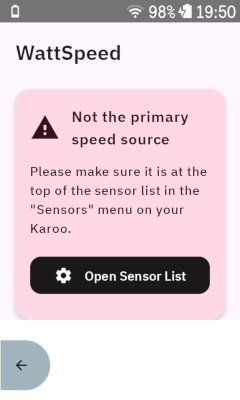
What might be happening is that you have added the "Wattspeed" sensor, but it is not at the top of your sensor list. The Karoo will take the speed readings from the first sensor in the list in your sensors app that supplies speed measurements; so if your smart trainer sits before the wattspeed sensor, the Karoo will still read the speed from the trainer. You can drag the sensors around in the list.
When riding, you can long-press the bottom left button on the karoo to get to the main menu, and open the wattspeed extension via the "Extensions" menu. It will show a message with the current state there.

Please sign in to leave a comment.
Comments
13 comments