New Data Field Templates - Missing Items!
Answered
I'm not sure what happened with these new templates for data fields...but somehow now we can't do 10 fields on a screen (i.e. a 5x2 pattern, the most available is 4x2...which is odd for such a big screen). Also, the circular data fields (e.g. Power, HR, etc.) are gone! They still work for those of us that had them grandfathered in, but we can't create new ones. Please bring both these back!
-
Official comment

Hey David. As always we have been collecting feedback with this particular change and have pushed it up to the product team. You can currently add the Circular data fields on pages with 1x2 Layout. You'll see more options available as future software updates come out.
Comment actions -

It's very annoying to change the Data Fields availability without notice. I cannot go back to my previous set-up after an experiment.
The worst is that we know they are still there and could be used.
One of the strength of Karoo was to be able to mix graphical and data fields, no more Circular HR, Visual Gear and page limited to 4.
By the way I would like to be able to custom a bit the canvas with big field in the middle.
-

I just noticed this also. A bit of a back ward step. We should be able to mix and match data fields and graphical ones.
I use 10 fields all the time on the Garmin, and the Sigma ROx allows even better customization.
We have a much better screen with the Karoo, so I'm not sure why you have limited us.
-

Just for your information, I also find it very annoying that the field Heart Rate - Circular Zone on pages with more than 3 data fields is now simply no longer selectable. Please repair it immediately.Nobody in development has to check this, it's just a mistake that needs to be corrected.
-

Hey all, Sorry for any inconvenience caused. We are constantly improving the software experience and your feedback is really valuable. We have introduced multiple Data card Layouts and it is in the testing phase by the ATG community. You will be able to use it in the upcoming software release.
Please see: https://support.hammerhead.io/hc/en-us/articles/360018056234-Creating-and-customising-Profiles
-
@Olivier @Gerard @Kenneth: I totally understand that you would like to see the HR/Power circle with the number in a numeric Data field. Right now, that option is limited to Graphical Layouts. We will share this feedback with the Product team for further review.
-

I'm glad I found this thread, but disappointed that it's been open for over half a year.
My default bike activity data screen on my Garmin watch has 6 fields, 2 of them are instant heart rate and power with zone gauges.
I expected the Karoo 2 to be able to do more than that, not less.
-
In fact it has been available at the beginning of Karoo. It's even still present, just not configurable.On old pages already configured the feature is still there, but if you modify the field you can't have it back nor configure the field in a new page.
I tend to think that's because the circle field is identified as Graphical and not number.
But what was very good in initial releases is that this field was updating to the available area. So from the big zones to just the colored circled with the number embedded.
-

Ronald, the graphical display is still there as an option. You have to select one of the graphical layouts for it to show. It will not show up on the numerical layout.
Refer: https://support.hammerhead.io/hc/en-us/articles/360054935614-Profile-Page-Layout-options-on-Karoo-2
-

Hello Ali,
Thanks for the quick answer. But I am 99% sure I could select the shifting(visual) on the map page. And now I can only select the shifting as numerical display. Although on the data page it is possible to select the shifting(visual). And I would like to have the shifting (visual) on the map page. The box to display it in is the same.
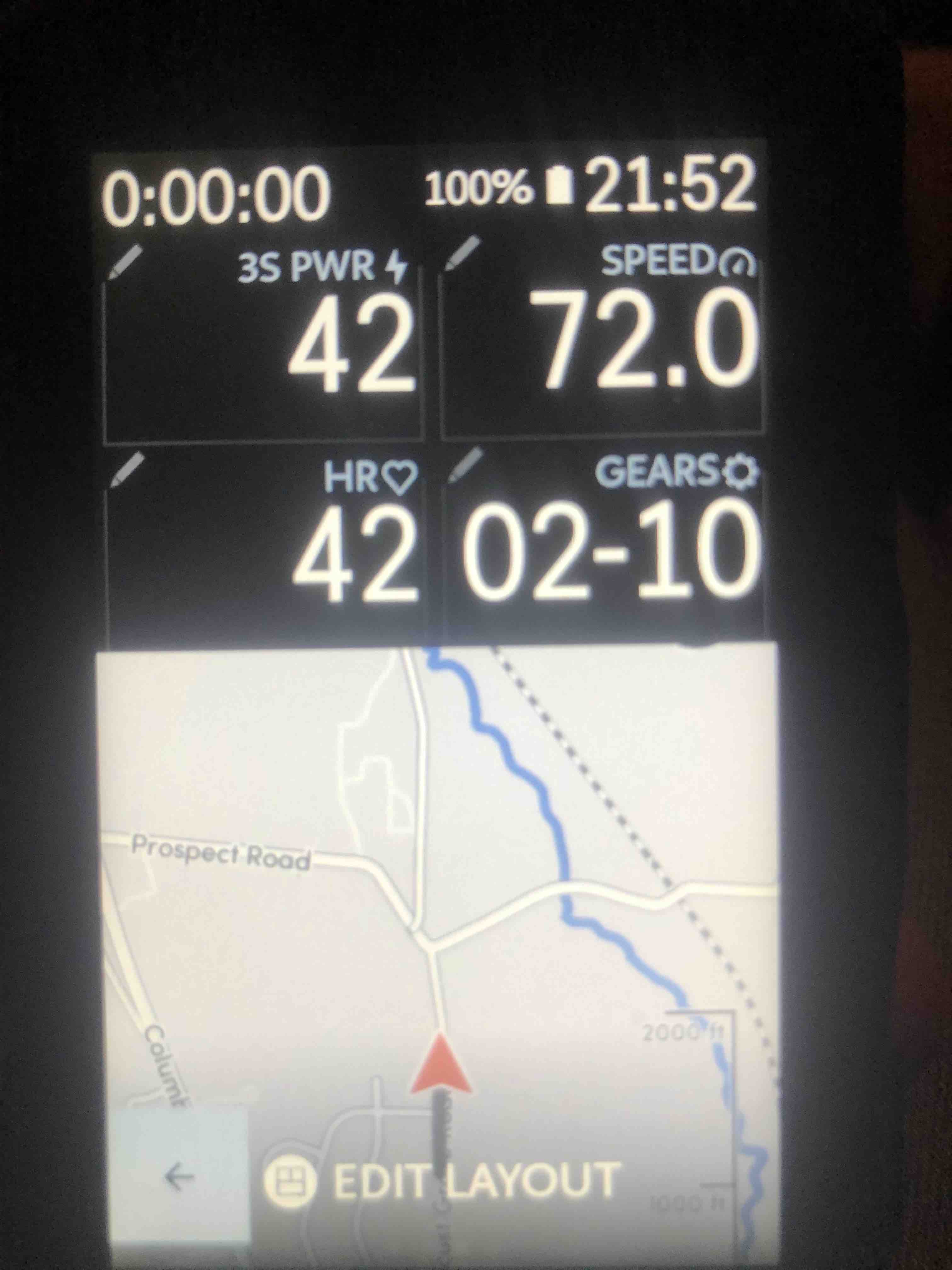
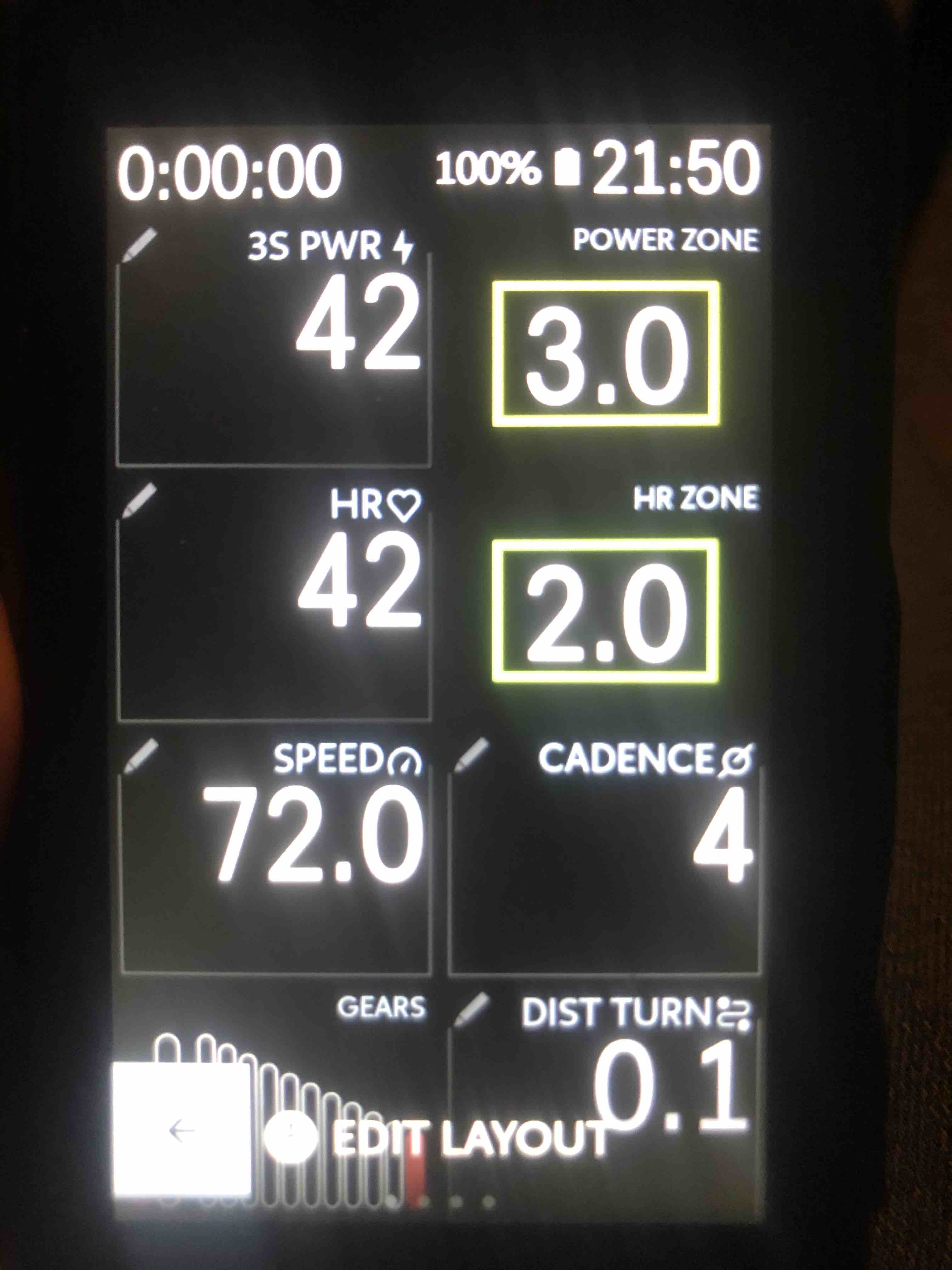
-

Ali, the need to show graphical fields in a data layout is beyond aesthetics. We could reduce the number of screens and therefore the need to slide from one screen to the other. Right now I have four screens and often find myself looking at them too often. Lucking I haven’t crashed, yet.


Please sign in to leave a comment.
Comments
20 comments