North-up navigation
Planned
I've recently bought a Karoo 2 and it is a significant step-up from my previous bike sat-nav -- bravo!
As my use of the term "sat-nav" suggests, I mostly use it for navigating around unfamiliar routes. I am part of that small group of people who likes to use maps in North-Up mode. Mostly this works OK on the Karoo 2, but there are occasions when I can infer that none of the main developers is a fan of North-Up :)
The basic problem is that the "current position" triangle is not centred in the map viewport (in the sense of "the part of the map the user can see", not Android's sense of "ViewPort"). This makes sense if you're in rotating-map mode, but for North-up, it means that anything that comes on the bottom of the screen obscures the current position. For example, if I'm cycling West, and have to make a South turn, I can't see anything while the directions tab pops up -- if I dismiss the tab, I can see part of the route I should take, but it can be a bit compressed, with most of the map space in a sense "wasted". Taking one of the example screenshots from the manual you can see the problem:
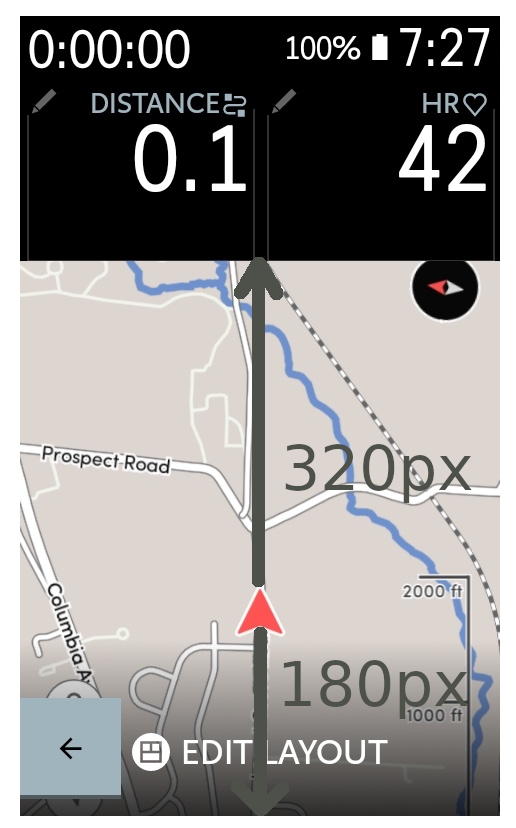
There's about 320px between the cursor and the top of the map, but just 180px between the cursor and the bottom of the map.
When a direction tab comes up I get something approximating this, with just a bit of the cursor visible:

When Climber appears, the cursor is covered entirely, roughly:
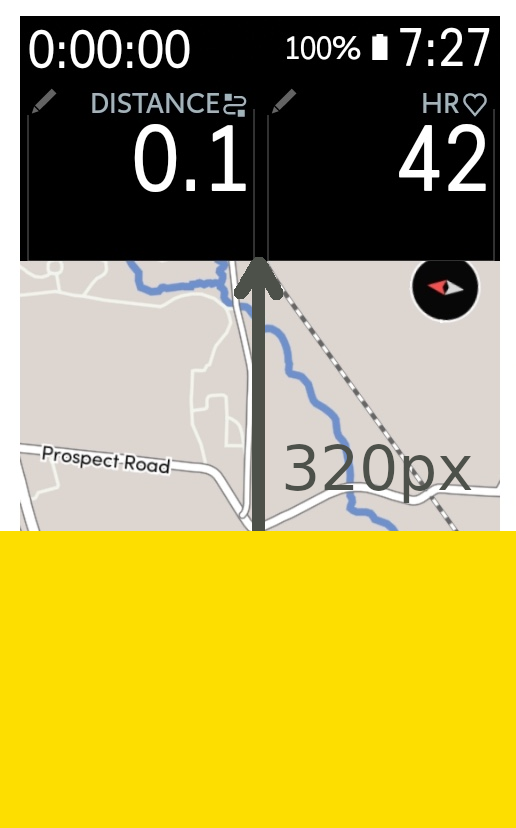
In summer, it's easy enough to flick the tabs away, but in winter with cold fingers and gloves, I think that might become rather accident prone.
Of course, moaning is easy: let me try and make a few constructive suggestions.
First, simply making the direction tab semi-transparent would help (and presumably isn't too difficult):

Second, always centering the cursor in the map viewport would be an excellent fix:
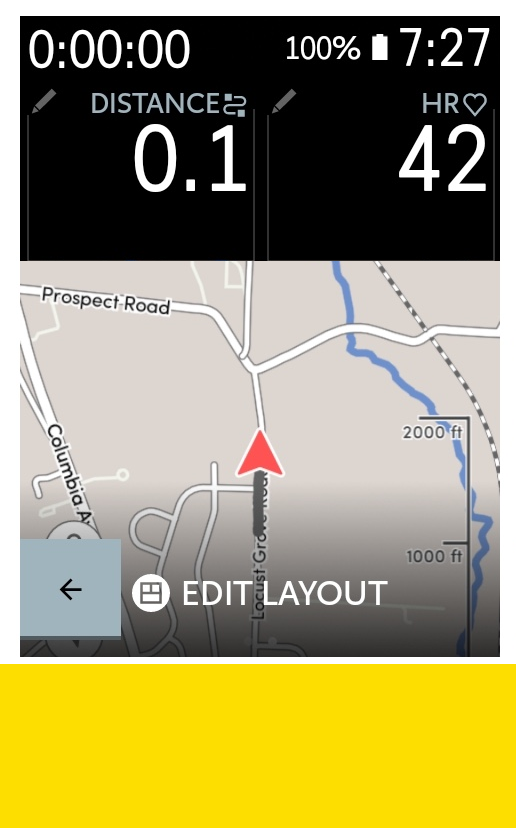
Third, an offset cursor might well make sense if the "larger part of the offset" is the bit in the direction of travel. In the example screenshot, since the bike is heading North, having the cursor offset to the bottom of the screen is fine: but if travelling South, you'd want the cursor offset to the top of the screen. One would need to be a bit careful not to jiggle things around with every twist of the handlebars, but a simple lagging check (a bit like a heater's use of hysteresis) would probably take care of that.
Fourth, it would be great if the map auto-zoomed in and out at junctions and so on. Particularly when the map is very small (e.g. when Climber is showing), this would make a big difference to my ability to navigate tricky junctions.
Thanks again for making the Karoo. It's a wonderful unit that I expect to have on my bike for many years hence!
-

I agree that in nord-up mode the current position should be in the middle of the map.
In a previous software version the current position was in the middle of the map, and now it's better in the forward-up mode.
The best solution would probably if the current location marker's position would switch between the north-up and the forward-up mode.
Some small recommendations:
- You can dismiss the yellow banner with the keys, so no touch required. (Out of my head: left down ["B"] dismisses it, check https://support.hammerhead.io/hc/en-us/articles/360052360133-Karoo-2-Physical-Buttons-)
- Pressing "B" and "D" simultaneously brings up the drawer again, pressing again extends the drawer to full screen, and again hides it. When fully extended, you can switch between the drawer "tabs" with the buttons "A" and "C". I rarely ever use the touch features during a ride, the buttons work very well for me. (The touch screen is still great and good for selecting routes and such, but to have both, and the buttons doing everything important while riding, is a big plus of the device.)
- I have the data fields at the bottom of the map, so the notifications don't hide the map, but the data fields.
-
The best solution would probably if the current location marker's position would switch between the north-up and the forward-up mode.
I agree -- I hope I didn't imply that the cursor should be in the middle for forward-up mode! I know that us north-upers are a small brigade :)
Thanks for your other suggestions!
-

I suspect that the north up people are a large brigade. More like a battalion, or maybe most of the army. I just tested my new Karoo 2 and noted that it keeps rotating the map as I turn. I don't like that and want north up all the time. And my current position should always be centered.
-
Hello Bryan,
I must admit that my first ride with the Karoo was a bit discombobulating as I got to grips with how North-up works -- I kept pressing a combination of the "lock" button (which locks *map scrolling*, not the screen, as I had first expected), the arrow button in the bottom-left (which is map-rotating mode), before eventually realising what I needed to do. In the end it was fairly simple: once a ride has started, you just need to press the "compass" button in the top-right once. This setting isn't sticky (it would be nice if it was :)), so you have to do that on each ride. But, having done so, everything works as expected by we, the righteous. I'm not sure we're a battalion, or most of the army, but we are, perhaps, a fifth column ;)
Laurie
-

Luarence I loved your question as it not only provided the challenge, but the remedy. And here we are, 8 months after your first post, and I am still googling on how to keep the Karoo 2 mapping "north up." I'm hoping they have an update for it soon. I can't find any info that is has been, so far...
-
Luarence I loved your question as it not only provided the challenge, but the remedy. And here we are, 8 months after your first post, and I am still googling on how to keep the Karoo 2 mapping "north up." I'm hoping they have an update for it soon. I can't find any info that is has been, so far...
-
Hello Rob,
Yes this issue is still present. I don't think I was the first (nor the last https://support.hammerhead.io/hc/en-us/community/posts/4926374765723-Bug-map-centering-wrong-for-north-is-up-orientation?page=1#community_comment_5680954099227) to report this but I remain hopeful that it will be fixed -- especially if I'm climbing in a Southerly direction where I can't see the cursor at all! It really is my only real frustration with the Karoo (OK, also elevation data) which is otherwise an astonishingly good hardware + software combo.
Laurie
Please sign in to leave a comment.
Comments
7 comments