Mute Notifications (TbT, strava segments, etc.)
Answered
I was thinking it would be excellent to have a 'mute' notification option from the swipe drop down menu - this would effectively end all notifications until you reinitiate them. If we already have this feature, could you let me link the feature below, as I'd love to use it?
Reasoning:
I do some routes on a consistent basis, particularly Stanley Park in Vancouver. I'm sure many others do loops of a local circuit of some sort. I do create and use a route for this so I can get the elevation graph. TBT notifications can be turned off individually, but this seems a little tedious. If was heading to a specific route, I may know how to get there and want TBT to be enabled once I arrive.
Along with this, Strava segments, although very useful can be quite annoying if the segment is on a route you use frequently. Yes, you can 'swipe down' to minimize it, but I was thinking a 'mute notifications' could disable this temporarily while on a ride where you have no intention of pushing for a PR (ie: commute routes).
I'd say this could be handy if your getting a lot of phone notifications as well that you don't need to know about it. (perhaps a group chat becomes very active while on a ride).
-

Hello Brandon, we appreciate you sharing your thoughts & suggestions directly with us!
From what I can tell, muting all notifications using the swipe drop down menu has not been requested by the community before. There have been similar requests though & just today we've release a big update that may enable more of these features. Linked here. You can mute & unmute automatic alerts for any of these tabs by tapping their tab icon at the top of the screen in full-screen view.
We will continue to monitor this post & the interests from other users. If things change we will do our best to update here.
Thanks again for the excellent suggestions!
-

- Is the any way how to dimiss phone notification? Even if I dimiss it on the phone, on K2 it stays forever or until subsequent notification comes.
- The In-ride Drawer is NOT showing up until I get a notification. After that there is no way how to hide the drawer again?
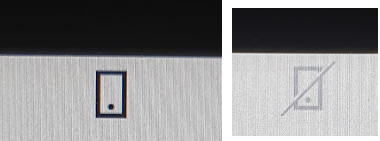
- What does it mean when the phone icon is crossed out? Which I can toggle by pressing the icon itself.
-

Helping Martin out, my understanding is:
- I don't know
- I also see it show up with the first notification. But there it can be swiped down to hide or up into full screen, or pushing both bottom buttons together to achieve this.
- Phone icon crossed out is meant to mute phone notifications on Karoo (but see bug above)
-
Hey Martin, thank you for your questions! I will do my best to answer all three.
- At this time there is no way to delete a specific notification from the Drawer Tab.
- The phone notification Drawer will only appear once a notification is received & to close the Drawer either swipe it down or press the Back hardware button.
- You can mute & unmute automatic alerts for any of these Tabs by tapping their Tab icon at the top of the screen in full-screen view. When the phone icon is crossed out the automatic alerts will be muted.
I'll drop a few links below to some very useful articles to reference.
Thanks!
Please sign in to leave a comment.
Comments
6 comments