Position marker (arrow) on the bottom.
Answered
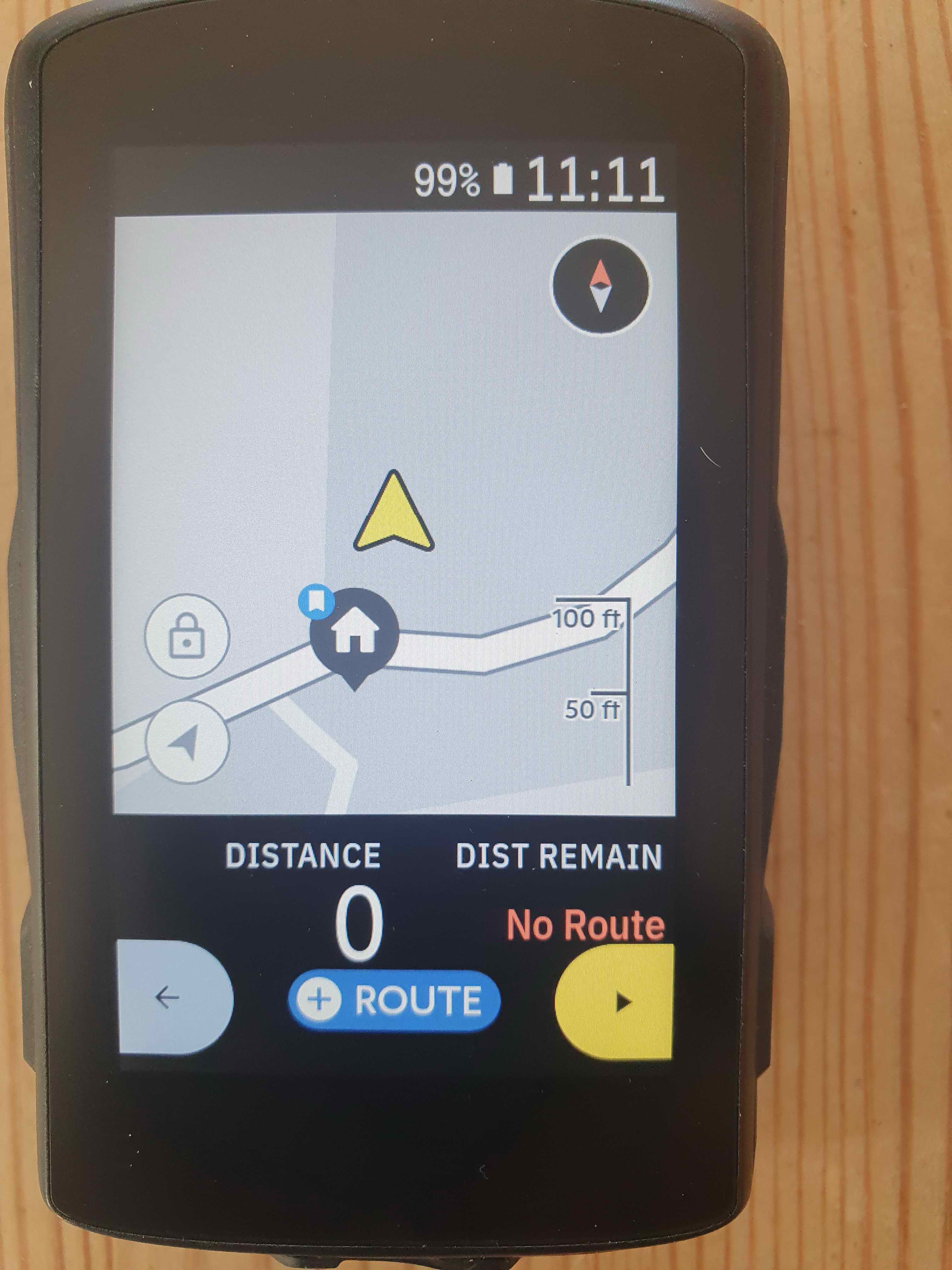
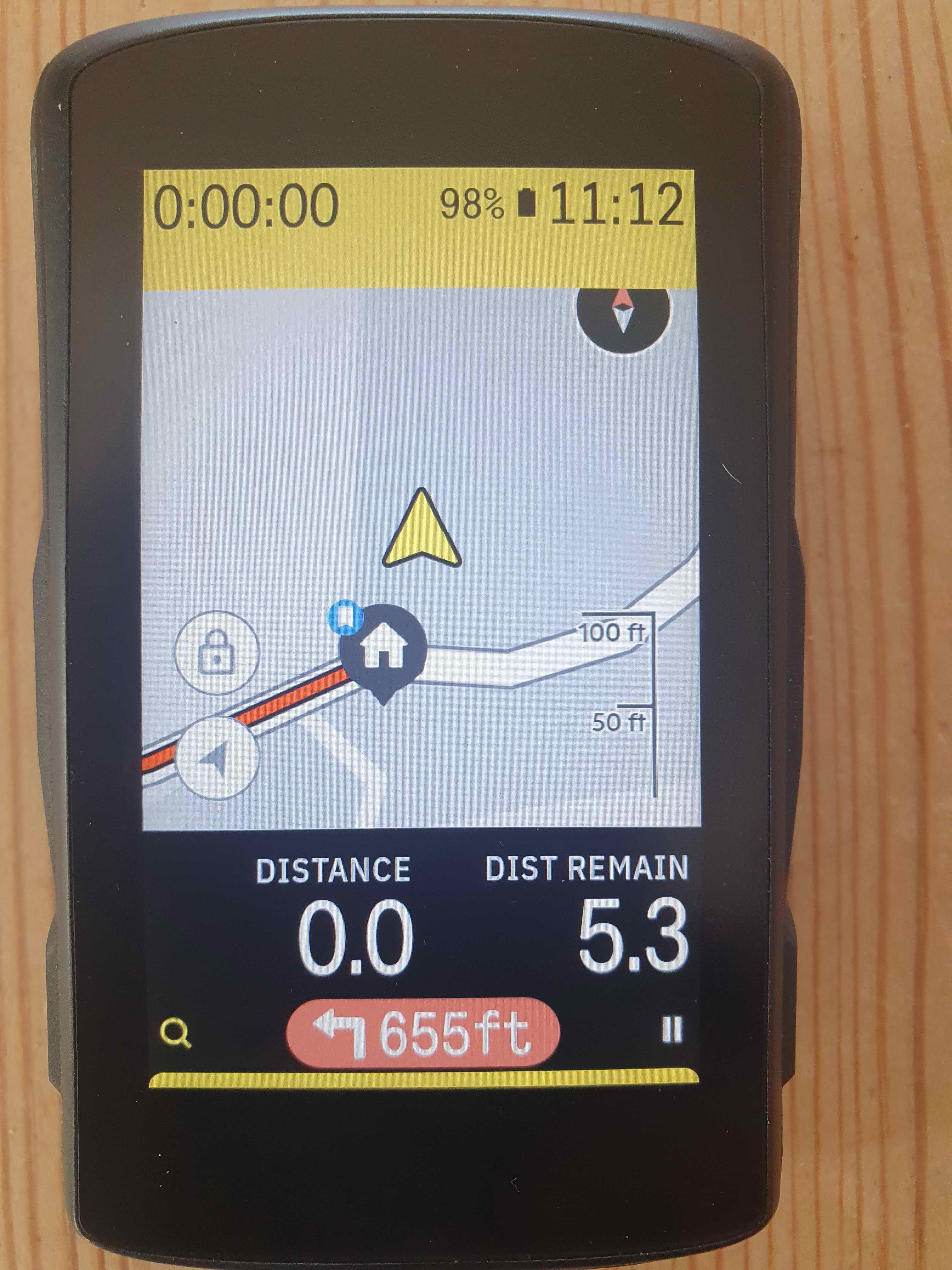
Please change position of arrow on map (First photo what it’s look like, second how it should be in my opinion) :-) thanks!

-

Thanks Julia. Well I don't know If the HH Team is reading these posts...the main post is marked as "answered" ...which it is definitly not :-) Let's see if they answer in the next days...perhaps we should open a new Post.
@Anna: seems you also have a problem with connection your K2 to USB while riding :-) :-) Perhaps an USB-angle-plug will help you out :-)
-

I don’t see any need for a second arrow position for north-is-up, it should just stay in the middle. Why would you want a specific function for seeing further on the map in one particular direction (north) when you can just unlock the map (when not wearing full-finger gloves, anyway) to look around in any direction?
I’d guess a good single default (say 15–25% from the bottom of the map) would be good enough for most cases with forward-is-up as well, you can still unlock the map if you need to see further.
(Haven’t been able to find a cable with an angle plug that isn’t at least a metre long, and anyway the powerbank is there for only half an hour or so at a time so I have been able to live with it. Anyway, I just broke the Hammerhead mount yesterday (hit something while cleaning(!) the bike) so I’ll be switching to a longer Garmin-style mount where the cable fits just fine.)
-

+1 for Andi's suggest --> please implement toggle-function to move arrow pos. down to see more route ahead
@Julia: same opinion, the two arrow buttons are confusing...functionality to switch map directions merged to the compass needle is way better.
@anna: unlocking is nice for swiping around for an overview but not helpful for setting the map for riding
-

Important to be precise with what you ask for - see example below. I have a data field at the bottom, so the arrow is in the perfect position on the visible part of my map - if it just got moved to the bottom of the map par se I wouldn't be able to see it I suspect.
By the way - when I turn my K2 on, until the GPS locks on, it always shows the location as in a park in Didsbury, Manchester, UK. Does everyone get this? I don't live in Didsbury, or anywhere near it!

-
Anna - have been searching for the short (~10cm) right angle braided USB-C cable I 'know' I have somewhere - I had it for a car I don't have anymore! If I find it, it's yours... Can't remember where I got it from but Amazon most likely. Sounds like not a big problem for you anyway. It may well have been thrown out in the major cull of old charging cables I had not long ago, which was like wrestling a next of vipers into the bin :-)
-
Yeah, and the “visible map” definition really should also exclude any section of the map temporarily obscured by navigation cues (meaning the arrow should move higher up when this is the case). I for one found this very annoying until the views with the data fields at the bottom were introduced.
Dave, thanks for the offer, but I’ll manage with what I have, it’s not that frequent a need for me either. The cable I have now fits fine between the longer mount when needed (it was the only one I had that did, that was why I originally picked it).
Oh, and my no-GPS location used to be in a canal in the Helsinki suburb Vuosaari (Google Maps sometimes seems to think my laptop is located in the same general area as well, which it isn’t), now it’s pretty much where searching for “Helsinki” places the pin.
-

Agree with
"I don’t see any need for a second arrow position for north-is-up, it should just stay in the middle"
Again there are differing needs for the GPS
#1 Orientation where what you have passed may be relevant
#2 Navigation, where up ahead has more value
And the addition of new icons that have hidden explanations IS and issue and a distraction.
And NO once they log a question as "ANSWERED" they seldom ever seem to follow up the discussion.
-

I have the exact same problem and been trying to figure it for the last couple of weeks...
I have 2 rows of data fields on the bottom and the map above, the arrow is almost 3/4 of the way up the map and makes it unusable!
Switching the data fields to the top has now fixed but hope it's resolved in the next update so I can have it my preferred way.
-
Hey Guys, please support Fernandos newest post on this topic (since this thread was has been marked as "answered" by Hammerhead)
Cheers, Andreas


Please sign in to leave a comment.
Comments
45 comments