Some questions from a new KAROO 2 user
Answered
Dear Karoo Team,
i got the new Karoo 2 a few days ago and what is see so far is very well, but i have a few questions which i would like to get answered:
1. If i am in the Map Mode my cursor/arrow is always going out of the screen, so that means the map is not moving, instead is the cursor/arrow moving and i need always to adjust my position by clicking on the the round icon below lock. How Can i adjust it that the cursor is not moving out of my scree when i am riding?

2. Can you please explain what is the description of the compass in the right corner which i can click and it disappear. If i click again on the icon which i show you in my picture above the compass appears again!
3. How can i adjust the scale in the Elevation Screen? I tried to check how many meter i rode on one hill and i could not figure that out, because the scale was to high. Is there an adjustment possible?
4. Can you explain me how i can get the STRAVA Live Segments into my Karoo 2? I do not understand how and why my Karoo2 shows me in my Live Segments a few segments. Is this connected with the route which i have on my Karoo? Is it not possible to just just the ride and all Live Segments will be on my Karoo2? I need here please a detailed description?
-

I'll try to answer no. 1 and no. 2 from my own experience:
1. I see that in the photo above you have "unlocked" the "padlock" icon - if you do that then the map will stay stationary and eventually you will "ride out" of it as you describe. Try locking it - the map should then scroll with arrow stationary in the middle. Thought I though that by default the "padlock: is in locked position
2. I don't remember it 100% now (don't have the device at hand now so can't check it) but when you tap this icon it should rotate the map so that north is up, south is down etc. When you unlock the map (as you have done in picture above) you can rotate the map with two-finger gesture (as you would do it on any smartphone - place two fingers on screen and rotate them) - then the compass icon should appear again and clicking it should rotate the map north side up again. However - when you click the "arrow" icon the map then rotates so that your location (yellow arrow) points toward the top of the screen and the map (and then it should rotate automatically to follow the yellow arrow). But then clicking the compass icon does nothing. So in summary: when you are freely browsing the map and rotating it (with padlock unlocked) then pressing the compass icon rotates the map north side up. But when you click the arrow icon I think the compass icon does nothing if I remember correctly
EDIT: and about number 3 and 4:
3. I also don't know how to scale the historical elevation profile (or in fatc if you can do it at all). You can however scale upcoming elevation profile when following a route (tapping on the graph should "zoom" it out and double tapping should "zoom" it in to the next 1.5-2km if I remember correctly)
Here is the "manual" page but I think it needs updating - I'm almost certain that there are couple "zoom out" levels for upcoming elevation when you single tap the graph and one "zoom in" level to the next 1.5-2km if you double tap (or vice versa) - but as I said I don't have the device with me at the moment and can't confirm 100%
https://support.hammerhead.io/hc/en-us/articles/360051592294--Elevation-Graphs-
4. I don't use live segments but probably you only see the segments which you have "starred" / favorited on Strava? as it's explained in the "manual":
https://support.hammerhead.io/hc/en-us/articles/360051580494--Strava-Live-Segments-
-
Hi Ivo,
thanks for the explanation. I will try to play around today again on #1 and #2. Thanks for your advice.
For #4 in regards of the Strava Live Segments, i do not know how i can add the right one on my device. I thought i need to create a route where the segments on and then import them into my device, but this does not work. Maybe somebody else has an idea. I have a few Live Segments on my device, but i have no idea from where those segments coming from in my area. Main questions: How can i get the Live Segments which are important for me in my device.
Thanks again for your help. Lets see
-
According to Hammerhead - Karoo syncs "starred" segments from your Strava account. So in order to get them on your device you would have to:
1. Go to your Strava account and star a segment (https://support.strava.com/hc/en-us/articles/216918377-Starred-Segments-Web)
2. In your Karoo go to "settings" and connect your Strava account (https://support.hammerhead.io/hc/en-us/articles/360051580494--Strava-Live-Segments-)
3. And that's pretty much it I think - when you connect your Strava account all the routes kreated there + starred segments should sync. I don't exactly know how that feature works in practice because as I said I don't really use segments. I presume that when you approach synced segment on your ride it should simply pop up
-
Hello Ivo,
thanks.... got you point finally, but also this does not work :-( . Finally I deleted all my favorite (star segments) and created new ones as you can see below:
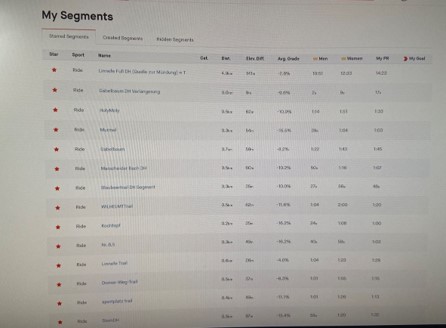
I synchronized the Live Segments on my Karoo2 and it show this times nothing.
Last time the device showed 2 from maybe 20 star segments.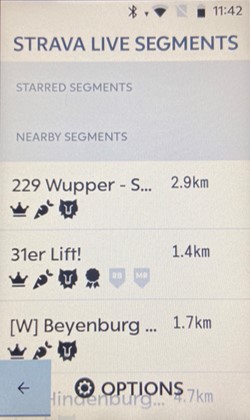
Very strange....also in my point of view the NEARBY Segment are kind of messed up. I have no idea what i did wrong -

Hi Michael, new user here too. I found (as Ivo said) that the “triangle” centres the map on your position and points the map towards your route (as opposed to north), tapping the padlock to a locked icon locks the map so you can’t accidentally move the map when swiping, and tapping the compass (when padlock is unlocked) orientates the map to north, as opposed to towards your route. Again you would tap padlock to lock it after.
The purpose of the compass when you have the map orientated towards the route is to show you which way north is. It saves having a Heading data field, like Garmin offers.Obviously if you have tapped the compass, it disappears as the map always orientates towards north so you don’t need to know which direction it is - it’s always up!
Took a little getting used to, but I think it’s a really nice implementation.
Please sign in to leave a comment.
Comments
6 comments